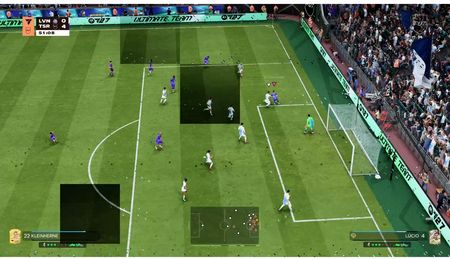
Title: FC 27 Black Rectangle on Screen – Speech-to-Text Bug Identified and Fix Found (PS5)
Hi everyone,
I finally figured out what is causing the large, semi-transparent black rectangle that appears during online matches in FC 27.
The issue:
There seems to be a bug with the Speech-to-Text accessibility setting.
Even when Speech-to-Text is turned OFF in the main game settings, it is automatically set to ON when you enter a match.
This explains why the black rectangle continues appearing even after disabling the feature from the main menu.
The solution I found:
- Start an online match in FC 27.
- Pause the game.
- Go to Settings → Accessibility.
- Find Speech-to-Text. You’ll notice it is set to ON, even though it shows OFF in the main settings.
- Change it to OFF.
- Resume your match.
Important note:
I’m hoping that once you turn Speech-to-Text OFF during a match, the game will remember your preference and keep it OFF for future matches.
However, I haven’t confirmed whether the setting stays OFF permanently. If you see the black rectangle again when starting another match, simply pause the game, go to Accessibility, and turn Speech-to-Text OFF again.
The actual bug:
FC 27 does not seem to correctly apply the Speech-to-Text preference from the main settings to the in-game settings. The option appears OFF before starting a match but switches back to ON once you’re inside the game.
EA Sports needs to fix this inconsistency so the setting remains OFF across all game modes and matches.
I tested this on PS5. Hopefully, this helps others experiencing the same frustrating black rectangle during gameplay.