Stolen account
I have been trying to get access to my account back that was stolen for almost 2 months. I can't even access games purchased from Epic Games. I have tried to write emails and other methods. In order to even post this, I had to make a new account that is attached to my Xbox account. I have tried several ways, and I am at my wits end. If I cannot get access back to my original account, I would like to get confirmation that the one who stole it, can no longer use it. The screen name used was BigBRR and the original email that was used was [edit: email address removed]. I have attached a few screen shots for reference.4Views0likes0CommentsOne of my accounts false banned for Account Takeover.
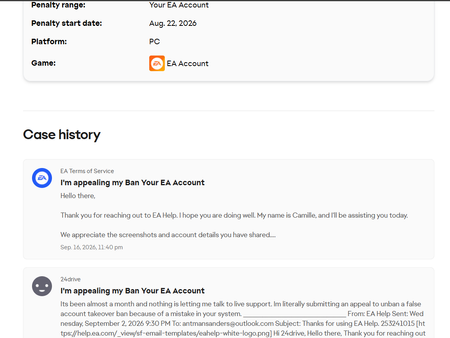
On August 22nd of this year one of my other EA accounts I use for my xbox account was banned for an account takeover after i changed the password for it. Since then ive been trying to get it appealed but all they tell me to do is go to "https://help.ea.com/en/customer-care/" However, whenever I do and I fill out the things it tells me to do it doesn't let me talk to live chat and it keeps on giving me suggestions on what I should do. Recently I logged back into the account just to check if they finally took action but they never did so I reached out again. Yesterday they got back to me but I never received an email and the case history page looks like the picture provided. Long story short I just want to get this situated and figure out why they banned the account for me simply changing the password. Especially when the account was made years ago and all the signed in locations have been my location since I made the account.46Views0likes5Comments
Random Account already linked!
I’ve just bought FIFA 27 and it’s my first time playing in years. My PlayStation account is already linked to my EA account. I’ve now got a new Xbox and wanted to link it so I can play on there, but it says there’s a random email address already connected to my EA account. How can I remove the existing email/account and link my Xbox instead? Random email in the attached image.21Views0likes0Comments
My sister's account got hacked!
Hi, I'm writing this as somewhat of an act of desparation because my sister's account got hacked a few hours ago and the hacker had changed her email to some other email. By some miracle, she was able to log in and changed her password despite the email being changed. However, now she is unable to change it back into her email due to the 30 day thing. If any live agent or something can see this, please help my sister change her email back!Solved34Views0likes3Comments
EA Creator Network community manager contact help?
I'm trying to get in contact with my community manager but I have been made aware they are no longer in said role and I have no way to contact another manager as of right now. Could someone let me know how I can contact an EA Creator Network community manager asap please? Thanks :)34Views0likes0CommentsEmail address domain for EA account is offline
My Xbox account made me create an EA account in order to play certain games. The linked email to my EA that will let me sign in with my Xbox log in, That email is a shut down domain so I can do NOTHING to verify or change my email through my old created account. I would very much like all of my linked Xbox data through EA back ups to then be used for PC and would like to recover all my hours and hard work. I have been at a stand still for getting help and even the account support chat has left me at a stand still. ( I will be checking back in here to see if there is any good help or if EA themselves can reach out easier to help me get this resolved ) [CM edit - adjusted title for clarity]Solved21Views0likes1CommentUnable to unlink Steam account – linked to unknown/hacked EA account
Hi everyone, I'm hoping someone can help me or point me to the right support channel. A while ago my Steam account was compromised (hacked). During that time, whoever accessed my account linked it to an EA account that is not mine and that I have no access to or knowledge of (not my email, not my credentials). Now I have recovered my Steam account and I also have my own legitimate EA account, but I can't link them together because: To link my Steam account to my correct EA account, I first need to unlink Steam from the unknown EA account. That unlinking has to be done from the EA account side, but since I don't own or have access to that EA account, I can't do it. As a result, my Steam account stays "stuck" linked to an account that isn't mine, and I can't connect it to my real EA account. Has anyone gone through something similar? Is there a way to request EA support to manually unlink my Steam account from that unknown EA account for security reasons. I tried to create a case several times, but although it shows an ID, no case appears in "my cases" and nobody has ever contacted me. Any guidance on the correct process or who to contact would be greatly appreciated. Thanks in advance!Solved17Views0likes1CommentThe original email on my EA account is unrecoverable, so I can't log in.
Hello, my previous EA account was [edit: email address removed]. This account has been with me for a long time, but now I can't log in because this email has been recycled, so I can't receive verification codes. The email provider can't resolve the issue, so I need to change the email linked to the [edit: email address removed] account. I've spent around 1500 hours playing Apex on this account, so it's really important to me, and I've also purchased other games. I can provide the Steam order number and screenshots from when I bought the game. My EA ID is Niretun2, and my Apex ID on Steam is 何の分離しない. The last time I ran Battlefield V was on August 20th last year, Battlefield 1 was last run on August 28th last year, and the last time I played Apex was also last year, but I can't remember the exact date. It's been a while, so my memory is a bit fuzzy. I hope to get my account back quickly. I really need your help, and if you see this, please reply. Thank you very much.Solved45Views0likes3Comments