jedi: Fallen Order/survivor DirectX launching issues
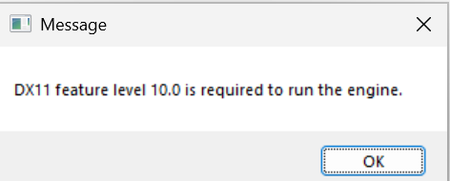
I can't get into the game even thought i have the GPU and everything else to load in, i still can't launch them both. For Jedi: Fallen order it says "DX11 Feature level 10.0 is required to run the engine." Even though i have DX 12 which should be able run it. For Jedi: Survivor it says "DX12 is not supported on your system. Try Running without the -dx12 or -d3d12 command line argument." Which im really confused to do to fix it. Jedi: Fallen Order: Jedi: Survivor: If u know what I can do, please reply and try to help me. If you need info about my computer, just ask in replies.26Views0likes2Comments
Squadrons Crash on Startup on Windows 11, Modern CPUs - High Core Count Bug
It is completely unacceptable that a multi-billion dollar publisher like Electronic Arts leaves a fully priced product on a platform like Steam when it is completely non-functional for modern computers right out of the box As a long term customer I dont think it is unreasonable to ask they release a minor legacy update to fix the Frostbite core-detection cap I have currently had to create custom .bat file that limits my CPU core count in order to launch the game, which is utterly ridiculous for a game that launched in 2020 Please do the right thing by your customers & fix Star Wars Squadrons18Views0likes0CommentsStar Wars squadron’s launch problem
This is my EA support chat history. They told me to post something in the forms. Are there any people that can help? I already tried everything and after this chat, I asked Gemini and it told me to try and download a free game to try and re-sync it that didn’t work either. This is my EA support chat history. They told me to post something in the forms. Are there any people that can help? Today • 6:51 PM We're connecting you to an agent. Your estimated wait time is 1 minute. • 6:51 PM when will this get fixed this is my last chat Apr. 01, 2026, 3:56 am Advisor: Abhishek Agent: Abhishek Chat ended: By Agent Date: Apr. 01, 2026, 3:56 am Duration: 37m 3s Location: Oklahoma, United States Hello! I'm here to help you find information and answer any questions you may have. How can I assist you today? Hello! Thank you for contacting us. An agent joined the chat and will assist you now. This chat will close automatically after 10 minutes of inactivity. You can restart it at any time, but you’ll be redirected to another advisor. Don’t worry, you won’t have to re-explain your issue. Hello there, nice to meet you. How may I help you out today?. my game is having problems Please elaborate your concern. check the dicription for this case #REDACTED Unable to check any details in provided case number. Do you mind sharing the details again of your issue? my game that i got on steam as a bundle with 4 other games will not show in the libary but all 3 others do and they work if i launch it it opens the anit cheat and then the anti cheat crashes and like i said it does not show in the ea app so i lanuched it from steam I will surely check and help you out with game not appearing in library issue. Please share your registered email address for the EA Account. oh yes one sec redactedThanks. the user name is READACTED Share the name of EA game which is not visible. Starwars sqadrons Alright! Try to follow the steps as mentioned below to check if it works for you. Open Marketplace> My Collection and see whether Starwars sqadrons is deactivated there. If it is, you can enable it with the selection button. i dont see it You are checking on Steam or EA app? ea app Check on Steam please. ok Let me know if it works. im in libary how to get there Open Marketplace> My Collection and see whether Starwars sqadrons is deactivated there. how do i open martketplace i mean the game is in my steam libary idk what your asking Just to confirm, the game is visible but you are unable to launch due to anti cheat error? no it shows in my steam libary but not in the ea libary when i lanuch it in steam it gets to anti cheat and crashes Alright! Try to perform the steps as mentioned in link below: Attachment successfully added its not anti cheat i play my other ea and steam games fine like starwars battlefront 2 jedi fallen order etc i got the 4 starwars games in a steam sale No issues, try to perform the steps as mentioned in the link. Let me know if issue exists. still wont work as anti cheat is already installed i think its a ea libary issue i also tried un installing and re installing both the anticheat and game Try to uninstall and install EA app once. nope still only shows the 3 games not the 5 Have you reinstalled EA app? yes its a steam and ea libary link problem i swear im a tech expert im using my custom built gaming pc rn Seems like a bug is running in background. Try to perform the steps as mentioned below. Attachment successfully added i told you im a tech expert a clean boot was the first thing i did does not work oviously Go through the steps as provided in link below Attachment successfully added my bios, drivers and windows are fully updated In this case, I am going to report the issue to my team for them to investigate the issue on their end, sounds good? thanks so much good night Perfect! I hope I was helpful enough. Apart from this Is there anything else I can help you with? nope bye its installed on steam but wont show in ea as seen below i bought all 3 games at the same time image_0.jpg image_1.jpg all 4 games* E Eleazar joined • 7:00 PM Hello! Thank you for contacting us. An agent joined the chat and will assist you now. This chat will close automatically after 10 minutes of inactivity. You can restart it at any time, but you’ll be redirected to another advisor. Don’t worry, you won’t have to re-explain your issue. E Eleazar • 7:02 PM Hello, it's a pleasure to meet you. I hope you're having a great day. This is Eleazar from EA Support. Allow me to review the conversation history. Ok E Eleazar • 7:04 PM Thank you for waiting. I have reviewed the conversation.To assist you further with the issue you’re experiencing, I will need to transfer your case to our dedicated team, as they are best equipped to provide the appropriate support. Please let me know when you are ready to proceed with the transfer. ok hello? Transfer requested at 7:07 PM E Eleazar left • 7:07 PM ughhhh can someone help so I can play my game? R Robin joined • 7:16 PM Hello! Thank you for contacting us. An agent joined the chat and will assist you now. This chat will close automatically after 10 minutes of inactivity. You can restart it at any time, but you’ll be redirected to another advisor. Don’t worry, you won’t have to re-explain your issue. Thank you for contacting EA Help, nice meeting you!! Hope you are doing great. My name is Robin. R Robin • 7:18 PM As I understand you are missing 3 games from your account, right? 1 game i bought 4 starwars games in the steam sale and 3 of the 4 work and show in the ea ap but sqadrins does not show in ea and when lanuched in steam its crashes in the first 10 seconds R Robin • 7:22 PM I will surely try my best to help you with Star Wars: Squadrons. all drivers bios windows are updated and i tried re linking the acounts and reinstalled everything R Robin • 7:23 PM Could you help me with your email of the EA account and Steam display name? its above Please share your registered email address for the EA Account. oh yes one sec redacted Thanks. the user name is REDACTED Share the name of EA game which is not visible. Starwars sqadrons Alright! also can i get that updated to redacted thats my old email i mean i can still asess it but it takes longer to get to Thank you. R Robin • 7:27 PM I am checking for the account. ok R Robin • 7:29 PM Do you see any error after the game crashes on Steam? i never checked let me try and launch it never gets past anticheat could it be a anticheat problem Sure. Yes, it can be an anti-cheat issue. R Robin • 7:32 PM If that's not installed properly, it can cause trouble. ok Here you can find supporting steps: How to install and troubleshoot EA Javelin anticheat on PC help.ea.com R Robin • 7:36 PM I hope, we are connected. yes wait R Robin • 7:36 PM Sure. i dont see sqadrons in the javlin anticheat list ohh its easy anti cheat R Robin • 7:38 PM Let me know if you find any trouble, I am here to help. yes i need help Today • 7:39 PM the game uses easy anti cheat not javlin anti cheat i think its a game libary link problem R Robin • 7:41 PM EA uses javelin anticheat only. huh when i launch the game it shows easy anti cheat R Robin • 7:43 PM Please make sure you are not using any third party anticheat program on your device. it shows this before crashing Screenshot 2026-04-01 194307 Yes, that's the third party easy anti cheat. Please uninstall it from your device. R Robin • 7:46 PM We do not support that. its not i came when i downloaded steam from steam* google it R Robin • 7:49 PM I don't think that's a software required to be used our games. But you can confirm about it through steam as well. Yes, EA uses anti-cheat software, but they have largely moved away from third-party solutions like Easy Anti-Cheat (EAC) in favor of their own proprietary in-house, kernel-level software, often referred to as EA Anticheat (EAAC) or EA Javelin. yes new games use javlin but oldergames like sqadrons use eac R Robin • 7:50 PM Getting this information validated with my team. ok no worries you learn something new everyday i saw this in the game files it looks like a error R Robin • 7:52 PM I found this to be true older games like squadrons using that. Sorry for confusion. your good R Robin • 7:53 PM Since Easy anti cheat is also not the problem. I am checking for the potential fix. yes i just uninstalled and reinstalled that anticheat too not working still Can you gather dxdiag report from your device: How to diagnose game issues on your PC using DxDiag help.ea.com R Robin • 7:56 PM Let me see if your device is compatible to game or not. it most definatly is but ok DxDiag.txt R Robin • 7:58 PM I am checking. R Robin • 8:02 PM Your device looks good enough to handle the game. ik Could you check help article: https://help.ea.com/en/articles/technical-issues/pc-graphics-troubleshootingThis covers most of the troubleshooting help with crashing freezing issue. R Robin • 8:03 PM If you have already tried them all. yes sry i closed the tab I was discussing your case with my team for a potential fix. They have suggested to give it a try by trying to clean boot your device, here you can find the steps: R Robin • 8:07 PM How to clean or safe boot your computer help.ea.com i did that i think its a steam - ea game libary link problem ea thinks you dont own the game and so it crashes R Robin • 8:09 PM That's bad, if that also doesn't solve the problem. Since you have exhausted all the possible troubleshooting already. I will ask you to try posting about this issue at forum page: https://forums.ea.com/ I have kept your case details, once we have enough similar cases, we will report it to game team directly from our end in order to check if this is actually a game issue. ok can you post to fourms i give you consent i just dont have time Unfortunately, we aren't allowed to post on forum from our devices, it's being tracked by our team. I will ask you to get it done when you have spare time. Sorry for not being a great help today. R Robin • 8:11 PM Is there anything else apart from this, I can help you with? no how long will it take to get fixed and how will i know when it is also can i get my email updated to redacted I can help you get the email updated on your account. R Robin • 8:13 PM I remember you said you have access of the registered email, right? yes Here you can find steps to update email yourself: R Robin • 8:14 PM Give it a try, if you are unable to get it done. I will help to get it done. R Robin • 8:18 PM Any luck? it says the email is taken it probly an old account i need merged Read • 8:18 PM I am checking for account. Thank you for trying. R Robin • 8:21 PM I checked and found email seems to be linked with an inactive EA account and doesn't have anything as of now. If you really want to use that email, first you'll need to restore that EA account by resetting account password and then we can proceed to change the email's between your accounts. nvm how long will it take to get fixed and how will i know when it is Read • 8:23 PM R Robin • 8:23 PM Since we don't have a fixed timeframe from our team. I cannot give you an ETA as of now. Once this is fixed, you'll simply be able to play the game. It's important you post at the forum. You might find a reply to your post there as well. ok thx bye257Views0likes3CommentsGame will not start beyond the EA "Preparing Game" popup
Pretty much what it says in the title, trying to figure out why my game just wont open at all. I have tried to open the game through both steam and EA (even tried through epic just to see). My PC meets the requirements, I have tried turning admin perms for the game on and off, ive reinstalled the game itself and EA multiple times, and tried to clean boot my pc. I really feel like ive tried everything but cannot find a fix, any help would be appreciated.60Views0likes2CommentsJedi Fallen Order
My app, Star Wars Jedi Fallen Order crashes, or stops and starts. I have repaired it twice through the ES app with no positive results. There is a message when booting that says I have a corrupt save file. Can I remove it from my PC and re-install it without paying for it again? That's it. Thanks-53Views0likes1Comment
Missing purchased Season pass and DLCS from Star Wars Battlefront
I logged into my EA account to play Star Wars Battlefront and received a notification that my battlepass, along with all following DLC had been removed. I don't understand why this was the case and I'd like to have access to my content again. Is there a way to contact support? Has this happened or been resolved for anyone else?Solved38Views0likes1CommentMission 5 Help
I am on the mission where you have to shoot down the missiles being fired by the star destroyer. The game keeps telling me that the rebel ships are getting hit by missiles. But I studied the area carefully and there aren't any, I shot them all down. Is this a known game bug? How do I complete the mission?16Views0likes0CommentsCan't launch the game Jedi Fallen Order
Previous status: I own this game on this account. I have downloaded it on my PC. I have no problem playing it before. Issue now: I open the game It says fail, because it could be downloaded by another user Then, it automatically switched to my other google account, that account doesn't have this game So I logged out that google account And tried to login with this account that owns the game It loops. There's no way I can play the game I bought. How is it even possible? How can the EA app login to my google account automatically without my own permission when I launch the game from this account on the app? I didn't even logout from this account when EA app did the switch. Does it make any sense?122Views0likes2CommentsStar wars squadrons stuck on mission 9
I had just completed the mission 8 and was trying to progress to mission 9 when the game got stuck on an infinite loading screen. The game was responding to windows and the small loading grid was still working however it wouldnt load the mission at any cost and eventually i would get frustrated and close the game. Do any of you have a solution because i cant seem to find it anywhere online