Adults/teens/children at work/school on reload trying to skip work/school
Adults/Teens/Children at school/work during lot reload are prompting them all to come home, effectively skipping school/work. I had 1 sim on their home lot - a residential small business lot, the business is not open on reload. My other four sims, an adult, two teens, and a child were all at work and school and immediately once the lot loads, the screenshots show what is popping up and I have to click through. I also had my adult sim return home from work before his shift was finished without a popup asking if he should miss work when I was playing yesterday. This occurred when I took 2 of my sims off lot to a park for a quest from the nature's calling event. update: my adult sim was still at work while one of the teens completed one of the nature's calling events (craft 2 items on new woodworking table) and I clicked on the UI for the next set of quests - I then received another popup asking if I want my adult sim at work to skip work... maybe it has to do with the event? I did also have issues with the Reaper's Rewards event in 2024 and was unable to continue progress on the quests past week 1.7.1KViews938likes86Comments
[LD] [DU] Memorial Portraits/Graduation pictures show up blank
The memorial portraits from the Life and Death Expansion Pack appear to be bugged as they no longer generate an image of a deceased sim, instead showing a blank white image. Extra Information: I'm on Windows 11 PC I'm on Version 1.117.227.1030 DX11 of the game. I don't have Journey to Batuu and Outdoor Retreat Game Packs, Cool Kitchen, Perfect Patio and Luxury Party Stuff Packs, Refined Living Room, First Fits, Industrial Loft, Courtyard Oasis, Country Kitchen, Throwback Fit and Fashion Street Kits. Found initially in a modded save, but I tested in a non modded new save and the issue still occured. Edit by crinrict There's a few similar issues now. Please everyone use the appropriate thread for the issue you are seeing. [GF] Can’t frame an autographed photo | EA Forums - 11858990 [GF] New autographs turned into family photos | EA Forums - 12323735 Black Photos (Patch 1.119.109) | EA Forums - 12878373 Paintings go white after putting them in inventory/Reloading game (1.119.109) | EA Forums - 12879032 Edit By Crinrict: Adjusted Title15KViews865likes263Comments
Server Error uploading to gallery/library
This is the text in the error message: Server error. We could not process this gallery request. Please try again later. I tried uploading the image from my phone, but I can't get my laptop to do so. Anyone else having this problem, for me it started after the new burglar update. Edit By Crinrict: Adjusted Title41KViews809likes869Comments
Photos/Paintings turn Black/white (Patch 1.120.140/2.26)
When loading into my game from my last save from last night (January 12), all my photos across the save are there. Now when I try to save today after the update, upon logging back into the game all the photos have turned black! I had to load back to the previous save from last night to get my photos back. But now I can no longer play/ save the game!! The photo system is completely broken. I don't know what code they put into this new update, but I cannot play anymore without the pictures turning black after saving. Please help fix it, I don't know what else to do other than ask for help. I tried making a new save, but photos still turn black. I've no mods/cc installed. The update today mentioned "fixes" with photo system items like graduation photos, celebrity photos, memorial photos, but I have a feeling somewhere within that coding something has gone wrong for existing photos. EDIT: Paintings are affected too. They turn white. Edit By crinrict: Adjusted Title Note by crinrict More info from Maxis on the issue: Photos turn Black (Patch 1.120.140/2.26) | EA Forums - 13095325 Please use the following threads for other instances of this issue [COL] Cross-Stich by Ref turning white/blank | EA Forums - 13016359 Please create a new thread if you have this for Puzzles as it currently doesn't have one. Note by crinrict Thanks for all that have provided info. Seeing that Maxis is on top of this, I will personally stop testing on this. Thanks to everyone that sent me saves. For a possible workaround by jacknifelee please see this post (apologies if someone else posted this earlier, I haven't had time to read the whole thread): Photos turn Black (Patch 1.120.140/2.26) | EA Forums - 13095325 Also a note for the next upcoming fix. Since black photos are a symptom of a bug and not a bug itself, the issue can have many causes and each needs to be fixed separately. The only safe thing you can do is keep backups of your save game and/or upload rooms with your photos to your library or gallery. This is true for the upcoming patch when they fix another instance. Do not throw your backups away. Keep them safe. You can also keep the files in the screenshot folder in a safe place and then restore them from there if necessary: https://sims4.crinrict.com/eng/2025/04/custom-photos-in-game-fix-for-black-photos/ (it's a bit of a tedious method and unfortunately doesn't work for console) You can also find a mini tutorial here: https://www.patreon.com/posts/mini-tutorial-148326243 to restore them from a backup. I haven't personally tested this though.32KViews764likes438Comments
Eyes/Eyelids Issues (Patch 1.110.265/2.01)
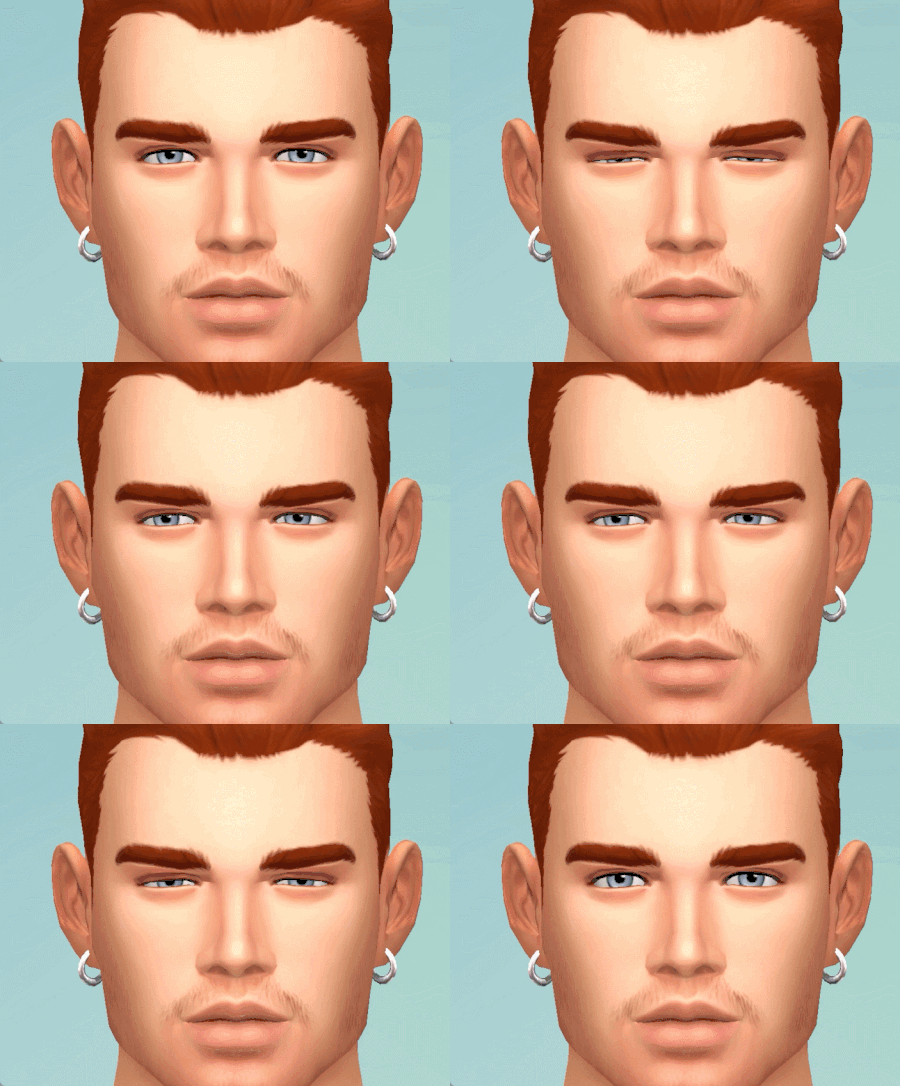
Hello, Since my bug report been archived and lost in the deep mountain, I restart a new one with all the updated ressources. TESTED WITH AND WITHOUT MODS/CLEAN SAVE, THIS BUG OCCURS ALL THE TIME. I am a modder and an animator and it seems that the eyelids doesn't translate correctly in the game like it used to be since this bug was introduced, and it's still there with the new patch. When the sim looks downside, the bottom eyelids don't move at all, making sims looks creepy (the eyes go inside the eyelid). I did some animations with the eyelids moving down while the eyes are looking down, and the animation from the eyelids doesn't translate correctly in the game at all. It affects any animations in the game right now. This is an example using CAS with maxis animations, where the eyes aren't closing completely due to the eyelids animations not translating correctly in the game. Before the eyelashes patch, they were closing just fine. Gifs with the bug : This is a gif from 2022, so without the bug : Maxis animations : Custom animation : For developpers/animators : I did another test, just to show you how terrible this thing is. For this test, I did a simple sleeping pose I will use to demonstrate the bug, because unfortunately it's the only way to explain the issue more properly, by comparing in an animating program and then how it translates in the game. To achieve this result in the game with the eyes being closed like this : In a posing/animating program, I had to do this : There is clearly an error of how the eyelids translate in the game since the lovestruck patch. I'd like to know if maxis is aware of this issue and if they will fix this, as it affect every animations in the game. If I'm closing the eyes as usual in the program, this is the result I get in the game : And no, it's not the program fault. This happens since the lovestruck patch and again, it affects all the animations from the game, even the vanilla ones. I believe a data from the eyelids or something similar has been touched and it needs to be reverted back. Edit By Crinrict: Adjusted Title22KViews717likes226CommentsWindows/Doors glitch into walls
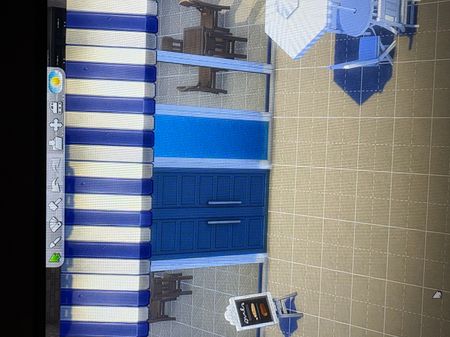
Basically the game isnt recognizing its a window. It happens with open door frames or regular doors too. The doors are functional but in game the windows look like walls with a window frame like the photo. Build mode, Live Mode, and Shows it in the gallery. Edit By Crinrict: Adjusted Title to better reflect the issue3.4KViews666likes63CommentsSims keep stopping/cancelling out their actions to do other things
My Sims will no longer perform actions unless I either instruct them to do so multiple times or keep the selected Sim selected until the action is completed since the update released on June 1, 2025 examples: my sim stops cooking to practice writing (he didn't have any skill previously and is not in a writing career) my sim stops taking care of her baby to listen to music on another floor (the radio was off until she turned it on) my toddler wakes herself up from sleeping even though she's exhausted (there was nothing in the room to wake her up and she didn't have any other negative moodlets)5.2KViews536likes69Comments
[W] Cannot select nose color/monochromatic face for werewolves
Nose colors are no longer available for werewolves, and for any existing werewolves itll reset as soon as you bring them into cas. I of course have no mods or cc in my game right now as its right after the update. Edit By Crinrict: Added pack tag to title. Please add tags for packs yourself.21KViews520likes222Comments
[BH] Employees disappear after loading screen
This is my first time doing this, so apologizes in advance if this is the wrong place. The bug I've run into is that as of this last update (5.27.2025), I find my Small Business repeatedly being emptied and treated as though my employees quit(one of the Sims in the household had a "No More Loyalty" moodlet for quitting a job). I tried a little trial and error, including repairing the game, turning off mods/cc, and trying in a brand new save. The outcome remained the same; - Start Small Business/Open Small Business Screen - Hire employees - Go into CAS or back to the world map - Reenter that same household - The Small Business now has no employees again. At first I thought it could be a conflict with mods, but even after turning them off, restarting the game, and starting a new save with a new family, it's still happening. Edit By Crinrict: Added pack Tag to Title, Adjusted Title10KViews471likes161Comments
Excessive Idle Phone Animations
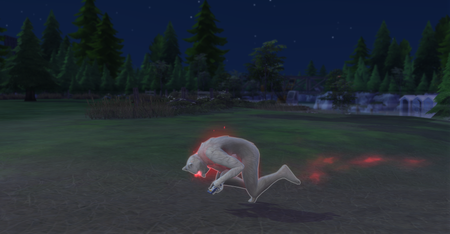
So, while admittedly not anything game-breaking, the frequency of the idle phone-tapping animations in this game is quite disruptive to a sense of immersion, and also just extremely annoying. This is especially the case when trying to play a household that's very nature-oriented (off the grid, or just not particularly into tech), since there is no reason for such sims to be glued to their phone at all times. In fact and in my opinion, there's not really a reason for ANY sim to be glued to their phone at all times, unless it's, say, a celebrity with that fame quirk. In terms of when this happens, I see it mostly when sims are routing from one place to another, though jogging seems to be a particularly consistent trigger for this behavior. Attached are screenshots of my werewolf sim, who somehow managed to use both front paws while rampaging, since apparently checking that Simstagram feed (or texts, or whatever) was just that important. Even if this universal phone addiction that sims have is by design, I somehow have a feeling that it is not meant to be happening in situations like the screenshots lol. Similarly (though I don't have an image of this), my sims have also been known to use their phones while half-submerged in the ocean. Which, again, seems like that's probably not the intended behavior. I tried looking around to see if anyone else had reported this bug, but the last one I saw was from 4 years ago and was marked as solved, so... Here we are. I can live with it, as I have been for the past 3 or so years, but I would certainly rather not have to. Thanks!2.5KViews432likes48Comments