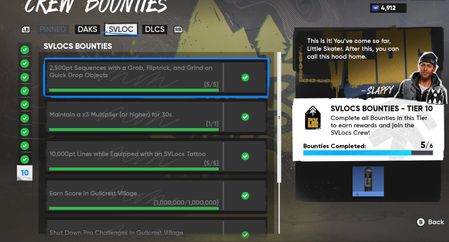
Can not claim reward for final SVLOC Tier - Crew Bounties
Completed all the requirements and still can not claim the Tier 10 deck reward, game is reporting 5/6 tasks done, but I did complete everything. This is so frustrating, after looking for people to co-op so I could get all the 225 challenge goals needed I'm rewarded with this bug. I tried everything I could think of, changed servers, relaunched the game, deleted the game's cache folder but nothing fixed it.60Views1like4Comments
MEGA THREAD: Board art, Stickers, Trucks, and Tattoos textures low res
After the update, every board, board sticker, tattoo, trucks I put on seem to be in low res. This wasnt an issue before the update. I have messed around with graphic settings and still the same. Im on PC btw. my pc specs are i7 7700 RTX 3050 6gb 32 gb ram 1tb PNY ssd276Views4likes7CommentsMissing Skate Insider/Playtest Rewards
I know it was stated to be rolling out in waves but I received a playtest/insider reward but it was only 100 San Van Bucks which is cool but not needed atm as I have my 15,000 in credits from the playtests which again is amazing but I'm sadly missing the board and stickers and I believe a grip tape? I was told by a chat agent to make a post specifically here so sorry if it seems out of place. Only place I've seen that may be of help. Thank you for your time and effort! Proof of insider email sign up and also play of playtest and proof of purchase attached below.6.1KViews95likes239CommentsEA ID change
The Season 5 update switched my EA ID I’ve played the game under since release to my PSN handle for some reason. Turning off and on cross-play didn’t change it back like I assumed. Kinda sucks and seems to have happened to no friends whose names are all the same still.12Views0likes0Comments
game blackscreen at launch
When I launch my game it goes into a black screen. Sometimes it wont even load into a full screen. But its always black and I have to restart the whole pc just to use it again. I want to play the game and havnt been able to since late April. I need help and EA only told me to search the forums. They refuse to help with any tech support.102Views0likes11Comments
New season, same Ban
now after more than a year I'm still banned. What can I say? It's all really ridiculous and no one in support cares. My EA account is perfect; I can play everything (BF6, Need for Speed, and other EA games) except Skate. I'm increasingly convinced that there's a blacklist I was placed on without violating the rules.Season 5 Fullscreen issues PC
Ive never had issues running my game in fullscreen mode however since season 5 my game will run in fullscreen for a few minutes then my monitor will black screen and once it comes back my game will be around 15fps. I can briefly fix it by changing the resolution to a different one then back to normal but it will happen again a few minutes later. Has anyone experienced this before and know a solution? its really frustrating.66Views1like4Comments
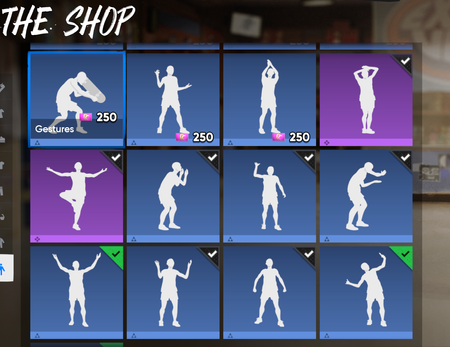
Gestures in Shop are missing icons showing if can use skating/moving around
GESTURES IN SHOP ARE MISSING ICONS INDICATING WHETHER YOU CAN USE THEM WHILE SKATING OR MOVING AROUND (sorry, i had to shorten the title) Season 5️⃣ is looking mint🏔️👌 - but there's something up in the shop. When browsing gestures in the Shop > Essentials > Movement/Gestures Shop, the preview screen does not show any icons apart from the thumbnail of the gesture. When you hover over a gesture and select it, the screen shows you a close-up of the gesture. In the bottom left, it is supposed to have an icon to indicate whether or not the player can use the gesture whilst skating/moving. These icons are missing, for both skating and moving. Attached are photos showing what the gesture preview should look like in the player customisation page under 'Gestures' - alongside the name of the gesture, where there is a corresponding icon. These icons do exist whilst viewing the gestures in the customisation tab, but NOT when viewing gestures in the shop(both purchased and unowned). Hope the team can take a look at updating this, cheers. Saucey™🦈65Views2likes3Comments