EA App crashes upon opening - 46-38F0
The app will crash after a few seconds of loading. I have tried running as admin, reinstalling, and using all the repair tool. My windows are drivers are both fully up to date. I cannot seem to find a way to open a support ticket on the ea help website. I get this error code in the logs: 46-38F012Views0likes0Comments
[INFO REQUEST] "Service Limitations Apply" Error In EA app Or Online
Hi everyone, Over the past week, we’ve seen a small uptick in reports from players encountering a “Service Limitations Apply” error in the EA app on PC and Mac. This error appears during login, when launching a game via a third-party launcher (like Steam or Epic), or when trying to link those launchers to an EA account. To help us investigate and hopefully resolve this for those affected, please share the following information in your reply: Your region/country of residence Whether you are located in or connecting through a country listed under EA’s restricted regions (see: "EA games unavailable in some countries or regions") Are you using a VPN? If so, please disable it completely (make sure no VPN-related processes are running), reboot your device, and try again. Your EA app Error Reporter ID You can generate this from the EA app and post it here in the thread. See [INFO/GUIDE] Index - Troubleshooting the EA app. Once we have these details, we can investigate the issue further and try to identify its cause. Thanks for your help!Solved22KViews7likes203Comments
Unable to launch game due to "not owning the game"
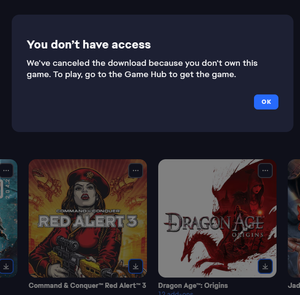
I've been working with the support to try and resolve this, but they directed me to the forums. I can't launch my Red Alert 3 from my library. I bought the game back when it came out on CD-Rom and added it on Origin as was required. After the update to the EA-app (and I think the launch of the C&C remastered collection). The game no longer is able to download as I get an error messages stating: Which is silly as I'm looking at the CD-Rom lying in front of me. The game doesn't have its own gamehub and the only option under the three dots is to download it, which gives this error. Having down the usual gamut of uninstalling, repairing, cache clearing, restarting etc. The service team couldn't help me further and directed me to post over here. Is there anyone who can help me out?171Views3likes7Comments
Broken and Updated Sims 4 Mods and CC: patch 1.120, Dec 2, 2025
About This Thread This thread tracks Sims 4 mods and CC that have been "broken" or made obsolete by game update 1.120, December 2, 2025, or declared unsupported by their creators. It also tracks updated game mods and important updates to custom content. SORT THE THREAD FOR WHAT YOU NEED: For the COMPILED LISTS, sort by Oldest For the MOST RECENT INFO, sort by Newest … or follow the topic to receive notifications of new posts. See the bell symbol, top right. Notifications can even be sent right to your email! Some things are NOT covered here: Early-access content and anything else behind a paywall Content outside the T (for Teen) game rating (no adult mods! including alcohol, violence) Creators/mods outside the EA and EA Answers HQ rules, and the Maxis guidelines for Sims 4 content creators Separate translation files Loading screens, CAS backdrops, main menu backgrounds, and poses unless the creator says an error is fixed Sims 4 Multiplayer Mod updates that don’t change the version number CAS and Build/Buy CC unless the creator says they're fixing an error or catching up pack content Mods and CC hosted on sites that are mostly adult content or that require joining an 18+ site Creators who update active creators' CC/mods or who upload folders of other people's mods and CC. In addition, news for mods/CC hosted only on Mod the Sims may be selective and/or delayed. In the end, YOU are responsible for your mod use. Because not all content and creators are covered on this official forum, many of you should be following creators directly for news. The pinned topic How to Use Mods and CC includes advice about game updates, mod management, finding broken mods, and how to avoid downloading broken and malicious content. And remember… Back up your Saves folder! Index for This Topic Newly Broken/Obsolete Game Mods and Tools Updated Game Mods and Tools, sorted by creator Newly Broken/Obsolete CAS and Build/Buy Updated CAS and Build/Buy Cleared by Creator for This Patch: gameplay mods reported by the creator or their testers to be compatible with the game update Core, Injector, Testing and Protection Mods Status: what you should be on for mods like ModGuard, Better Exceptions, venue lists, Lot51 Core, and XML Injector Creator News New Bugfix Mods Start of Ongoing Reports - scroll down or sort replies by NEWEST Other Resources Previously Broken/Obsolete Mods and CC: selective; up to patch 1.119 [MASTER POST] Common Symptoms of Mod/CC Issues, with Known Causes | EA Forums - 9360744, including links to earlier Broken/Updated Mods threads. Start here to find out if your symptom has a known cause. The previous Broken/Updated Mods thread, for patch 1.119 Patch Notes for this game update How to use Mods and CC: including how to test for broken mods/CC ("vanilla" testing and the "50-50" method) Malicious Scripts and Malware Need to tell me something? If you need support or have a broken mod to report, post in the forum. My DMs are open for creators only23KViews10likes28Comments
'Failed to Launch Game: An Error on Our End' for Multiple Games. Any Fixes?
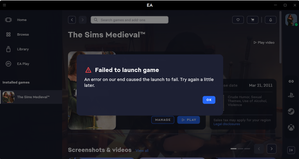
I read all the forum messages about this issue from 3 years ago and tried all their solutions. I sent in a ticket to EA Games. I cleared the cache, restarted everything, went into the EA Games folder in my program files, tried running as administrator, tried everything else people mentioned. I forced a game update, an app update, and all produced no results. What is the point of having a game you can't open? I never had this problem before the app. Yes, my new laptop meets and exceeds all requirements. Running Windows 11. What else can I do? And if the error is on EA Games end, why can't they fix it? CM title editSolved18KViews42likes317Comments
'There was an error uploading your item to the Gallery'
Ever since patch 1.117.221.1020 (August 19, 2025) I have had this error when trying to upload Lots to the Gallery; whereas, prior to the August 19th patch everything worked perfectly/as expected. So far, I have: Removed Mods; which didn't make a difference, the error still persists Repaired the Game several times; which didn't make a difference, the error still persists Started a Fresh/New Save; which didn't make a difference, the error still persists Re-saved Lot to Library and tried to upload a new copy; which didn't make a difference, the error still persists. Reset the Game to Factory settings without Reinstalling via Crinrict's site; which also didn't make a difference. NOTHING seems to Help this Generic Issue. :< I'm not sure what else to try, there is no Error Code or Anything useful in the error message to direct/lead to potential solutions while troubleshooting, just the Generic Error: "There was an error uploading your item to the Gallery" Ref: https://sims4.crinrict.com/eng/2014/09/resetting-the-game-to-factory-settings-without-reinstalling/895Views121likes38Comments
Exception Help, Please?
Is there anyone who knows how to read an exception report that could help? I have some adult mods so I haven't been able to upload them to any of the discords I know about, but I don't want to pull them in case it's one of them causing it. I've gone through my mods and I still can't find whats causing it. :( Server\traits\trait_tracker.py is the error I keep getting but I've taken out all the traits I had. TYIA I've attached the exception just in case