The Sims 3 is unplayable....
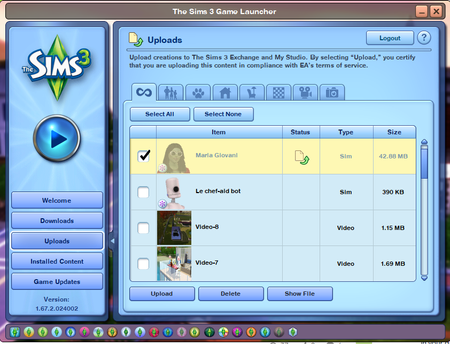
I recently came back to The Sims 3, but unfortunately I keep running into constant issues. The game keeps freezing, and even when it launches, I get this message: "It looks like you have installed a game modification that is not compatible with your current version of The Sims 3." I just reinstalled everything with all DLCs, and I can’t even click OK or close the error — it just gets stuck there. Please fix the game and update it for modern hardware. It’s ridiculous that over the years you’ve managed to break the game this badly — and the EA app as well. We paid for this, and IT DOES NOT WORK!!!!! (P.S.: I have NO mods installed at all, nothing. Everything used to work fine before. Specs: i7-9700K / RTX 2080 Ti)35Views1like1Comment
My household is gone after changing screen size
So i changed the resolution from 1366×768 to 1920×1080 (i play in fullscreen mode). And forgot to restart the game and just started my save. But when it loaded, the game took me to create/choose/move household screen and my household was gone. My lot was there, so I just moved my household copy and started to play. I thought everything was normal back again. So i saved the game because i didn't wanna deal with this issue again. But later i realized this was an older version of my household. My sim was jobless even though he was employed the entire time of my gameplay (i moved them to a new town about 25 sim days ago so the copy is that version). I can't even apply for the same job again or cheat (he is a doctor and at the highest level). What should I do? Since I already saved it once my backup file takes me back to create/choose/move household screen76Views0likes4CommentsSims 3 not aging up
I realized that my sims have stopped aging up even though I haven't disabled aging. I don't have any mods or cc and I play on my macbook. Recently, I had a problem where the connecting screen loads forever but that problem is fixed by deleting some files in Keychain Access. Could this be related to my problem with my sims aging up? If anyone has a solution please let me know! Thank you40Views0likes1Comment
Sims 3 won't work on windows 11
I just saw that Ea is running a sale on Sims 3 products but Sims 3 won't work on my windows 11 pc. Do we have a way to fix this yet? I tried to contact Ea only to find an Ai bot who can't figure out anything. just ran me in circles. Is there a way for me to play sims 3 on my new pc. ?? Any help?!452Views0likes21CommentsNo cc showing up in game
Im new to ts3 modding so dont judge me lol. basically I downloaded some new mods and loaded the launcher i looked and saw that the installed logo wasnt showing on any off the cc so i clicked select all and pressed install now no cc shows up at all. n some of my dlc worlds wont show up unless i install everytime i start . i followed a guide and deleted all the cache and dpc files . pleasee help i am struggling74Views0likes3Commentssims family stuck in the future
Hi there, I recently sent the whole family into the future. When I decided to send them back home, it seems stuck on the loading screen for around an hour, with the frozen progress bar, and I accidentally turned it off while I was doing something else on the laptop. And the next time I entered the game, they were all standing next to the time portal. So I sent them back home again, and this time the game quit unexpectedly in the middle of the loading screen. I have tried many times, but every time the game crashed when loading halfway through the progress bar. Besides this problem, my Sims have some problems I keep ignoring.😭 I am not sure whether these problems caused the game to quit unexpectedly. First, when the game launches successfully, my launcher will quit and pop up a problem report for Sims, like 'Sims3 quit unexpectedly.' But it doesn't affect the game from launching. It also happens when I click the button to check the downloads, uploads, and installation parts on the Launcher. The second issue is that I can't load a game when I try to start or choose a family in a different world or select a dorm in college. The button turns grey. I can still turn to the left and right in the world. About this problem, I have posted before. Choose Household, Start Playing now won't work. I am really sorry I didn't reply because I stopped playing for a while, and this situation suddenly recovered without any movement. So I kept playing for a few months, until this problem occurred again recently. I have installed some mods, including NRaas ErrorTrap, Overwatch, and MasterController. And I have installed some cc I didn't use.151Views0likes13CommentsGame wont load after failed attempt at downloading from the sims 3 store
I recently decided to buy one of the daily deals items on the sims 3 store, and when I went to download it in the sims 3 launcher, the launcher forgot my account password and wouldnt let me log in. the welcome tab on the launcher also wont load. i closed the launcher reopened, same thing, and i tried to play my game and my game will no longer open. it stucks trying to open but doesnt successfully, and doesnt respond to trying to quit and only will close from task manager. already repaired the game on ea, reset ea app, and cleared the cache on edge. however all help will be appreciated and thank you for reading98Views1like5Comments
sims 3 game launcher not working mac os tahoe 26.1
Hello, ive seen alot of discussion on the launcher having a system failure when downloading .sims3pack cc. so i deleted all of them. But, I have tried downloading packages as normal and it still hasn'[t worked! I have redone the framework for a new mods folder and yata yata, but still nothing. Deleted everything from the cache, and deleted my sims 3 folder and started over. Is there any solution? i have scrolled through reddit for hours but nothing has worked.90Views1like3Comments