UI Overlap & Texture Issues on AMD GPUs
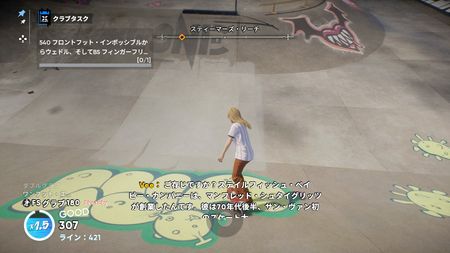
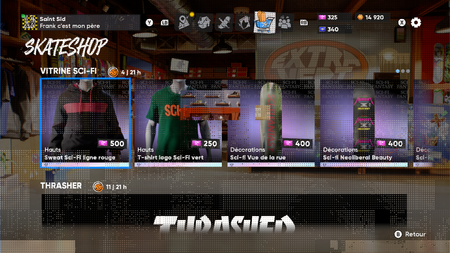
Hello, I have this weird texture when i enter the shop, and it goes everywhere in my game right after. I checked my GPU, everything's fine. Same for my monitor. I wonder if it's not a Skate. disfunctional thing. Can someone give me advice ? Thanks in advance2.6KViews20likes90Comments
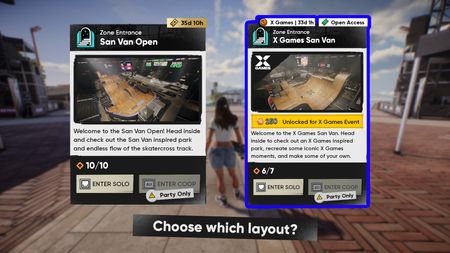
(Idea/Concept) Being able to choose different layout of the San Van Stadium.
Ever since the X-Games event started, I absolutely love the 3 different layouts of the current indoor stadium. However, I realised that this is gonna be time limited and we wont be ever to see or skate it ever again. :( So I propose an idea of being able to choose between the 2 of them before entering the stadium (Normal layout or X-Games' layout). It could set up like a seperate server on how Isle of Grom & San Van Stadium operates. Pros: Give the freedom for the players to choose. Pros: More choices. Cons: It could affect the X-Games branding license unless replace it with an in-game brand.(?) Cons: More backend work for the devs if server issues were to happen.(?) Heck, it could also apply to the Isle of Grom (Day and Night). *I dont know how does a live-service works in the programming or game design side so I do apologies in advance. ----- I've created a quick UI concept on how it would work. Feel free to share some of your ideas on this.
Game is running poorly on my 2070 😒
My GPU has been temp throttling the entire time the game is open, holding at 73 degrees Celsius. This recent patch update is wrecking my PC, and I won’t play until it’s fixed. I’ve set all graphics to low and render resolution to 60%, yet my GPU still runs like it’s cooking a steak. Instead of just adding new content, please take the time to benchmark and test hardware compatibility. When the game first launched, it was amazing—last week too, no throttling. But this recent X-Games patch has terrible performance. Please fix it, or I’d like a refund for the skate pass, as poor optimization is pushing me out of the player base and I won’t be able to complete it without destroying my CPU’s thermal paste and overheating my GPU.
object glitch
i came across a bunch of ramps piled together and when i went to disable them, they were not interactive. there was no button to see who placed them. almost as if the game had them there by default but they werent there a couple minutes before. i was in editor and when i got out the editor, i saw the picture attached.
Replay Editor Flick It Visualizer Bug
I was filming/exporting a clip I had recently gotten and exited the replay editor. When I did so, my flick it visualizer disappeared completely. I had attempted to fix it by (1) enabling and disabling the flick it visualizer, (2) reentering and exiting the replay editor, (3) closing and reopening my game, (4) bailing, and (5) entering and exiting challenges to no avail. I had only managed to fix it consistently when changing areas (e.g., grom to san van, san van to grom). I have also been able to consistently cause the bug by just entering replay editor (on and off board) and exiting. The bug occurs in both scenarios. I’ve been able to replicate it 6 times in a row now. This was on Xbox occurring at roughly 9:40pm EST, Username is DraconianGFX
Game STILL crashes my ENTIRE COMPUTER on LAUNCH
Hey, I figured this would be fixed by now. I'm already dealing with my product boxes being locked and I cant ever buy my stuff, I just restarted because I the door to the Stadium was just GONE. Then, when I restarted I forgot to open a separate tab and it completely crashed my entire computer. I don't understand what's causing this because I've done all the "FIXES" I have deleted the old data and it still remains messed up. Now my videos are just jumbled around in 3 different locations because I've done this so many times.