School Overhaul! Hear me out!! :D
I really enjoy playing the High School features of the game and I feel like one thing that is missing is a system where there is a Private School option and even a Homeschool option. I used to always love that other Sims games had the Private School feature and I miss it! I feel like it would be very complimentary to the Royalty and Legacy pack as well as the University pack. Please consider it! I think it would give a school years more depth and more fun options - school rivalry, snobbish sims going to elite schools, ect. To add to this idea... an option for occult sims to go to their very own Magic school would be awesome too- think the sims version of Hogwarts. Lots of room for ideas with this, but I think the game would benefit greatly and that it would be a very popular addition to the game.63Views4likes5Comments
🎄 My Dream Christmas Pack for The Sims 4! 🎄
I would absolutely love to see a new Christmas-themed pack for The Sims 4! I would love to have more Christmas decorations, beautiful Christmas trees, festive lights, Christmas sweaters, matching family pajamas, snowmen, gingerbread houses, and more winter activities. It would also be amazing to have Christmas traditions, gift-giving, Christmas dinner, and the ability to celebrate Christmas Eve with family and friends. I think a dedicated Christmas pack would make the holiday season in The Sims 4 so much more magical! ❤️🎅 Please consider making a new Christmas pack!33Views1like2Comments
Problème market place
Bonjour j’ai un souci je possède le kit thé au soleil, les 2 kit bob l’éponge sauf que sur le market place je ne peut plus les télécharger j’ai beau cliquer sa fais rien comme si le téléchargement fonctionne pas alors que je me j’y télécharger d’autre kit comment faire ? Je suis sur Xbox
What gameplay/feature systems do you enjoy the most in The Sims 4?
There's many different systems/features in The Sims 4, these can range from the Club System, to Residential Rentals or even Lot Challenges. What systems do you like the most and why? (Feel free to add screenshots of you using these systems) For me I really enjoy using the Simple Living Lot Challenge, Small Business Residential/Venue and building Residential Rental Units. 🤗386Views7likes19CommentsRodeo & Ranch Expansion Pack Idea (Featuring Bucking Bulls & Western Gameplay!)
Hi Simmers and EA Team, I have really enjoyed Cottage Living and Horse Ranch. The farming and ranch gameplay added so much depth to storytelling, and I would love to see western gameplay expanded even further. I would like to suggest a Rodeo and Ranch themed expansion pack that focuses on competitive rodeo events and deeper cowboy gameplay. Here are some ideas that could make it exciting: Bucking bulls as a new animal type separate from cows. Sims could build a new Rodeo skill that improves balance, bravery, and athletic ability. Weekly rodeo competitions held at a special arena venue. Higher difficulty bulls could offer bigger prize money. New traits such as Fearless Rider, Adrenaline Seeker, or Country Tough. Expanded rodeo events like barrel racing, team roping, calf roping, and bronc riding. Teen Sims could participate in junior rodeo competitions. New careers such as Professional Rodeo Rider or Ranch Hand. A new arena lot type that players can build and customize. Western clothing options like chaps, rodeo vests, larger belt buckles, gloves, and more hat styles. Build and Buy items such as arena fencing, announcer booths, livestock trailers, and cattle pens. There could also be a ranking system where Sims earn trophies, belt buckles, and reputation. It could even connect with Get Famous so successful rodeo Sims become local celebrities. A new southwestern or Texas inspired world with ranch land, small towns, and a large rodeo stadium would fit perfectly with this theme. I think this type of expansion would build naturally on Horse Ranch and Cottage Living while adding a new skill based competitive gameplay system. It would give players more ways to tell western stories and create long term goals for their Sims. I would love to hear what other players think and what features they would add to a rodeo themed pack. Thank you for your time and for continuing to grow The Sims.116Views1like2Comments
Public Photo Studio
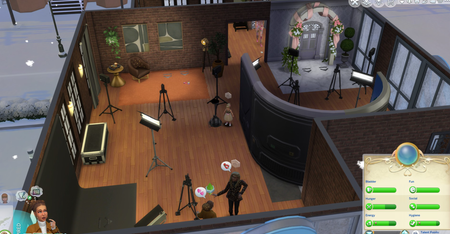
I have fun with in-game photography and decorating with family photos. I wanted to make a public photo studio that all of my sims could access. And I wanted to play around with staging. The empty second floor of the karaoke bar in the Spice Market, Waterside Warble in San Myshuno is perfect! It was large enough. I could take a group there and they could entertain themselves downstairs while I rotated taking photos. I had to add a staircase and a bathroom. Added a thermostat so they can comfortably wear any outfit. There's an entrance door that can be removed to keep the Sims in or out. I have four spots set up - wedding, modern living, the Moschino digital wall and a backdrop. Thru the archway is a styling area and I've used it for photos too. The bathroom is there so they don't have to leave the second floor. There's a stereo where they can dance. Anything to keep them from getting bored or unhappy while waiting. 😄 The lighting colors can be customized - color and intensity. I like using the "stand here" mark and camera tripod outdoors too. The studio gives me more options and different kinds of photos. Sometimes I can capture good candid pics of a Sim on the mark and the photographer Sim using their Inventory camera to - Take A Photo - which lets you take a photo of anything in the view range. I mix it up. I just took toddler twins for the first time. Learned that toddlers will use the "stand here" mark and will wait for the photographer. Toddlers don't have many pose options but it was cute - and it makes them stand in one spot! The game randomly sent one of the twins to Day Care. Their needs were okay. We'd been there awhile and I think they were getting bored. I mention it so you know that it can happen.108Views3likes8Comments
Italian Themed World/ Expansion Pack
Can we please get a pack with a world based on Italy like the Sims 3 Monte Vista? I LOVED that world, and the gondola rides from the venue Last Venue of Amore. This would make the perfect romantic getaway vacationing spot for our Sims. I think we need more romantic places!250Views4likes11Comments