Conduit locked and cannot be unlocked
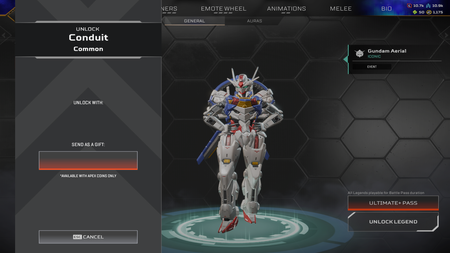
Hello, EA_Mako , sorry for bothering you. I know there are some posts about Conduit being re-locked, but I haven't seen any resolved cases, so I decided to create a new post to explain my situation in detail. If possible, please help me fix this bug. I unlocked Conduit when the legend was released in 2023. The third attachment is a screenshot I retrieved from my gameplay recording from a few months ago. You can see the Conduit was properly unlocked at that time. On Sept 3 2026, I used EA app on a new PC to launch Apex Legends and played normally. However, on Sept 4, I logged into Apex via Steam client on my old PC and found my Conduit had become locked. I tried to unlock the legend, but the unlock button had disappeared. Details can be seen in the first two screenshots. I have tried all troubleshooting methods: re-logging in, restarting the game, rebooting my PC, and verifying the integrity of game files. I also unlinked my Steam account from my EA account, yet Conduit remained locked. Afterwards, I re-linked the two accounts. I submitted a support ticket through EA Help, but I have not received any reply to this day. I noticed that the bug I encountered is very similar to the earlier issue where Ash was unexpectedly re-locked, and seems you have already fixed that bug. I hope you can resolve my current issue so I can use Conduit normally. Thank you. Please leave a message if you need any additional information. Thank you again.21Views1like1Comment
Periodic Frame Pacing Anomaly Every ~5 Minutes in Apex Legends
Issue Summary: I am reporting a periodic frame pacing anomaly in Apex Legends that occurs approximately every 5 minutes. This issue has been verified across multiple different PC environments. Detailed Behavior: Roughly every 5 minutes, frame pacing becomes erratic for a duration of about 15 to 20 seconds. On my specific setup (Ryzen 9 7950X3D / RTX 4090 / capped at 270 FPS ), the average framerate maintains a steady ~270 FPS even while the anomaly is occurring. However, the Adaptive STDEV of the frame times degrades from a normal baseline of ~0.1 ms (7.6 FPS) to roughly ~1.3 ms (146.4 FPS) during the abnormal periods. Frametime Analysis: Furthermore, the frametime variance during these abnormal periods exhibits a strong cyclic component at about 63-64Hz (~15.7ms intervals). Rather than a simple drop in average FPS, the frame pacing completely breaks down into a repeating pattern for individual frames: Long -> Extremely Short -> Normal -> Normal -> Long -> Extremely Short -> Long... For example, a specific frame sequence looks like this: 6.04ms -> 1.39ms -> 3.77ms -> 3.59ms -> 5.61ms -> 2.19ms. Visual Impact: As a result, despite the in-game counter showing a stable 270 FPS, the anomaly manifests as a periodic judder. While not extremely severe, it is noticeable at 480Hz. On a 480Hz OLED monitor, the abnormal sections can be perceived as a fine ~60Hz judder superimposed over the gameplay. The visual severity likely depends on the display's refresh rate and pixel response time. On LCD panels with lower refresh rates or slower response times, this specific frame pacing issue might be partially masked, meaning other players could be experiencing the exact same bug without consciously noticing it. Attachments & Additional Info: An extended CapFrameX capture shows this anomaly repeating at nearly identical intervals. I have attached four graphs from the same Firing Range session for reference: Apex Legends.png: Full-length measurement graph Apex Legends.png: Isolated graph of an abnormal sequence 1 Apex Legends.png: Isolated graph of an abnormal sequence 2 Apex Legends.png: Isolated graph of a normal sequence extracted from the exact same measurement Note: The onset of this issue roughly coincides with recent Anti-Cheat updates, though I cannot confirm a direct correlation. Please note: I am not a native English speaker, so I am using an AI translation tool.117Views3likes6CommentsRanked Challenges completed 2 seasons ago, but reward was never granted
Issue: I completed the Ranked Challenges approximately 2 seasons ago, but I never received the reward. As shown in the attached screenshot: Both Ranked Challenges are marked as "Completed". The progress shows 2/2 completed. The reward on the right shows +1, but it was never granted to my account. After completing both challenges, I should have received the corresponding reward. The challenges are completed, but the reward is still missing, even after approximately 2 seasons. Could you please check my account and grant the missing reward, or investigate why it was not awarded? Platform: PC (Steam) Thank you.14Views0likes0CommentsSilver II requires 750 RP instead of 500 RP to rank up to Silver I
I encountered a possible Ranked progression bug. According to the current Ranked RP requirements, ranking up from Silver II to Silver I should require 500 RP. However, my game currently shows that I need 750 RP to rank up from Silver II. At first, I thought this might only be a visual/UI bug. However, I have now earned more than 500 RP and I am still in Silver II. My current progress is 535/750 RP, so the game appears to actually be requiring 750 RP for the promotion. I have attached screenshots showing the issue. Earlier, my progress was displayed as 319/750 RP, and after continuing to play Ranked, it is now 535/750 RP without promotion to Silver I. Expected result: Silver II → Silver I promotion at 500 RP. Actual result: The game requires 750 RP, and I remain in Silver II even after exceeding 500 RP. Date observed: September 12, 2026 Please let me know if any additional information is needed. Thank you.14Views0likes0Comments