Neighbourhood Progress reset & stuck at 0 / 0
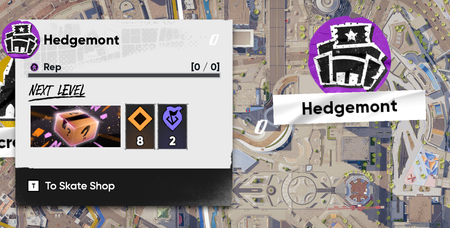
Description of the issue: Right after the Season 3 maintenance was over and I hopped in to check things out, all of my neighbourhood levels and progress got reset/bugged out. They are simply stuck at 0 / 0 and will not update or progress at all. Can't buy any product boxes either, even if it shows that I already have multiple boxes unlocked in said neighbourhood. It's been like this two weeks. Steps to trigger/reproduce the issue: Start the game as usual Look at the 0 / 0 on your current neighbourhood and wonder if all your progress gone Write bug report and hope for the best. I've seen a handful of other people post on reddit and the discord with the same issue. Still no acknowledgement as a known bug, which worries me a ton. Platform: PC (Steam) Troubleshooting steps already performed: Validated files through Steam. Reinstalled game completely. Attempted to run a few missions both old and new in every neighbourhood hoping it would fix things. No luck.2.5KViews24likes71Comments
Editor is Exporting Videos @ 1.5x Speed with Season 5 Update
Started happening with the Season 5 update. I've attached a handful of videos. Editor.mp4 is a screencapture showing exactly what happens during an actual short session of editing and exporting a video, where it remains normal speed until Skate exports it and you see it visibly faster. When you press export, you see the countdown timer - 3, 2, 1. During which the video starts playing. At the point 1 hits, the video starts over where Skate starts recording and the video is playing around 1.5 to 2x faster than the original intented speed. Clips that should be 10 seconds long, come out around 5-6 seconds long due to this. The other videos attached are short example clips that are visibly too fast. I can't seem to export a single video without this issue. This is on PC. Specs are i9-13900K, 64 GB RAM, RTX 4090. DxDiag included for reference.181Views9likes14Comments
skate. Error Server Bugs "990104014"
Hello EA Support, I am locked out of skate. due to Connection Lost Error Code: 990104014. I have done all local troubleshooting (DNS, network reset, reinstall) but it still persists. My account session seems to be stuck or bugged on the server side. Please help me to force reset or clear my active game session data. Thank you.18Views1like0Comments
CPU Heating to 192-195 F
I'm on the Steam version with a 4080 Super, Ryzen 7700, and 32 GB DDR5, but my CPU skyrockets to 195 degrees while playing at 4k 240Hz. I would try 120Hz or 165Hz, but there is no option. This is the only game that gives me this issue, I even have the graphics turned down, but it makes no difference. I love this game, but I fear playing it will just degrade my hardware. Playing at a lower frame rate makes this game significantly less enjoyable, and 1440p on a 4k panel looks pretty bad.Inconsistent performance on pc- brief black screen then worse performance
I’m having a strange issue with Skate on PC. While playing, the screen will sometimes suddenly go completely black for a few seconds. The monitor then shows “DisplayPort” as if the display connection has been interrupted, and the picture comes back. After this happens, Skate runs noticeably worse than it did before the black screen with less frames and worse graphics. Restarting the game seems to restore things temporarily, but the issue can happen again. I originally had the monitor connected via HDMI, but I switched to a DisplayPort cable and the exact same issue still happens, so it doesn't seem to be specific to the HDMI connection. I’m using an AMD RX 9070 XT and a 144Hz monitor connected via DisplayPort. I’ve also tried reinstalling Skate, but the issue still happens. Has anyone else experienced Skate causing a brief display/driver reset like this, followed by worse graphics and performance? I’m trying to figure out whether this is a Skate/AMD driver issue or something else. I havent noticed this in any other game either. I also noticed everytime I boot the game and it verifies shaders it goes up to 11/12% then skips to 100 and sometimes it goes black and says DisplayPort in the top left. Could that be related or is that just how Skate boots? Any information would be much appreciated. thankyou:))14Views0likes0Comments
Softlock Megathread [Last Updated: 28-09-2026]
Hello, fellow skaters! We continue to see reports of players getting soflocked at various points. The old thread has more than 9005 comments, and sometimes it is difficult for the team to organise and spot new issues within all the reports. That's why we have decided to open a new megathread to work on the most recent softlock issues. If you are softlocked, please provide the following information: Platform Mission/Challenge? If Mission, what step in the Mission? Can you describe how you got stuck and provide some screenshots? Username you're playing with (Gamertag, PSN ID, or EA ID - no emails. We'll assume it's the account you're posting with as well.) Please be as thorough as you can when sharing your information, as this will help the team investigate and help unstuck other players in the future. Also, in order to keep you informed, we will update this thread every week with the number of players we have unlocked. We will include a description of the issue we worked on. If you have been unlocked, please let us know. If you haven't been unlocked, please bear with us, we are working on it. __________________________________________________________________ Week [Sep 21 - Sep 25] Gullcrest Village remains locked after completing more goals than required: Players unlocked: 15 Market Mile remains locked after completing more goals than required: Players unlocked: 8 Softlocked at "Transition Skating 101" mission: Players unlocked: 12 Various mission progression issues: Players unlocked: 71,896 Total player unlocked: 71,9315.5KViews23likes130Comments
Coping Inspector trick tutorial not registering
FS Handplants work just fine, however the quarter pipe on The Vault skyscraper roof will not register BS Handplants of any kind. I have been sitting here for half an hour pressing the Right bumper and right on Right Thumbstick and nothing happens. I saw a bunch of other players having the same issue.
Neighbourhood Progress keeps resetting to 0/0
Platform: PC My Neighbourhood/Repping Crew progression is not loading correctly. My actual progression has previously displayed as: Hedgemont / DAKS: MAX level Gullcrest Village / SVLOCS: Level 10 — 7750/7750 Market Mile / DLCS: Level 6 — 4215/5000 However, after restarting the game, all three neighbourhoods can display as LVL 0 [0/0]. There is also a separate problem with Gullcrest/SVLOCS. When my correct progression does load, it shows Level 10 — 7750/7750 and “Next Level In 0”, but it does not change to “MAX level!” and still gives me the option to “Start Repping.” Hedgemont/DAKS behaves correctly at maximum level: it displays “MAX level!” / “You reached MAX level!” and does not give me the Start Repping option. I have already tried EA's recommended PC workaround of closing the game and renaming %localappdata%\skate so that the game creates fresh local data. The correct progression temporarily appeared again, but after restarting the game it returned to 0/0. This appears to be an account/progression sync issue rather than permanently lost progression, because the game has successfully displayed my correct values between restarts. EA ID: WhiteShaq I can provide screenshots showing both states.6Views0likes0Comments