Jet spawn points incorrectly trigger Leave the Play Area after Update 1.4.3.0
Since Season 4 Update 1.4.3.0, aircraft spawn points appear to have an incorrect Out of Bounds area. On multiple maps, including Wilds Trail, when a jet is about to spawn, approaching my team's aircraft spawn point triggers the "Leave the Play Area" warning. This makes it impossible to wait at the aircraft spawn point before the jet becomes available. This is especially problematic for players with higher ping who cannot reliably compete for aircraft through the deploy screen. Please check whether the new Out of Bounds volumes are incorrectly covering aircraft spawn areas.3Views0likes0Comments
AUDIO Cuts out in Menu when buying Battlefield 6 Bundles
Hello friend! Penguin purchased bundles in Battlefield 6. And the audio cuts out during a specific section when purchasing bundles since the recent update, Battlefield 6 in-game store 👉🛒🏪 Penguin attaching video in order to illustrate when it happens. Approximate timing of bug is 12 seconds. This happens every single time Penguin is purchasing bundle. Big Fan Of Battlefield! Also: Do not push others into ⚠️👉RedSec 👈⚠️ Many Thanks Penguin6Views0likes0Comments
Cannot change weapon attachments while in-game
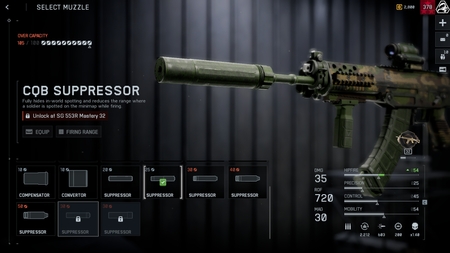
Some attachments, particularly those unlocked during a match, cannot be equipped. It shows that they are unlocked and available to use but when selecting to equip them the game seems to force the previous attachment back onto the weapon. This does not occur in the main menu, only during a match or while waiting for a match to start.3Views0likes0Comments
Delayed Kill Feed and Scoring Events after patch 1.4.3.0
Description: After patch 1.4.3.0, my kills and scoring events frequently appear delayed in the main kill feed. This has happened on multiple maps across Conquest and Escalation, on-foot and in vehicles. Frequency: Often Reproducibility: N/A Steps to reproduce: N/A I have attached a clip with 2 examples below. Clip Time: approximately 14:20 UTC 15-09-2026 Clip Server Region: Europe West You can see the objective scoring event, and the killfeed are both delayed. Kill Log in the top right appears to be keeping up with the server.26Views1like1CommentBattlepass not progressing
Completed multiple game and in the game completed weekly challenges, earned tokens would appear at the end of game screen however battlepass would not progress and would state "no progress earned". restarted game multiple times and nothing worked and am now missing ~20 tokens from progress.296Views11likes18Comments1.4.3.0 unlisted changes
Hello dear money providers. We hope that you enjoyed the new Store content for this new update. Please don't forget to open wide your wallets and pay for our Feodal Japan masks, that are totally in line with the design vision of the shareholders and other people who don't care about the game. But if you are, for some odd reason, interested whatsoever by the gameplay of our game, here is a new change that may interest you: New weapon attachment system We found the previous system way too fast and too clear. It was way too engaging, and allowed players to play several games, unlock several attachments, without any need to look at our beautiful store. In an effort to correct that problem, we introduced a new system, that will keep the new attachments locked, until you restart the game! So that we will be sure to be able to reach you with one of our new and engaging non-skippable popups ! We hope you like this new Balance and Upgrade of the Game, and be sure to stay tuned for more !27Views0likes0CommentsOut of Bounds Error
It's happened now on multiple occasions and on multiple maps that when in a playable area I am given the "Return to Combat" countdown as if I've left the playable area. Most recently I had the experience while playing Casual Breakthrough on the Manhattan map and I was trying to lay down behind some concrete dividers near the second sector A capture point. I can't recall the other map that this happened on, but both of these experiences have caused my death because I suddenly had to run from cover or the game itself would have killed me.110Views4likes11Comments
Squad Orders do not work while moving
Squad Orders do not work while moving. Even before Update 1.4.3.0, Squad Orders were often unresponsive. Sometimes, the Squad Order sound effect and character voice line would play, but the objective would not actually be marked. Since Update 1.4.3.0, the issue has become even worse. Now, I can only issue a Squad Order while standing still. If I am moving, the Squad Order does not register. This post was translated automatically, so I apologize if any part of it is difficult to understand. Thank you for your hard work every day. Please keep up the great work!48Views3likes0Comments