[Steam ID: 123] Ash legend locked bug - Purchase button is missing
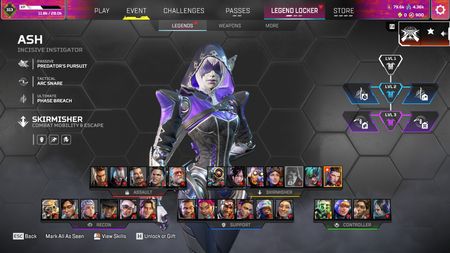
Hello EA Community Manager, I am experiencing a severe bug where the legend Ash has become locked on my account. I have already unlocked and played her normally in previous seasons. Currently, she is shown as locked in the Legends menu, and the purchase buttons are completely blank or missing, making it impossible to re-unlock her. This is a severe account-side synchronization issue. Could you please check my account data and restore my access to Ash? - Platform: Steam - EA ID: [edit: email address removed] - Steam Nickname: 123 Thank you for your assistance. I look forward to your reply4Views0likes0Commentspenalty for my friend afking out of ranked match for isp issue
i was playing a match with my buddy's around 12 am EST and at the start of the game the sever got super laggy for all of us. our buddy for the USA DC'ed and got timed out and couldn't rejoin we placed 2nd in the match and i was the one that got a penalty for his afk out of the ranked match. it frustrated me and threw off the rest of my night. why am i the one that gets a penalty when my friends got none at all......29Views1like2Comments
My ash legend locked since prodigy split 1 - need solution ticket 214665463
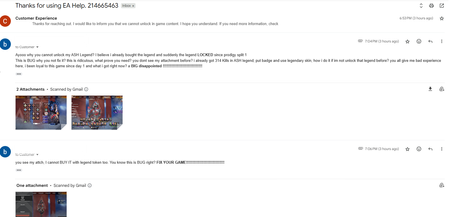
Ayooo why you ALL said cannot unlock my ASH Legend? I believe i already bought the legend and suddenly the legend LOCKED since prodigy split 1 This is BUG why you not fix it? this is ridiculous, what prove you need? you dont see my attachment before? i already got 314 Kills in ASH legend, put badge and use legendary skin, how i do it if im not unlock that legend before? you all give me bad experience here, i been loyal to this game since day 1 and what i got right now? a BIG disappointed !!!!!!!!!!!!!!!!!!!!!!!!!!!!!!!! you see my attch, I cant event BUY IT with legend token. You know this is BUG right? FIX YOUR GAME!!!!!!!!!!!!!!!!!!!!!!!!!!!!!!!918Views7likes31Comments
Mouse stuck / Connected again and lobby freezed / Penalty for abandoning
I was playing a ranked like an hour ago and this happened: When it showed my dropzone location i clicked on mouse1 and pinged something random on the map, then i click on mouse2 to delete it and from there on could only move my mouse on the legend selector screen, when i landed into the match i could't move my mouse at all From there on I altf4ed, re-connected and my game become darker and the lobby fully froze but the chat was working as you can see on my clips. Then i restarted the game AGAIN and got 10 mins penalty for abandoning :) i've cutted the clips on some loading screens and when i checked speedtest to see if it was my internet lagging but everything was fine, i was on a discord call and it was working completely fine, so i guess that it can't be my problem at all. Hope you guys look it into it, i already had that bug that i couldn't move my mouse when landing but it was a LONG time ago, it never happened again until today but i never had my lobby froze after that, i always re-conected and from there on everything usually started working, but not today i guess. Thanks for the attention. Kind regards.8Views0likes1CommentEAC Untrusted file (atiadlxx.dll) & DXGI crash on AMD RX 5000
Product: Apex Legends Platform: PC (Steam / EA App) GPU: AMD Radeon RX 5700 XT CPU: AMD Ryzen 5 7600X OS: Windows 11 Issue Description: Apex Legends crashes to desktop when loading into a match. Easy Anti-Cheat pops up an error window stating: "Untrusted system file (\System32\atiadlxx.dll)" Followed by the DirectX crash error: "DXGI_ERROR_DEVICE_HUNG (0x887A0006)". Troubleshooting already completed: - Clean reinstallation of official WHQL AMD drivers using DDU. - Verified game files integrity in Steam/EA App. - Repaired Easy Anti-Cheat service. - Performed Windows Clean Boot (no third-party software conflicts). - Lowered VRAM budget and capped FPS. EA Live Support agent (Case #251730607) verified that standard troubleshooting is exhausted and advised creating a bug report here for the development team and Easy Anti-Cheat engineers to investigate. I have attached my DxDiag report below.38Views0likes0Comments
Constant Stutter and Lag
I keep getting constant stutters, spikes, and intense lag during gameplay quite often. I've tried to bring down every single quality setting down, closing everything but Apex, uninstalling and reinstalling the game, and even disconnected my wired internet access to see if Wi-Fi would somehow be better which changed from often to constant. I don't understand what is going on. It's a brand new laptop with less than a month of use and modern components. Attached are a speed test with the wired internet and a "ping test(?)"11Views0likes1CommentConstant Crashing With the Error Code 0x8000001
For approximately 4 months, I have consistently had Apex Legends crash. It always crashes with the exact same message in a small window: "Integrity error 0x8000001 Apex exited due to a failure of game integrity." I am always able to load into the main menu of the game, and around half the time shaders are loaded. When reaching the menu of the game, after about 6 or so seconds, the game will freeze for about 1 second, then continue for about half-a-second, and then the game crashes with the "Integrity error 0x8000001" code. Methods I have tried/ attempted. Verifying Files I have opened my Steam Library, right-clicked Apex Legends, selected properties, gone to installed files, and clicked "verify the integrity of game files." It has made the game work a handful of times, but most of the time nothing has changed after verifying the game files. Even though the message stated after verifying the game files is "all 10391 files successfully validated," the game has about a 95% chance of crashing. The game will seldomly work fine with no issues but I do not know why. Repairing System Files I have opened the command prompt through Win+R followed by Shift+Ctrl+Enter which makes it so the command prompt is opened as an administrator. Using sfc/scannow files that were corrupted or needed repair were fixed. I also ran DISM/Online/Cleanup-Image/RestoreHealth in an attempt to fix any windows image issues that were had in my computer. I was able to play Apex Legends for about an hour-and-a-half after doing this, but the next time I booted the game up, the game crashed with the same error code. The next two times I booted up Apex Legends, the game worked with no errors. The third time the game crashed yet again with the same error code. (Integrity Error 0x8000001) Graphics Driver/Windows Updates I replaced my graphics driver entirely. I currently have the AMD Radeon(TM) Graphics driver. The driver itself is up-to-date with a simple message stating, "The best drivers for your device are already installed." Windows software updates are also up-to-date as of July 3rd 2026. Reinstalling and Repairing Easy Anti-Cheat I have deleted the Easy Anti-Cheat folder and all its accompanying files multiple times and redownloaded those same Anti-Cheat files through verifying files. When attempting to open up the EasyAntiCheat folder, I am able to run the file. However the EasyAntiCheat_Setup.exe never actually runs. From that I am never actually able to attempt to repair the files. Miscellaneous I have uninstalled Apex Legends multiple times and reinstalled it. I have run the game while using an administrator account. There are no overlays to deactivate, such as Discord, as none are installed on the computer that I own. I will end by saying that there isn't a chance I am cheating as I am genuinely bad at the game, with an average KDA in battle royale of around 0.44.139Views9likes5Comments
Ash became locked after the Battle Pass season ended (Account Bug?)
Hello, I'm experiencing a strange issue with my Apex Legends account. I have owned Ash for a long time and was able to play her normally. During the Battle Pass season, I purchased the Laced Lethality Legendary skin for Ash. After the season ended, Ash suddenly became locked, and I can no longer use the legend even though I already owned her before. I have already tried: - Reinstalling the game - Unlinking and relinking my EA account - Logging in from another PC The issue is exactly the same on every device, so I believe this is an account-side issue. EA Support has already suggested reporting this as a bug. Has anyone experienced this issue before? Is there any way to restore Ash, or does EA need to fix my account?38Views2likes1Comment