Ship/Toon Colors still 'greywashing' on selection screen with HDR on
When I go to a Character or Fleet Selection screen (like the current galactic challenge) the colors of the toons/ships greywash out. It's not really that noticeable on the characters but it's REALLY noticeable with the ships- see attached pic. When you go to the fleet selection screen you can see the colors for like a split second after the screen comes up but it washes out after. I poked around here and saw a post about it from the beta client and the determined cause was from Windows 11 HDR, which I can confirm is correct because this bug is STILL HAPPENING. So is there some fix for this that I'm unaware of (beyond turning off HDR which I don't want to do because it works in all my other games)? It's not really a huge deal; it's not breaking the game or anything, i just figured I'd ask.263Views1like5Comments
New Update 11/21/17 Game Crashes
I can't load my game and because I initially signed on as a guest I can't move my game to another device. C'mon. This is ridiculous and I've been on your chat fthe welcome screen states I have less than 5 minutes to wait.. It's been 25 minutes. Or have you figured out a way to move a guest account and tie it to a Google account???3.6KViews9likes124CommentsUnable to Unlink EA Account from the Game (Error Code 9.0)
Hello EA Support, I am trying to unlink my EA account from Star Wars: Galaxy of Heroes using the new in-game unlink feature, but I keep getting Error Code 9.0 when I attempt to do so. I no longer have access to the EA account currently linked to my game, but I still have full access to my SWGOH account through Google Play and Apple Game Center. Since I cannot log into the old EA account to unlink it manually, I need assistance in having it removed so I can link my game to a new EA account. Account Information (Player ID can/will be provided if/when requested): SWGOH Ally Code: 756-537-827 In-Game Username: THX1138 Google Play Linked: Yes Apple ID/Game Center Linked: Yes Error Message: “Error Code 9.0” when using the in-game unlink option. I have already tried: Using the in-game unlink feature (fails with Error Code 9.0 every-time) Reinstalling the game and clearing cache Contacting EA Help previously on a multitude of different occasions, on both platforms in-game and on the EA Help website, but they were unable to resolve the issue; instead continuously sent me through loops back and forth to one another for months. Attempted to do all of the above on several different devices from both platforms. Since I have verified access to my game through Google Play and Apple Game Center, I would appreciate if you could manually unlink my SWGOH account from the old EA account so I can link it to my new and accessible EA account please. I would really like to play the game on the PC Client and gain access back to the Web store!! If there is nothing that can be done by whoever reads and/or responds to this, I would like my issue to be escalated and investigated further. I cannot be the only player with this issue. Being a tech guy who has dabbled in many things programming, it seems to be very much a bug/glitch with the new unlinking feature that was recently added to the game. Thank you for your help, and I look forward to a helpful response.236Views1like2Comments
Account Overwritten
My Galaxy of Heroes account has been overwritten (a new account shows up for the game center I have always used, and I can't get my old one back( for over a year. I been trying to get it back recently, but no luck. It was connected to Game Center, but not this EA account, because at the time, I did not have an EA account. I did not take a picture of my player ID or Ally Code. But it was connected to Game Center.375Views0likes2Comments
How to contact support for Star Wars™ Galaxy of Heroes
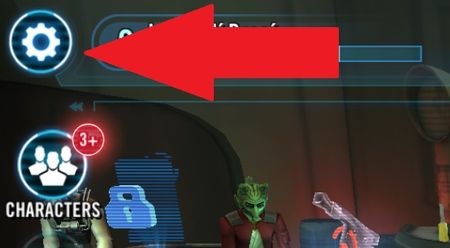
Having trouble in Star Wars: Galaxy of Heroes? Here's how to get information and contact support. Before contacting us > Make sure you have your Player ID or Ally Code so that our EA Advisors can help you. Tap the Help Button in the Settings menu Locate the ⚙️ Cog wheel icon/ Settings button in the top left corner of your screen Tap the Help button and your game will connect to the EA Help support site. The page will display Star Wars Galaxy of Heroes support articles which could resolve your issue. If you can’t find a solution in a support article, please follow step make a support ticket. To make a support ticket Click the Contact Us button at the bottom of any article, or Select the Contact Us button underneath the article options: (SOURCE)19KViews10likes8Comments
GA oppo toons revive after battle.
Hi. I had a battle in GA where my squad couldn't defeat a First Order Squad, I had killed all opposing characters apart from Kylo Ren, when I came out the battle and returned to the teams screen it showed that one battle had happened but all opposing characters were shown as alive with full health and protection. I'm not sure if this is a bug or something i'm not aware of ? AdeSolved594Views0likes6Comments