Broken and Updated Sims 4 Mods and CC: patch 1.122, March 17, 2026 and hotfixes
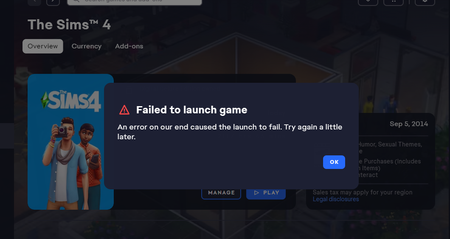
About This Thread This thread tracks Sims 4 mods and CC that have been "broken" or made obsolete by game update 1.122, March 17, 2026, and the March 18 and March 23 hotfixes, or declared unsupported by their creators. It also tracks updated game mods, important updates to custom content, general news from/about creators, and new bugfix mods. -------------------------------------- FAILED TO LAUNCH ERROR: "Failed to Launch" message plain black screen on launch (no words) sometimes you can launch but are missing CC in CAS A patch for these specific issues was released March 23, 2026. If you have them, please update. If you still have them after that, it's possible that there are other causes. Please do a vanilla test. If the issue persists, please update your ReShade; if you don't use that or other mods that aren't Mods-folder content, go to the Bug Reports forum. ---------------------------------------- SORT THE THREAD FOR WHAT YOU NEED: For the COMPILED LISTS, sort by Oldest For the MOST RECENT INFO, sort by Newest … or FOLLOW to receive notifications of new posts! Click on the bell symbol 🔔, top right. Notifications can even be sent right to your email! Some things are NOT covered here: Early-access content and anything else behind a paywall Content outside the T (for Teen) game rating (no adult mods! including alcohol, violence) Creators/mods outside the EA and EA Answers HQ rules (especially trademark or copyright infringement and having permanently paywalled “exclusives”), and the Maxis guidelines for Sims 4 content creators. NOTE: The Marketplace is not a paywall: it’s items published by EA. The paywall rule is about content that creators self-publish. Creators who update active creators' CC/mods without permission, who upload folders of other people's mods and CC, or who copy other modders' code without permission. Separate translation files Loading screens, CAS backdrops, main menu backgrounds, and poses unless the creator says an error is fixed Sims 4 Multiplayer Mod updates that don’t change the version number CAS and Build/Buy CC unless the creator says they're fixing an error or catching up pack content Mods and CC hosted on sites that are mostly adult content or that require joining an 18+ site In addition, news for mods/CC hosted only on Mod the Sims may be selective and/or delayed due to recent security incidents. In the end, YOU are responsible for your mod use. Because not all content and creators are covered on this official forum, many of you should be following creators directly for news. The pinned topic How to Use Mods and CC includes advice about game updates, mod management, finding broken mods, and how to avoid downloading broken and malicious content. And remember… Back up your Saves folder! Index for This Topic Newly Broken/Obsolete Game Mods and Tools Updated Game Mods and Tools, sorted by creator Newly Broken CAS and Build/Buy Updated CAS and Build/Buy Creators Clearing Mods for This Patch - gameplay mods reported by the creator or their testers to be compatible with the game update Core, Injector, Testing and Protection Mods Status: what you should be on for mods like ModGuard, Better Exceptions, venue lists, Lot51 Core, XML Injector, and MC Command Center Creator News New Bugfix Mods Start of Ongoing Reports - scroll down or sort replies by NEWEST Other Resources Previously Broken/Obsolete Mods and CC: up to patch 1.121 [MASTER POST] Common Symptoms of Mod/CC Issues, with Known Causes, including links to earlier Broken/Updated Mods threads. The previous Broken/Updated Mods thread, for patch 1.121 and its mini-patches. Patch Notes for this game update How to use Mods and CC: including how to test for broken mods/CC ("vanilla" testing and the "50-50" method) Malicious Scripts and Malware, including information about the March 2026 incident at Mod the Sims.66KViews24likes34Comments
Error when loading the game
I finally decided to take a chance and updated my game 2 days ago. After ensuring all mods are updated before launching, I unfortunately get an error message saying that the game has failed to load on our end and to try again later. I read a forum where its states the bug was resolved but that is not the case !!
game still crashes :(
hi all! i came here looking for help with my game. i saw the update from the 23rd i believe and was hoping my game would load. unfortunately it does not, i still receive a white box error message saying my game won’t load. this probably only happens when i have mods and CC in my Mods folder. I’ve tried launching offline, and just attempting the start bottom repeatedly but still nothing. if anyone has any ideas as to how to fix this that would be great! i haven’t played in a week and im kinda sad.109Views0likes3Comments
Mods loaded on list but not showing up in game
I've been seeing a lot of posts regarding the new update but I haven't seen this issue from it posted. In my game I'm seeing all my script mods listed in the settings list but when I open a game they don't show up. My CC is fine its just the mods. I went through and redownloaded all to their latest update but mods like MCCC and UI cheats don't have any options in game. Grannies cookbook allows me to place the cookbook but any only the dessert menu comes up and is blank. Thank you!!Solved287Views0likes9Comments
I LEARNED HOW TO FIX THE BUUGGGS
Okay, so after many hours of sorting through files and being pissed off, my game was able to open up without the mods folder and I figured out a fix that at least works for me. Go into setting and switch from DirectX11 to DX9. This helps the game see all the script (that have been updated) and package files that the DX11 had overlooked because it messes with graphics and older models in a weird way. This also made it where the Error message wouldn't pop up and crash the game from the EA app. I hope this helps you guys :) These posts are everywhere but im trying to tell the people the british are coming.I Got My game to work !!
I was just able to open my game, for the first time in 2 days. Seems like everything is there. All my mods and CC's. I updated the "breast slider v3" https://www.patreon.com/posts/default-breast-96592682 Also i deleted the "Main Menu override" i had. Then i did a repair of the game AGAIN 😂 Now it's working Again , check if any mods, defaults, overrides, whats so ever, is updated!105Views0likes0CommentsBroken and Updated Sims 4 Mods and CC: patch 1.121, Feb. 3, 12 & 19, 2026
About This Thread This thread tracks Sims 4 mods and CC that have been "broken" or made obsolete by game update 1.121 patch, February 3, 2026, and by the mini-patches, February 12 and 19, or declared unsupported by their creators. It also tracks updated game mods and important updates to custom content. --------------------------------------------------- This is a high-impact patch and will break MANY mods! KEEP your pre-patch Saves backup, especially if you use any mods that touch genealogical relationships. --------------------------------------------------- Sort the thread for what you need: For the compiled lists, sort by Oldest For the most recent new info, sort by Newest … or follow the topic to receive notifications of new posts. See the bell symbol, top right. Notifications can even be sent right to your email! Check your Notification settings. Some things are NOT covered here: Early-access content and anything else behind a paywall Content outside the T (for Teen) game rating (no adult mods! including alcohol, violence) Creators/mods outside the EA and EA Answers HQ rules (especially trademark/copyright infringement and having permanently paywalled mods/CC), and the Maxis guidelines for Sims 4 content creators Creators who update active creators' CC/mods without permission, who upload folders of other people's mods and CC, or who copy other modders' code without permission. Separate translation files Loading screens, CAS backdrops, main menu backgrounds, and poses unless the creator says an error is fixed Sims 4 Multiplayer Mod updates that don’t change the version number CAS and Build/Buy CC unless the creator says they're fixing an error or catching up pack content Mods and CC hosted on sites that are mostly adult content or that require joining an 18+ site In addition, news for mods/CC hosted only on Mod the Sims may be selective and/or delayed. In the end, YOU are responsible for your mod use. Because not all content and creators are covered on this official forum, many of you should be following creators directly for news. The pinned topic How to Use Mods and CC includes advice about game updates, mod management, finding broken mods, and how to avoid downloading broken and malicious content. And remember… Back up your Saves folder! Index for This Topic Newly Broken/Obsolete Game Mods and Tools Updated Game Mods and Tools, sorted by creator: A to R, and S to Z Broken CAS and Build/Buy Updated CAS and Build/Buy Creators Clearing Mods for This Patch - gameplay mods reported by the creator or their testers to be compatible with the game update Core, Injector, Testing and Protection Mods Status: what you should be on for mods like ModGuard, Better Exceptions, venue lists, Lot51 Core, XML Injector, and MC Command Center Creator News New Bugfix Mods Ongoing Reports - scroll down or sort replies by NEWEST Other Resources Previously Broken/Obsolete Mods and CC: up to patch 1.120 (January 2026) [MASTER POST] Common Symptoms of Mod/CC Issues, with Known Causes, including links to earlier Broken/Updated Mods threads. The previous Broken/Updated Mods threads, for patch 1.120 (December 2025) and the mini-patch (January 2026). NOTE: Patch 1.121 is high-impact; mods updated or cleared for 1.120 might now be broken. Patch Notes for this game update, Feb. 3. And patch notes for the mini-patch Feb. 12. How to use Mods and CC: including how to test for broken mods/CC ("vanilla" testing and the "50-50" method) Malicious Scripts and Malware127KViews22likes88CommentsSims coming home from high school and work early autonomously
As the title says, not long after sending my sims to high school or work they come home early and I get the pop-up asking if they should leave early, but they just do regardless of what I choose. I'm not entering cas, build mode, or traveling with other sims while they're away, it just happens. (Attatchment shows the pop-up and in the corner you can see how she already came home early). I've already removed all mods relating to high school and careers (also I dont have get to work or anything) and it still ain't working and it's so frustrating.