Apex legends - Failed to create texture fullscreen
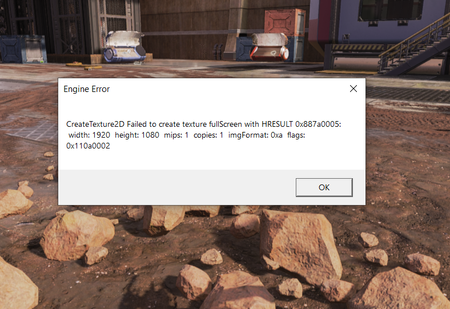


Actually this problem didn't occur until just 3 or 4 days ago right when World's Edge came out so I don't know how this might help but here!
Edit: I forgot to mention but only while playing Apex, my pc would show blue screen saying "Your pc ran into a problem and needs restart." I haven't encountered this in any other games I play. I initially thought it was a system problem but if I don't play Apex, it doesn't happen.

 Community Manager
I appreciate it, thanks!
What do you currently have your texture detail option set to in the in-game graphics settings?
/Kent
If you mean texture streaming budget then here and if not, I'm pasting the whole video settings of mine. Sorry for the inconvenience!
Community ManagerGot it, thanks!
When you've got a chance could you try lowering the texture filtering settings to see if that makes any difference at all? I've seen some cases where having this set too high can cause some weird issues.
Let me know if you're still getting the same error message afterward.
/Kent