Forum Discussion


6 years ago
Hey There,
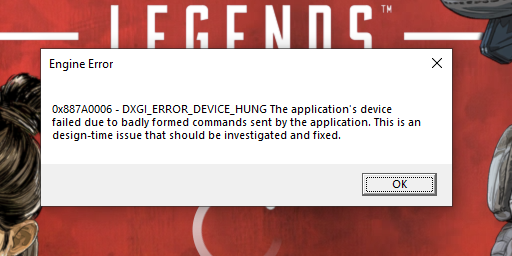
Been enjoying the game so far alot but as per a few other posts I am getting random crashes which cause the game to completely freeze to a black screen, I am able to open task manager and see that I get the below error and it is always the same.
I have included my DxDiag report as an attachment as well.
I thought this maybe card or driver related so I tried updating the Nvidia drivers but no luck and I just done a complete format of my PC and still no luck sadly.

6 years ago
The game crashes after a few mins, the error says something like, application tried to read memory at location 0x00000000, failed to read, or it says it tried to write at location 0x00000000, failed to write
The application number changes, but the location is always the same, 0x00000000
- 6 years ago
I should add im on pc, gtx 970 and intel i5 4670, 8gb ram
- 6 years ago
Might wanna try running the game on admin, for some reason it seems it can't get access to that location. That or one of your RAM sticks are dying
 6 years ago
in graphic settings choose the 2nd highest option at VRAM usage settings. Solved my crash in i8600k + 16GB + 1070Ti 8GB. No crash after this settings changed. When changed it back, game crashed almost instantly. After restart changed settings back to use not 8GB but only 6GB VRAM and game is running ok again.
This must be a screw-up in game itself or nvidia driver.
 Jeeha06 years agoRising Adventurer
Changing the VRAM usage settings from 8 to 6 or lower in-game does not solve the issue, I have tried it and many other things and sometimes it seems like your changes might have worked until the crash randomly appears again. I just turned off G-Sync and I played for a couple of hours without a crash, I thought that it would have been fixed but nope, the happy little crash surprised me once again.
Featured Places