Re: download game keeps resetting
Hi @savinkaMSI
When file system gets corrupted, it will report the free space incorrectly, which looks like something is taking up disk space. In this case, you can do the followings steps to fix corrupted file system:
First thing to do delete temp files: open the Start Menu and type %temp% in the Search field or click in the Run option in the Start Menu and type %temp% in the Run field.Press Enter and a Temp folder should open. You can delete all files found in this folder, and if any files are in use, they can be skipped.
Restart your machine and check.If your issue persists :
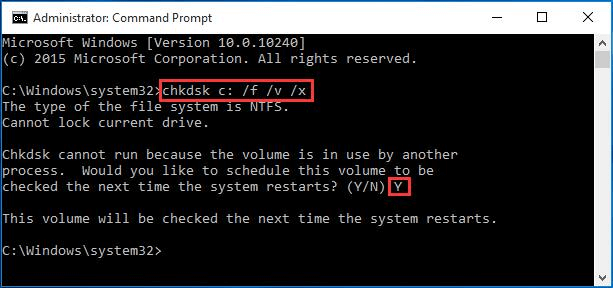
- Run Command Prompt as Administrator, and then allow it to make changes to your PC.
- Type "chkdsk C: /f /v /x" and press Enter.
- Type "Y" to agree to schedule for reboot, and then reboot your computer to let it scan while it reboots.
After that check again.I wait your feedback mate.
-yahel_1