Forum Discussion

Mr_LittleWeasel's avatar
7 years ago
Solved

Resolution Problem (Apex Legends)

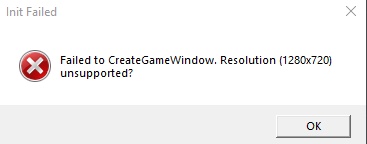
My friend is currently having a situation with the resolution 1280x720, I saw that someone already made a thread but I thought making a new one might help get more traction for the devs to see. Anyway, the problem that is occurring is that he loads up the game. The anti-cheat banner does pop up and load all the way through, it opens a window to the game but then only shows a white screen opening a message window and stating what is said in the png. I've gone through the game files but I cannot find any one that has a option to change the resolution to be able to have him at least load the game.
  • Rybean's avatar
    Rybean
    7 years ago

    C:\Users\<YOUR USERNAME>\Saved Games\Respawn\Apex\local

    videoconfig > open with note pad.

    Find these command lines and input your resolution, fullscreen "0" and "no window border" "1"

    Example > 

    "setting.defaultres" "1920" < Width>
    "setting.defaultresheight" "1080" <Height>
    "setting.fullscreen" "0"
    "setting.nowindowborder" "1"

    save file > reopen to check changes stuck

    Apex must be closed during these changes otherwise it will overwrite upon closing. 

    Works for me.

48 Replies

  • Koetullatyreal's avatar
    Koetullatyreal
    5 years ago

    I cannot find these "manage display mode" settings. I think nvidia control panel changed and had an update.

  • Koetullatyreal's avatar
    Koetullatyreal
    5 years ago

    I think that this problem can't be fixed anymore because of a nvidia control panel update.

  • BasicsMUPY's avatar
    BasicsMUPY
    5 years ago

    @LordStarkXVLIII wrote:

    So i am sure that other people are still having this problem even after changing the videoconfig file. I know i couldn't get it to work. Right before it stopped working I was trying to troubleshoot a different issue (Lenovo fn-Q, not going into performance mode) I fixed that issue and then this happened. My laptop is fairly new so as it turns out I had not ever opened my Nvidia Control Panel application, during the trouble shooting of that last problem I opened it and agreed to the terms. Turns out this applied some default settings to my laptop. 

    If you have it go to, Nvidia Control Panel -> 3D settings->Manage Display Mode, If your display mode is on automatic Apex will not run (I don't know why, I'm not an expert.) I selected Optimus, instead. click apply->Keep Changes, I tested the game and viola it worked. So I closed the game down and switched it to my other option (Nvidia GPU only) this also works. 

    TL;DR

    Nvidia interferes with launcher. 

    Nvidia Control Panel->3D settings->Manage Display Mode->take it off auto->apply->keep changes

    Best of luck. 


    u saved my lifeeeeee

    i try to fix this problem for monthhh 

    thx u so much <3

  • OvertheMun_93's avatar
    OvertheMun_93
    3 years ago

    This one is helped me after I'm trying so many different ways and not worked! thank you so much!

  • EA_Lanna's avatar
    EA_Lanna
    Icon for Community Manager rankCommunity Manager
    3 years ago

    Hi @OvertheMun_93

    Glad to hear the advice here helped. Please give the post with the useful information a big thumbs up by pressing the 'XP' button under it. 

    I'll close this thread here to limit necroposting.

    Thanks,

    - EA_Lanna

Featured Places

Node avatar for Apex Legends Technical Issues

Apex Legends Technical Issues

Having issues with Apex Legends? Join here to find help with connectivity, performance issues, crashes and more.Latest Activity: 13 minutes ago
39,063 Posts


