Forum Discussion


xcoupx
4 years agoNot applicable
Hello everybody,
after trying so many things I finally found the solution to fix my stuttering problems. After I deactivated IPv6 I had no more problems.
1. Close Apex.
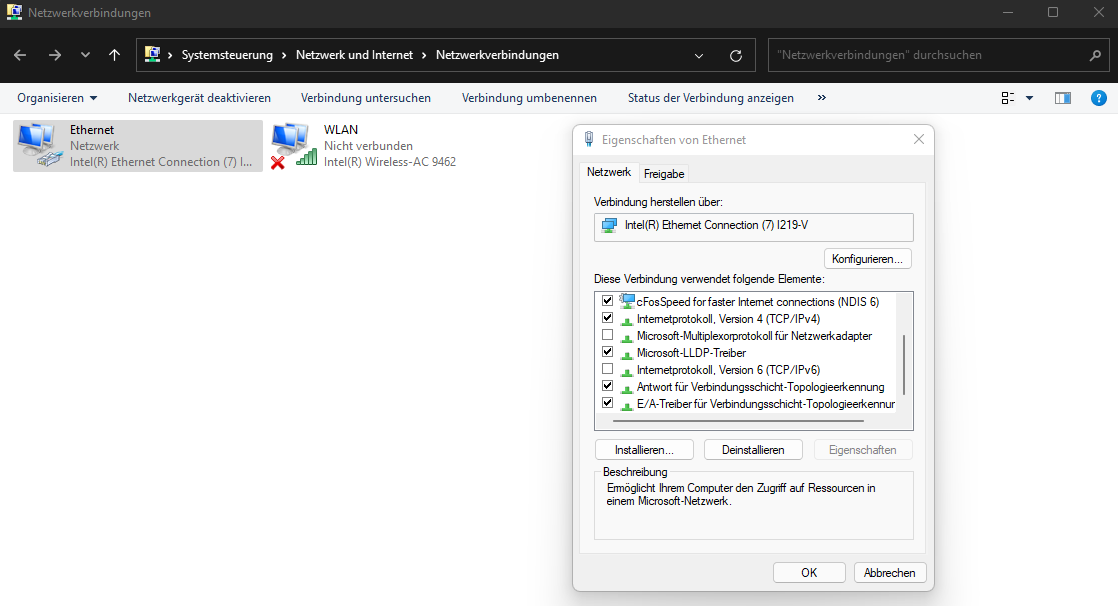
2. Go to control panel -> Network Settings -> Adapter Configuration. I'm german so I'm not sure if the translation is right. This is the path in german:
Systemsteuerung\Netzwerk und Internet\Netzwerkverbindungen
3. Rightclick on the Adapter of your Internet Connection (mine is called "Ethernet") and deactivate "Internet Protocol, Version 6 (TCP/IPv6)".
Snapshot in attachements
I hope that helps most of you. Please let me know if it helped you :-)

ttv_Doom_mw
4 years agoNot applicable
Sadly, no this still didn't work. I however updated my game today and so far stuttering seems to be gone? I do have random crashes while loading into ranked games. On kings canyon ranked it hasn't stuttered consistently like before but its still there some games. Weird stuff
Featured Places

Apex Legends Technical Issues
Having issues with Apex Legends? Join here to find help with connectivity, performance issues, crashes and more.Latest Activity: 14 minutes agoCommunity Highlights
- EA_Blueberry7 years ago
Community Manager