Forum Discussion

29 Replies
Omfg, didnt fix? Jesús Christ....so the only way to play this * game is installing a New Windows , this is ridículous.
- @h0lck I've got the latest windows. Makes no difference.
 LlamaWithKatana5 years agoSeasoned Ace@h0lck that aslo didn't help XD
OMG 7 Days he dont fix this error. EA games .....
 EA_Atic5 years ago
DICE Team
Hey everyone, I hope you are all well!No new update with me today on when it will be fixed, but I have a few questions from our investigations.We have seen a lot of players having older Windows versions experiencing the error, for everyone that is still experiencing the issue could you try to update to the latest windows version preferably 21H1.After you have done that can you start the game and do you get the same error, if you do get the same error where are you getting it? Is it on startup and can you take a screenshot of the error code.Thank you for your patience./AticPraise jeebus a response. Thanks atic
Update windows ay. urgh. Every time I do its bluescreens or the black screen of death.... loathing the thought of a clean install. Guess that's the fun exciting task for tomorrow. *.
ETA: This is the least frustrated I can sound. Pretty annoying hearing this after it worked fine in the beta.
Same error, I cannot play for week, I'm old users more than 10 years with EA, but this is situation truly annoying
I updated windows 10 to windows 11
updated all drivers, reinstalled gpu drivers many times
nothing helps
old driver new driver same problem
So I said earlier I refunded the game, I couldn't cause I had played too long via game pass on steam. So whatever, I tested more. Believe it or not, I made slight progress. Know that I am dealing with the directx errors Device Hung and Device Disconnected, which are not the directx error this thread is about. I just saw a lot of people posting about the hung and disconnected ones too, so I share my progress here.
I tried A LOT of things, at least 25-30 different things. Nothing has made any difference at all, but I have been playing somewhat steadily the last 2 days with my new fix here. It still crashes, but it is rare now. I can play several games in a row usually, whereas I was crashing every 1-5 minutes before. The game was completely unplayable, it is not anymore, though still very problematic.
What I did is annoyingly simple, though I have not seen it mentioned elsewhere. I increased the voltage on my GPU (a standard gtx 2070) by 25, and underclocked it by 185. I used EVGA Precision X1 to do it, but MSI afterburner should be fine too. Why those numbers? Couldn't say. Just tried them out randomly, and they make a very significant difference. I can actually play the game. Probably there are better settings, but I am so tired of trying different things that I just live with it for now. But * this whole situation EA created. I hope this helps someone else, because you know EA isnt gonna help.
@PiksvedYeah, similar on my end. Thought it was working with 90% powerlimit voltage capped to 1,0v - no underclocking. Played around 6 games, no crashes. Then with the same exact settings yesterday -> crashed every match. Had some luck towards the evening when having 90% powerlimit and underclocking by -100mhz. 2 FULL games in and no crashes (yet).. Interesting to see how it plays tonight when I get off work..
Edit: oh and for some odd reason it felt somewhat smoother when having -100mhz.
This has been fixed for me by updating to dev channel on windows 11. And i see now that AMD, has relased a driver that fixes crashing i BF 2042.
Dont know if this is a fix for the DX error but AMD users can try the new driver before updating to dev channel.
- @OX-sypher What dev channel? I'm currently running win11. Some insider preview of an upcoming update or?
@JaGes666 yes, check the picture,its in norwegian but i guess you will find it on your system as well
- @OX-sypher Okay, thanks. Will give this a try tonight
- @JaGes666 no return if you do it,get a rollback image before you update, just incase it brakes something else.
Nvidia has also released a new driver. AMD guy so dont know if it fixes anything
@EA_Atic Hi, I have Windows Server 2019 last Version, have same issue.
I Hope this helps somehow.Yesterday i tried to start a game and guess what? I was able to see MAIN MENU! Game simply let me see main menu for few seconds! It was beautiful. That 3 seconds of seeing that beauty changed my life! Then it crashed without any error. And that made me sad.
Today:
After last "update" of the BF (1.6GB or do), game is freezing at ship screen. Error 2:2600J still persists.
Progress is stable, game is not closing itself without warning, now just freezes. In that pace maybe i will be able to play it next summer?
Latest GPU drivers, W10 21H1 - no new updates in windows update. Every other game, including older BF works just fine.
Platform: PC - Windows 10 and 11 Fresh Installs for Both
AMD or Nvidia Model Number: 3080
CPU: 12700kf
Enter RAM memory size in GB: 8x4 - 32GB DDR4 3600
Are you using any software with an overlay: All disabled
Which part of the game is the issue happening in: Random/In-Game
Please select your region: US
Summarize your bug:
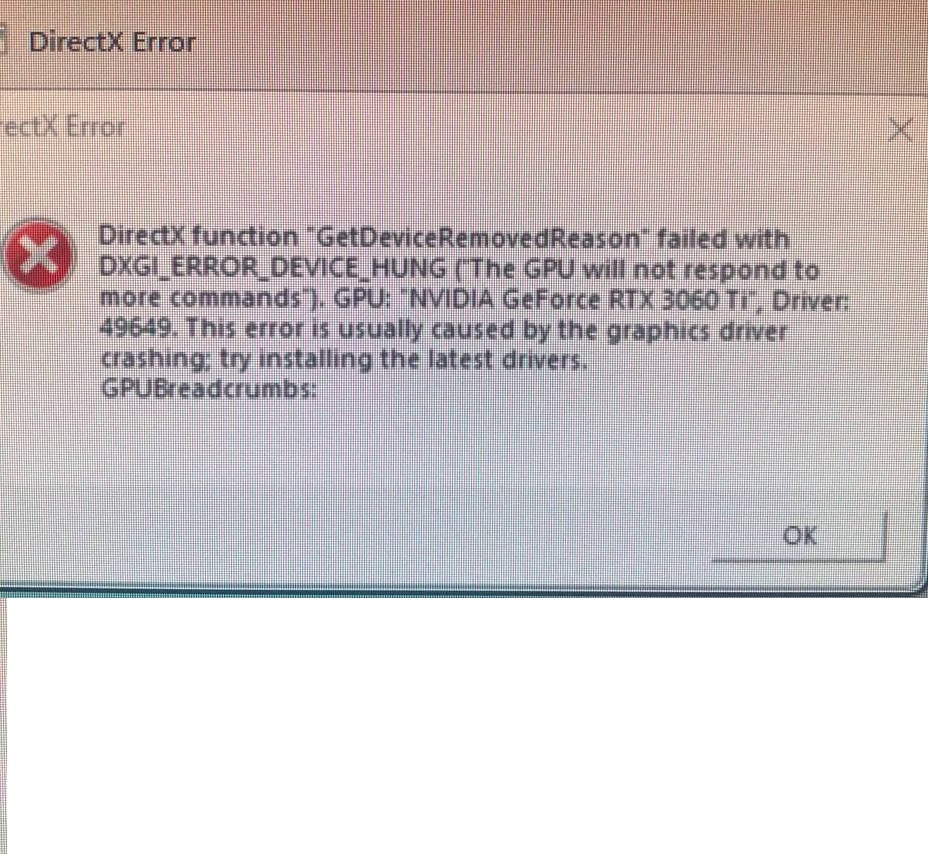
Direct function GetDeviceRemovedReason" failed with DXGI ERROR DEVICE HUNG (The GPU will not respond to more commands*). GPU; NVIDIA GeForce RTX 3080 Driver: 47212. This error is usually caused by the graphics driver crashing try installing the latest drivers.
DirectX function "RenderCore2DebugHandlers.setProcessBreadcrumbsComplet Notify failed with DXGI ERROR DEVICE HUNG (The GRU will not respond to more commands*). GPU: "NVIDIA GeForce RTX 3080 , Driver: 47212. Hang detected by RenderCore2 breadcrumb handler and broadcast to Ret handler. This error is usually caused by the graphics driver crashing, try installing the latest drivers. GPUBreadcrumbs: -_ GPU Stopped somewhere near here . NO ]-Rc1: drawFinalADS
I will attempt to screenshot the error(s) when I next can.
How often does the bug occur: Slowly, then repeatedly until restart of PC
What happens when the bug occurs: The game freezes on the current frame and an error popup appears behind the frozen application. Pressing windows allows me to view, but not click on the error as that places the focus back on the frozen frame. This sometimes requires a forced restart of the entire PC from said frozen frame.
What should be happening instead: The game should not crash
Other Information: I have reinstalled windows, DDU for my drivers, underclocked my ram and GPU, attempted to add TdrDelay and TdrLevel in the registry, varried my ram speeds in bios, and reinstalled the game on two different m.2's
 MTxE_SWINDL3R5 years agoSeasoned Rookie
I cant update my windows 10 past the old version. played the beta no problems. Do I have to buy a new windows 10 or will you guys be offering a fix? @EA_Atic
Machine Id: {2A22D7C2-F0FD-432C-A131-89D7C4F45C94}
Operating System: Windows 10 Home 64-bit (10.0, Build 17763) (17763.rs5_release.180914-1434)
Language: English (Regional Setting: English)
System Manufacturer: Gigabyte Technology Co., Ltd.
System Model: Z87X-UD3H
BIOS: BIOS Date: 08/03/13 07:48:04 Ver: 04.06.05 (type: BIOS)
Processor: Intel(R) Core(TM) i7-4770K CPU @ 3.50GHz (8 CPUs), ~3.5GHz
Memory: 16384MB RAM
Available OS Memory: 16270MB RAM
Page File: 9186MB used, 23468MB available
Windows Dir: C:\WINDOWS
DirectX Version: DirectX 12
DX Setup Parameters: Not found
User DPI Setting: 96 DPI (100 percent)
System DPI Setting: 96 DPI (100 percent)
DWM DPI Scaling: Disabled
Miracast: Available, no HDCP
Microsoft Graphics Hybrid: Not Supported
DxDiag Version: 10.00.17763.0001 64bit UnicodeHi,
Thanks for being here trying helping us.
I'm having this Directx error since the BETA.
Motherboard: Asrock x470 Master SLI (latest BIOS)
Processor: Ryzen 5800X
GPU: EVGA RTX 3080 XC3 Ultra
Windows 10 Pro version 21H1
Latest Nvidia drivers
There isn't a particular moment in which the game crashes.. sometimes it happend in the menu, sometimes when I'm in the middle of the battle and sometimes when I'm alone.
The only thing I noticed is that if I put a limit of 100 fps in the EVGA Precision x1 software I can play longer.
I have tons of crash logs if you need.. just tell me how I can send them to you.
Last thing to say is that the error I get is not always the same.. the one I upload here is just the last I got.
Thanks.
Same problems with me...
Motherboard: MSI MAG Tomahawk X570 (latest BIOS)
Processor: Ryzen 5900X
GPU: Asus ROG Strix 3080ti OC
Windows 11 Home (Clean Install) all updates
Latest Nvidia drivers
- @Strider444555 look at my post and pls tell me if it helps https://answers.ea.com/t5/Technical-Issues/Directx-Error-CreatedCommitResource-Invalid-was-passed-to/m-p/10989748#M6874
@vR4w I do appreciate it but I do not alt-tab out of any game and I only have one display.
Ok, managed to update to 20h1 and yes, I can finally get to the menu. Will try playing a few games now to see how it goes.
Unfortunately, doing this caused the usual problems windows update causes, namely memory management BSOD's. If they continue I am going to have to rollback, which makes this solution... less than ideal.
I suspect you are going to get a lot more people reporting this problem in a similar situation to myself. Perhaps going back to the improved compatibility of the beta is a better idea (and more in line with beta players expectations) than forcing them into this uncomfortable situation. Just a thought.
Please give us an update man. I'm so * sick of it. I can't refund this * game cause I preordered it long ago and I am NOT ABLE TO LAUNCH IT AT ALL CAUSE IT KEEPS GIVING ME THIS ERROR SAYING MY GPU IS NOT PLUGGED IN OR SOMETHING and to UPDATE my drivers need to be updated??? My drivers are the latest version and I have the latest version of windows and I've tried practically everything in this thread besides reinstalling windows AND NO IM NOT REINSTALLING WINDOWS FOR A * GAME AND IT HASN'T EVEN WORKED FOR EVERYONE. I'm literally so tired, I wanna give up on this game so bad but I love BF so much and I really wanna play it and try it out myself but im NOT reinstalling windows or installing win11 for this game. Please fix it. It's one thing for a game to have a buggy release and * performance but if people can't even play it or open it what's the point? the ea play trial worked fine too on the same version of windows... amazing game.


Featured Places