XBOX Elite Series 2 Controller is not working with BF2042 on the PC
Product: Battlefield 2042
Platform:PC
Please specify your platform model. PC
AMD or Nvidia Model Number NVIDIA 2080TI RTX Founders edition
Enter RAM memory size in GB 64GB
Are you using any software with an overlay? No
Which part of the game is the issue happening in? Game Menu
In which game menu were you when the bug occurred? Main
Please select your region Europe
On which server did this happen? All
When did this happen? (dd.mm.yy hh:mm) 18112021 13:25
Summarize your bug My XBOX Elite Series 2 Controller is not working with BF2042 on my PC. It works perfectly with the XBOX Accessories App as well with any other game like COD, Flight Simulator etc. .... I've used a USB cable to connect to the PC and also tried different USB ports. One curious thing is that if I disconnect the controller while in the game main menu, the game freezes and I have ti kill the process in the Task Manager.
How often does the bug occur? Every time (100%)
Steps: How can we find the bug ourselves? You can follow the above I described.
What happens when the bug occurs? The XBOX Elite Series 2 Controller doesn't work with the game via PC.
What should be happening instead? The XBOX Elite Series 2 Controller should work with the game.
My XBOX Elite Series 2 Controller is not working with BF2042 on my PC. It works perfectly with the XBOX Accessories App as well with any other game like COD, Flight Simulator etc. ....
I've used a USB cable to connect to the PC and also tried different USB ports.
One curious thing is that if I disconnect the controller while in the game main menu, the game freezes and I have ti kill the process in the Task Manager.
Hi all.
I was able to find my issue.
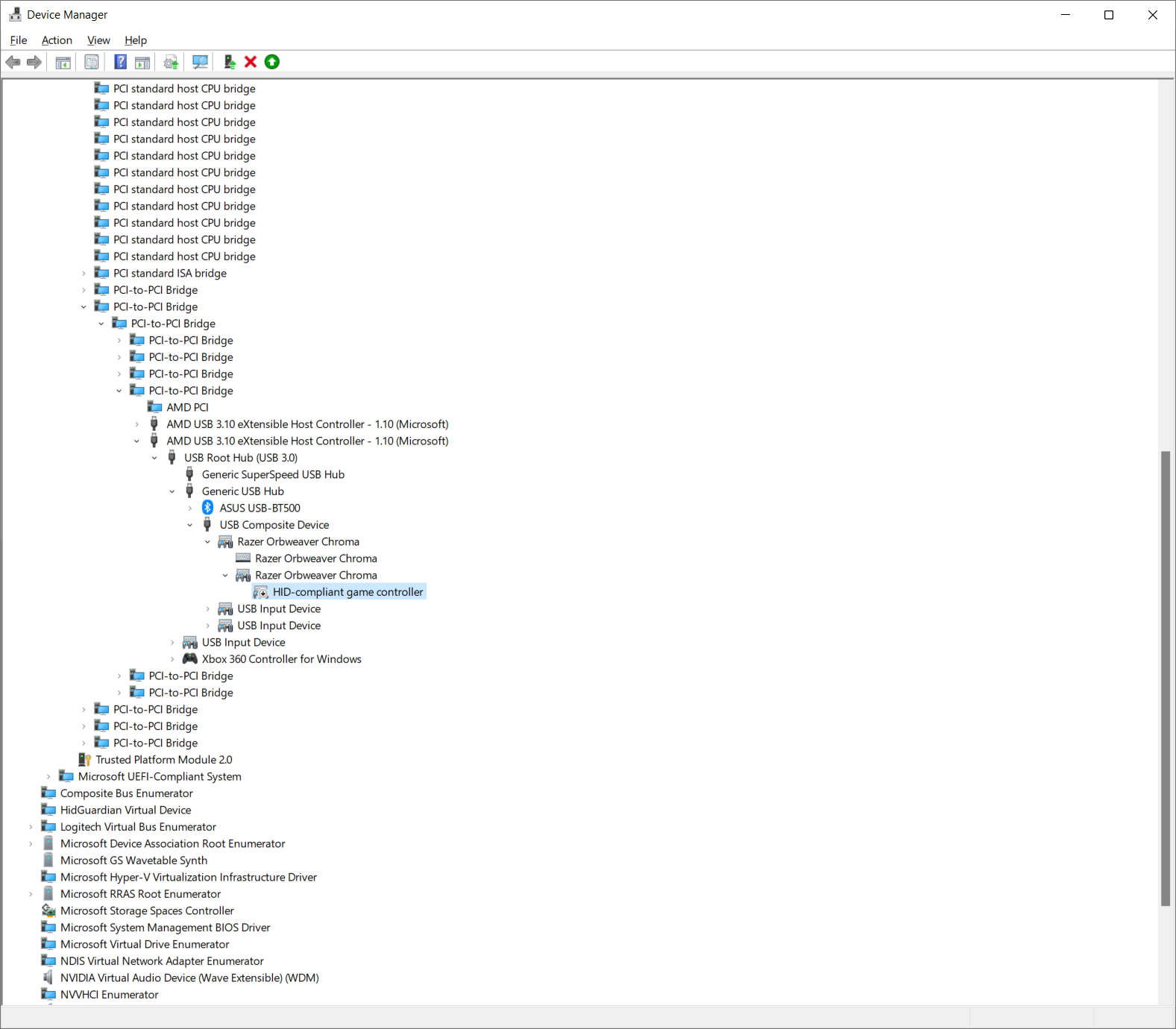
I use a Razer Orbweaver Chroma that actually installs itself as an HID-compliant game controller and this clashes with any Game controller I connect to my PC.
So I found the following article that provides the solution to this:
https://steamcommunity.com/app/235600/discussions/0/846962439253315359/
Step by step:
1. Press Start in your Windows and write down "Device Manager"
2. Go to "View" at the top menu and chose "Device by connection"
3. In my case I followed the below tree menus for the Razer Orbweaver
ACPI x64-based PC -> Microsoft ACPI-Compliant System -> PCI Express Root Complex -> PCI-to-PCI bridge -> PCI-to-PCI bridge -> PCI-to-PCI bridge -> AMD USB 3.10 eXtensible Host Controller - 1.10 (Microsoft) -> USB Root Hub (USB 3.0) -> Generic USB Hub -> USB Composite Device -> Razer Orbweaver Chroma -> Razer Orbweaver Chroma -> HID-compliant game controller
4. Right mouse click the option "HID-compliant game controller" and chose "Disable Device"
Check attached screenshot.
In my case there is a conflict of Game Controllers.
After I took the above steps everything is running smoothly.
I hope this works out well with you guys.
Have a pleasant day.
Regards,
Koi