Forum Discussion

Count_Dooku19's avatar
Count_Dooku19
Seasoned Rookie
1 year ago

Battlefield 6 Wont Launch — EAAntiCheatService and 0xC0000005 Error

Updated on December 25, 2025

When I click Play on Steam, the BF6 splash screen shows up for a few seconds, then the game crashes with no logs or error message. (As seen on the video I attached)

Checking Event Viewer, I see these two errors every time (sometimes just the second one):
EAAntiCheatService
Failed retrieving service path.
&
EAAntiCheatService
The game bf6.exe exited unexpectedly, exit code: 0xC0000005

Sometimes the error does not appear at all, but the behavior is the same.

Steps I have already tried:

  • Validated game files
  • Fully reinstalled Battlefield 6
  • Manually uninstalled and reinstalled EA AntiCheat (including deleting leftover folders and service)
  • Updated GPU drivers
  • Updated motherboard BIOS
  • Added bf6.exe and EAAntiCheatService.exe to Windows Exploit Protection exceptions
  • Disabled Control Flow Guard (CFG) and Mandatory ASLR for bf6.exe
  • Restored NVIDIA global settings to default
  • Disabled NVIDIA and Steam overlays
  • Turned off Smooth Motion and Variable Refresh Rate
  • Moved the game install to a different SSD
  • Tried launching in single-player only
  • Tried launching with WiFi disabled
  • Tried the Storage Spaces fix (removed all active storage pools)
  • Turned XMP off and on
  • Reinstalled DirectX
  • Reinstalled Microsoft Visual C++ Redistributables (x86 and x64)
  • Confirmed Media Foundation is installed (mfplat.dll exists in System32)\
  • Confirmed paging file is enabled and system-managed
  • Disabled Windows Game Mode
  • Disabled Core Isolation / Memory Integrity
  • Disabled virtualization features
  • Adjusted BIOS CPPC settings (CPPC Dynamic Preferred Cores set to Driver)
  • Tested with all overlays and monitoring software disabled

System Specs:
OS: Windows 11
CPU: AMD Ryzen 9 7950X3D
GPU: NVIDIA GeForce RTX 4090
RAM: 64 GB DDR5
Motherboard: ASUS ROG STRIX X670E-A GAMING WIFI (BIOS 3304, 09/19/2025)
Secure Boot: On
TPM 2.0: Enabled

Despite all of this, bf6.exe still never launches or appears in Task Manager. (Only the anti-cheat shows up)
At this point I am out of ideas. Has anyone else seen the same EAAntiCheatService failed retrieving service path error or crash code 0xC0000005?
Any known fix or workaround would be greatly appreciated.


48 Replies

  • BlackGhostBg1017's avatar
    BlackGhostBg1017
    New Rookie
    7 months ago

    Season 2 did not fix the problem, but I found out something ridiculous... Try adding a local account to windows and see if the game launches. I am not kidding when I say that was my fix. I speculate that Javelin does not like the Admin privileges of my default account

  • Aholix1's avatar
    Aholix1
    Newcomer
    4 months ago

    Count_Dooku19​ Did you ever find a solution to this? I've ran into this issue today and have tried everything. Just wanted an update, thanks! 

  • P3wP3w_no_QQ's avatar
    P3wP3w_no_QQ
    Seasoned Rookie
    4 months ago

    I also have this problem, I last played a week and a half ago, then mid last week there was a small ~280MB patch and since then I haven't been able to launch the game. I cannot for the life of me find my way through the support portal to the point where I can log a support request.

  • MagicBonze's avatar
    MagicBonze
    Rising Newcomer
    4 months ago

    I'd like to add some details about my troubleshooting process in case it helps someone else. One day, BF6 suddenly stopped launching. There was no error message at all — after the loading screen finished, it would simply return to the EA app.

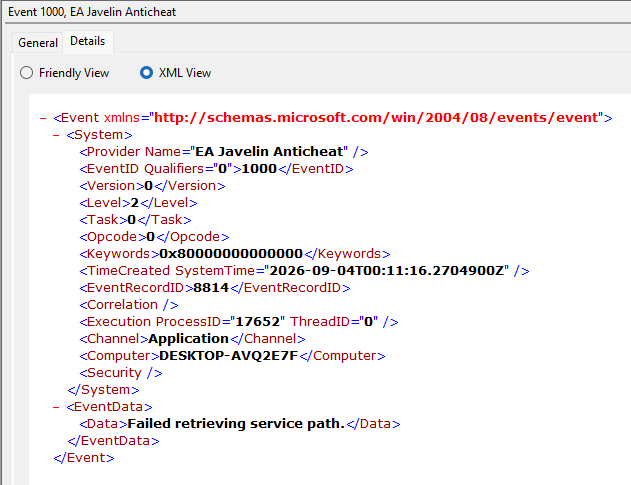
    I highly recommend checking the Windows Event Viewer logs before trying random fixes. If you're seeing the same error shown in Screenshot 1, I first tried uninstalling and reinstalling EA Javelin Anticheat in multiple ways, including:

    Uninstalling it and letting BF6 automatically reinstall it on startup.

    Downloading the installer from EA and running it as Administrator.

    In my case, neither of those steps fixed the issue.

    The important clue in the Event Viewer was:

    Faulting module name: C:\Windows\System32\msvcp140.dll, base: 0x7FFC85A70000

    That suggested the problem was related to the Microsoft Visual C++ runtime rather than the anti-cheat itself.

    Eventually, I found a Reddit post that recommended installing the latest Microsoft Visual C++ Redistributable (VC++ Redist). After downloading and installing the latest version, the game launched normally again.

    https://learn.microsoft.com/en-us/cpp/windows/latest-supported-vc-redist?view=msvc-170

    https://www.reddit.com/r/Battlefield6/comments/1o3epj3/solution_if_the_game_silently_crashes_after_the/

    Hopefully this helps someone else. Thanks again for pointing me in the right direction!

  • Guys, I just solved this problem in a really stupid way. I tried everything—CMD, BIOS, tweaking every possible setting—but for days, the game would just launch to a black screen and then shut down without an error message. WELL, I have an AMD graphics card; I have no idea what the hell happened since I hadn't changed anything, but I just switched the game setting to "Quality Preset," and it launched normally. I'm really happy, but I also feel like an idiot.

  • Count_Dooku19's avatar
    Count_Dooku19
    Seasoned Rookie
    2 months ago

    Sorry for the late reply, haven't opened the forums in a long time. I did not find a solution, but the game did "magically" work for me. At around early/midway through season 3, I just randomly decided to try launching the game and was surprised it worked. From then and to this day, I've had no issues. 

    It could be that I've done something to make it work, but honestly, I can't recall doing anything that would have fixed it. Did your game work before at a certain point? Because mine didn't work from launch until season 3, and I'm 100% sure the issue was the EA Anti Cheat. 

  • I'm getting the same error.  Was able to play Wednesday - shut down for the night, came back yesterday (thursday Sept. 2nd) and got this error and tried all the tghings I read and what AI said and I get this in the logs

    "ExitType: 0xA447588E598D404B"

    "Failed retrieving service path.

    It's like it can't find it's own EAAntiCheat.sys file or whatever, but I also read that the file is kept secure by the anti chat software

    I have downlaoded the installer frrom EA's website, no luck


    I have this isue with Batgtlefield 6.  Was able to play since launch with no isues until now.

    Tested with the most recent preview Windows 11 update just in case, didn't work so I rolled back.

    All files are clean - no corruptions

    GPT partition (no dual boot)

    Secure Boot Enabled

    UEFI boot

    CSM disabled

    TPM 2.0 with it's updated firmware

    NOTHING IS WORKING!

  • I ran into this problem after the release of Season 5; I resolved it by reinstalling the Microsoft Visual C++ Runtime (the latest Visual C++ Redistributable package). 

Featured Places

Node avatar for Battlefield 6 Technical Issues

Battlefield 6 Technical Issues

Having issues with Battlefield 6? Join here to find help with connectivity, performance issues, crashes and more.Latest Activity: 6 minutes ago
9,979 Posts