Forum Discussion

PerkyflyNCE's avatar
PerkyflyNCE
New Adventurer
2 months ago

BF Update 1.2.3.5 Not Applied – CDN Delivery Failure (Investigation Requested)

Dear EA Support / EA Forum Team,

I am reporting a critical failure in the delivery and application of BF Update Version 1.2.3.5 (May 5, 2026).

This issue appears to be caused by a CDN/server-side problem and cannot be resolved on the client side. Given the nature of the behavior, there is a risk that this may affect other users depending on routing or server allocation.

Incident Details

Start Time: Around 20:00 JST, May 5, 2026
Server Observed: 184.27.185.77 (Akamai Technologies, Inc.)

Key Symptoms

・ Download speed remained abnormally low (below 1 Mbps throughout).
・ Download progress behaved inconsistently and appeared to skip incomplete segments.
・ Connection repeatedly stalled and resumed during the process.
・ Update process completed unusually fast (~30 minutes), inconsistent with actual data transfer.
Application launches, but update is not applied (version remains 1.2.3.0).
“Repair” does not correct the version; “Modify” is unavailable (grayed out).
・ Post-Update Abnormal Behavior (Potentially Related)
・ Severe inconsistencies in gameplay (eliminations from implausible positions).
・ Repeated rapid eliminations by the same opponent.
・ Spawn placement in immediate high-risk enemy zones.
・ Persistent abnormal performance compared to pre-update conditions.

Assessment

This strongly suggests that the update payload was not properly delivered or applied, despite the client reporting completion. The behavior is consistent with incomplete or corrupted CDN delivery.

Since other users appear to have successfully updated, this may indicate a partial distribution failure affecting specific CDN nodes or routing paths.

Request for Immediate Action

・ Verify integrity and delivery status of Update 1.2.3.5 across CDN nodes.
・ Investigate the behavior of server 184.27.185.77 and related routing paths.
・ Provide a method to correctly reapply the update without requiring full reinstallation.
・ Confirm whether similar cases are being reported.

This issue is not recoverable from the client side and may impact additional users if not addressed.
I monitored the network behavior during the update process (connection interruptions, server endpoint, and transfer patterns) and can provide detailed observations if needed.

I would greatly appreciate your urgent investigation.

Sincerely,

3 Replies

  • [UPDATE - 06MAY2026]

    ADDITIONAL CRITICAL DATA: Update 1.2.3.5 Failure and Network Hardware Freezing

    Following my previous report, I have identified a recurring pattern that confirms the severity of this delivery issue. Every time this specific update fails, it leads to a complete loss of internet connectivity that can only be recovered by a physical power cycle (unplugging/replugging) of the router.

    Technical Observations on Network Failure:

    • TCP Session Exhaustion: During the download from server 184.27.185.77, the application appears to trigger an abnormal number of simultaneous connection requests or repeated TCP RST (Reset) flags.
    • Hardware Hang (Router): The frequency of "Start/Stop" cycles during the download overwhelms the router's NAT session table, leading to a complete hardware freeze. This is not a typical ISP drop; it is a direct result of the malformed or interrupted data stream from the CDN.
    • Silent Corruption: Because the router hangs mid-process, the client launcher "times out" and incorrectly flags the update as "Complete" upon reconnection, even though the internal version hash remains 1.2.3.0.


    Updated Request for Technical Team:

    1. Investigate Payload Integrity: Please check if the delta-patch for 1.2.3.5 on the Akamai node 184.27.185.77 has a corrupted manifest file.
    2. Retry Logic: Review the client's retry logic. If the connection is lost/reset repeatedly, the client should hard-fail with an error code rather than falsely reporting a successful update.
    3. Manual Hash Verification: Provide a way for users to force a byte-by-byte integrity check that bypasses the local cached manifest.


    Kind regards,

  • PerkyflyNCE's avatar
    PerkyflyNCE
    New Adventurer
    2 months ago

    Subject: CRITICAL UPDATE - Forensic Recovery Success and Evidence of Persistent Storage Corruption via CDN Infrastructure

    I am providing a critical update regarding the catastrophic storage failure previously mentioned. I have successfully performed a deep forensic recovery on the volume that was rendered "RAW" and unmountable during interaction with EA’s deployment infrastructure.

    Evidence of Recovery (The "Smoking Gun"):

    Using PhotoRec in a Linux environment, I bypassed the corrupted Windows file system and successfully rescued 504 files directly from the sector level. This confirms that the data was physically present, but the Partition Table and File System Headers were systematically corrupted/overwritten by the network-driven process (Akamai CDN socket activity).

    Clarification on Incident Timeline and Scope:

    It is important to clarify that this "RAW conversion" incident first manifested in early April while preparing a backup for Version 1.2.3.0. This indicates that the interference from Akamai EA’s delivery system is not a one-time glitch with update 1.2.3.5 but a persistent, recurring threat that has become increasingly sophisticated and difficult to detect through standard OS monitoring.

    Technical Assessment of "Invisibilized" Interference:

    In previous years, CDN-related interference was identifiable via palpable system lag.

    However, current delivery protocols have evolved; the interference now bypasses user perception while directly impacting hardware integrity at the driver and controller level. The fact that a "Repair" or "Update" trigger can instantaneously render a secondary storage volume as "Unallocated" on Windows is a severe breach of system safety.

    Formal Demand for Technical Review:

    The successful forensic recovery of my data proves that your software and CDN interaction is damaging the logical structure of user hardware. I am documenting this as a "Critical Infrastructure Bug."

    Request 1:  Explain how your CDN handler manages socket connections to local storage during "Repair" and "Backup" validation.

    Request 2:  Address why the EA app triggers high-frequency TCP RST flags that coincide with partition table corruption.

    A standard game update should never require a user to resort to Linux-based forensic tools to protect their hardware from being wiped. I expect a response that goes beyond "clear your cache."

    Soon, I'll attempt to fix the Battlefield 6 application V.1.2.3.5 package volume, which Akamai has modified to alter the integrity of the file system.

    Kind regards,

  • PerkyflyNCE's avatar
    PerkyflyNCE
    New Adventurer
    2 months ago

    Subject: CRITICAL: Verified Update Failure of BF6 v1.2.3.5 – Exhaustive Technical Troubleshooting Report & CDN Discrepancy (Ref: Server 184.27.185.77)

    Dear EA Support Team / Community Managers,

    I am submitting a formal report regarding the persistent failure of the Battlefield 6 Season 2 Update (v1.2.3.5). Despite 72 hours of rigorous, multi-stage troubleshooting and forensic-level verification, the update remains unapplied due to what is clearly a catastrophic failure in your CDN (Akamai) delivery logic.

    Below is the chronological log of my investigation and the evidence of delivery corruption:

    I. Environment & Initial Clean-Slate Protocol

    Storage Isolation: Formatted and initialized a dedicated 250GB SSD volume specifically for the BF6 v1.2.3.0 baseline.

    Baseline Restore: Reinstalled the v1.2.3.0 package from a verified local backup.

    II. Update Execution & Observed Server Anomalies

    The Trigger (May 6, 14:30 JST): Initiated the v1.2.3.5 update via Akamai server 184.27.185.77.

    Looping Logic Error: The EA App repeatedly displayed "Update 100% Complete" every few minutes, yet failed to finalize. I was forced to manually restart the process four times. During these attempts, the route shifted to server 104.18.9.118.

    Repair Mode Failure: Switched to the "Repair" function (handled by 184.27.185.78). Transfer speeds were throttled to an abysmal 1 Mbps, despite my network being capable of high-speed throughput.

    III. Definitive Evidence of Version Mismatch

    Despite the EA Launcher reporting a "Successful Installation," the application remains stuck in the past:

    Actual Version: 1.2.3.0 (Data/Code: 27.753.786).

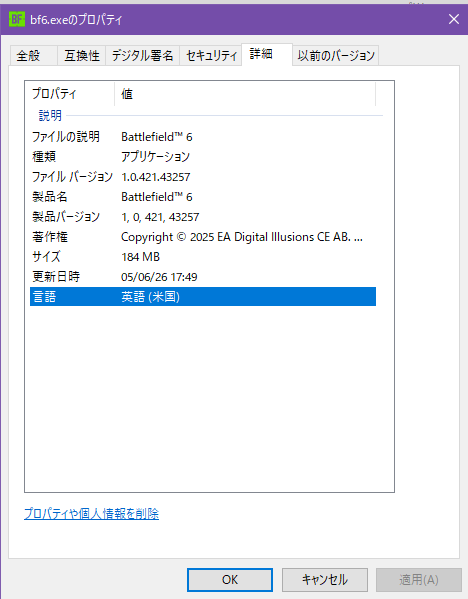
    Executable Analysis: bf6.exe product version is 1.0.421.43257.

    Digital Signature Timestamp: April 26, 2026 (Pre-dating the May 5th update release).

    Fresh Install Test: Even after a full 12-hour "clean install" from scratch, the CDN continues to push the old v1.2.3.0 binaries while labeling them as v1.2.3.5.

    IV. Impact Assessment

    Time Loss: 72 hours of exhaustive troubleshooting.

    Infrastructure Failure: The Akamai CDN nodes assigned to the Japan/Asia region appear to be serving stale or mislabeled manifests.

    Community Scaling: Similar reports are surfacing on Reddit and other forums. If EA has silently suspended the update, the lack of official communication is causing users to subject their hardware to unnecessary stress and data-writing cycles.

    Formal Request:

    Acknowledge Manifest Desync: Investigate why Akamai nodes (specifically 184.27.185.77) are delivering v1.2.3.0 payloads under the v1.2.3.5 header.

    Forced Sync Method: Provide a workaround to force a byte-by-byte integrity check that bypasses the current faulty CDN cache.

    Official Status Update: Confirm if Update 1.2.3.5 has been pulled or if this is a localized regional CDN failure.

    It is unacceptable that a professional software deployment relies on a CDN infrastructure that "normalizes" such high-level delivery corruption. I expect a technical response that addresses these specific server-side discrepancies.

    Sincerely,

    Enclosures: bf6.exe_property-General.PNG, bf6.exe_property-DigitalSignature.PNG, bf6.exe_property-Details.PNG

Featured Places

Node avatar for Battlefield 6 Technical Issues

Battlefield 6 Technical Issues

Having issues with Battlefield 6? Join here to find help with connectivity, performance issues, crashes and more.Latest Activity: 2 hours ago
8,603 Posts