Black screen after splash, shuts down...

Battlefield Attempts to play
Currently have on EA App.
All issue's consist on both Steam and EA App. (Refunded on Steam, now own on EA App)
What I've Done.
-Verified/Reinstalled game(Both Steam and EA App.)
-Storage Pool, was never a thing enabled.
-TPM is 2.0
-Drivers, updated
-Windows 11, updated
-Tried with Firewall Down.
-Tried repairing/reinstalling Anti-Cheat(still believe its the Anti-cheats fault)
-Have Restarted my PC multiple times.
-Ran all as Administrator (EA App, Anti-Cheat, Battlefront Exe.)
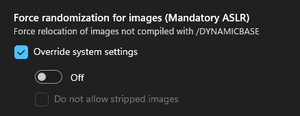
-Modified Exploit Protection to all being option Off for Battlefield Exe.
-Attempted launching with Wi-Fi off.
-System Requirements all meet the minimum.
-Secure Boot is on.
=========================
I do not know what issue I am facing that everything I'm seeing from others work but with me they do not. I'm at a loss on what I can do more so if anyone has any suggestions I'd love to hear!

leokatu look in Windows Event Viewer for BF6 or EA anti-cheat errors after the game closes.
As far as I can see through the Events viewer and I don't see anything big. Beyond that with EA Jav, I can't find the spot for crashes but from what I've looked into I don't think its causing it.. So yeah I can cross off the Anti-cheat as the reason. Though that leaves a mystery to me.