"Connection Failed" With Error Code 1:86001S:51002S:57019S
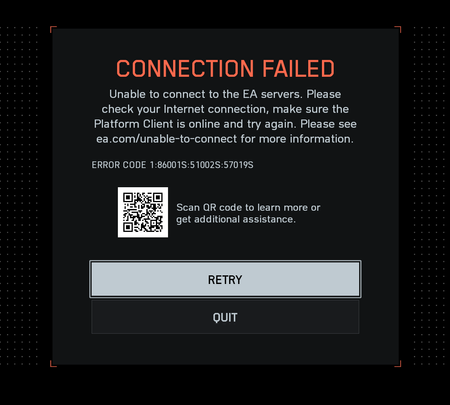

I tried everything I could find on Steam/EA forums:
- another connection (phone)
- uninstalling ea app
- checking game files
- disabling anti-virus (windows defender)
- disconnect every usb devices
Did anyone with this error code managed to make it work ? It was working in the open beta...

Same (but Steam version). Nothing worked for now.

You're not alone. Have you tried using an ethernet cable, if you're using wifi? That got me past that problem just now. Still can't find a match though.
Edit: nvm, restarted and it's back to the issue... Another embarrassing release I guess...
I'm on ethernet, did try to use my phone in hotspot mode but literally had the same error code sadly
I'm on Steam too (I don't think I can edit the post to make it clear)

Same, steam or EA both doesn't work.
DNS, Clear cash, nothing helped
Same here. Did reinstall the game three times and tried everything like you guys told. I got it work if I use my hotspot from my handy. But I don´t play with my handy connection....
But looks like I am not alone here.
For me it worked if I play with WLAN. LAN network does not work. You can even use the WLAN network from your router where you are connected with LAN.
Just tried that but got the same issue
I'll try that later, thanks !
Hello guys, I have the same issue as you all. I am trying to solve this issue by myself 6 hours strait but unfortunately nothing worked still in connection error (cannot connect to game server thingy). So still waiting for a solution from EA. And must say that I am very disappointed. It is not an ordinary bug or issue that can be ignored by players. Even who pre-ordered it same as me. Very disappointing events occurred.
Did you disable your LAN network? Just WLAN must be active.

Also have this issue, ive tried all the solutions people have offered (usb connections, opening ports, disabling overlays and running as admin, restarting pc/steam/ea/router, etc) and i still am unable to make it into the queue due to this error code. Spent a total of 2 hours retrying already to no avail. Hopefully this is fixed sometime soon...