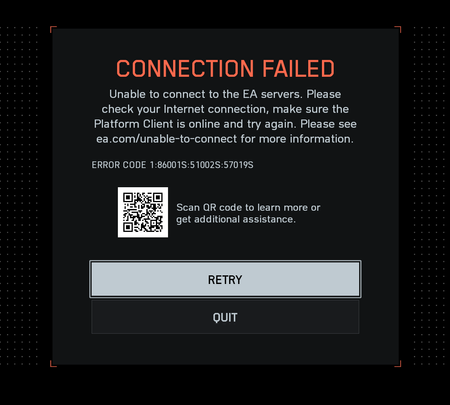
Here’s what I’ve already tried so far:
- Cleared EA App cache from %ProgramData%\EA Desktop and %AppData%\Local\Electronic Arts.
- Repaired the game and EA App from both Steam and EA launcher.
- Flushed DNS and renewed IP lease – switched DNS to Google (8.8.8.8 / 1.1.1.1).
- Verified network ports – opened UDP 3659, 14000–14016, 22990–23006 and TCP 80, 443.
- Disabled Firewall and antivirus temporarily to test connectivity.
- Repaired Easy Anti-Cheat (EAC) and restarted Windows.
- Unlinked and relinked Steam ↔ EA account to generate a new OAuth token.
- Tested both IPv4 and IPv6 connections (IPv6 enabled on Windows and router).
- Tried Wi-Fi connection instead of LAN (some users report LAN causes handshake failure).
- Tested Cloudflare WARP (same result – connection still fails).
My connection is stable — I can ping and traceroute easo.ea.com with no packet loss (average 112ms).
Everything on my end seems fine; this looks like a backend or protocol-handshake issue between EA App and Steam builds.