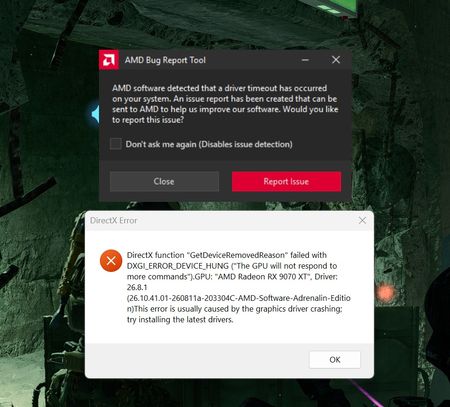
Since I can get ZERO help or interaction from a human on my need for technical support on this issue and I am always redirected to post on the forums by AI chatbot or the "self-help" support, here I ...
I have only 16gb of ram, set my VM to match it just incase it needs it. Could try the 16-16000 got nothing to lose at this point.
Weird thing i used to have with my 6700 xt under device manager - display adapter - update driver - Browse my computer - Let me pick.
I had two AMD options available to me. One recognized and worked with the drivers for gaming, the other didn't.. It wanted some other AMD graphics drivers that had a blue icon for software when it normally has a red icon. I changed them around and got it working properly on the adrenaline with a red icon.
Random other thing in device manager is disabling the high precision event timer, apparently that helps with games.
Could be something dumb with a default power setting in windows, i think some of them mess around with x3d chips. If the pcie link powerstate is enabled that can cause the odd latency hiccup so mines off for that reason.
You mentioned one display going black, have you changed leads over, used a different port..?
Other than that i'm all out of ideas my dude, I gather you've tried Reddit?
I have been all over the web searching for fixes; Reddit, Steam Forums, EA forums etc. I try to research my issue and do the trial-n-error before asking for help..
The screen only goes black when it is a DirectX BF6 crash. Then I have to use the Windows Key+Shift+P then 'Extend' to get it back, otherwise it remains black. No other games do this, only BF6 which brings us back to the same problem. The problem has to be from EA's/BF6's end because if none of these attampts have fixed it.. I do not know what else will. But I would love to have an actual EA Representative to respond incase I missed something..
Having issues with Battlefield 6? Join here to find help with connectivity, performance issues, crashes and more.Latest Activity: 40 minutes ago9,932 Posts