Nightfall update broke Aspect Ratio Scaling
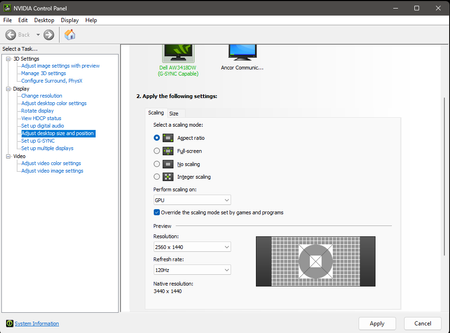

v27v wrote:I normally run at 2560x1440 for BF6 since my GPU chokes on ultrawide.
It's far better to set the desktop resolution to display's native resolution, while enabling upscaling. Here are my settings, though I use a Discrete GPU manufactured by a different OEM:
Graphics -> Advanced -> Fixed Resolution Scale: 100
Graphics -> Advanced -> Frame Rate Limiter - In Game: On
Graphics -> Advanced -> Frame Rate Limit - In Game: 30
Graphics -> Advanced -> Frame Rate Limiter - In Menu: On
Graphics -> Advanced -> Frame Rate Limit - In Menu: 30
Graphics -> Advanced -> Frame Rate Limiter - In Background: On
Graphics -> Advanced -> Frame Rate Limit - In Background: 30
Graphics -> Advanced -> Dynamic Resolution Scale: Off
Graphics -> Advanced -> AMD Anti Lag: Disabled

NOTE: Enable the Performance Overlay and set it to "Extra" to adjust the resolution scale based on the native resolution of the display itself.

Graphics -> Advanced -> Upscaling Technique: FSR
Graphics -> Advanced -> Upscaling Quality: Balanced ( 1.7x ) or Performance ( 2.0x )
Graphics -> Advanced -> AMD FSR Frame Generation: Off
Graphics -> Advanced -> Future Frame Rendering: Off

Graphics -> Graphics Quality Settings -> Texture Quality: High
Graphics -> Graphics Quality Settings -> Texture Filtering: Low
Graphics -> Graphics Quality Settings -> Mesh Quality: Medium
Graphics -> Graphics Quality Settings -> Terrain Quality: Low
Graphics -> Graphics Quality Settings -> Undergrowth Quality: Low
Graphics -> Graphics Quality Settings -> Effects Quality: Low
Graphics -> Graphics Quality Settings -> Volumetric Quality: Low
Graphics -> Graphics Quality Settings -> Lighting Quality: Low
Graphics -> Graphics Quality Settings -> Local Light & Shadow Quality: Low
Graphics -> Graphics Quality Settings -> Sun Shadow Quality: Low
Graphics -> Graphics Quality Settings -> Shadow Filtering: PCF
Graphics -> Graphics Quality Settings -> Reflection Quality: Low
Graphics -> Graphics Quality Settings -> Screen Space Reflections: Low
Graphics -> Graphics Quality Settings -> Post Process Quality: Low
Graphics -> Graphics Quality Settings -> Screen Space AO & GI: Off

AMD Software꞉ Adrenalin Edition -> Performance -> Tuning (WattMan) -> Global Tuning -> GPU -> GPU Tuning -> Enabled
AMD Software꞉ Adrenalin Edition -> Performance -> Tuning (WattMan) -> Global Tuning -> GPU -> GPU Tuning -> Advanced Control -> Disabled
AMD Software꞉ Adrenalin Edition -> Performance -> Tuning (WattMan) -> Global Tuning -> GPU -> GPU Tuning -> Min Frequency (%) -> 0
AMD Software꞉ Adrenalin Edition -> Performance -> Tuning (WattMan) -> Global Tuning -> GPU -> GPU Tuning -> Max Frequency (%) -> 45
AMD Software꞉ Adrenalin Edition -> Performance -> Tuning (WattMan) -> Global Tuning -> GPU -> Fan Tuning -> Enabled
AMD Software꞉ Adrenalin Edition -> Performance -> Tuning (WattMan) -> Global Tuning -> GPU -> Fan Tuning -> Zero RPM -> Disabled
AMD Software꞉ Adrenalin Edition -> Performance -> Tuning (WattMan) -> Global Tuning -> GPU -> Fan Tuning -> Advanced Control -> Disabled
Is anyone at EA even aware this is going on? Do these forums get checked?