Forum Discussion

uhnonemus's avatar
uhnonemus
Seasoned Newcomer
2 days ago

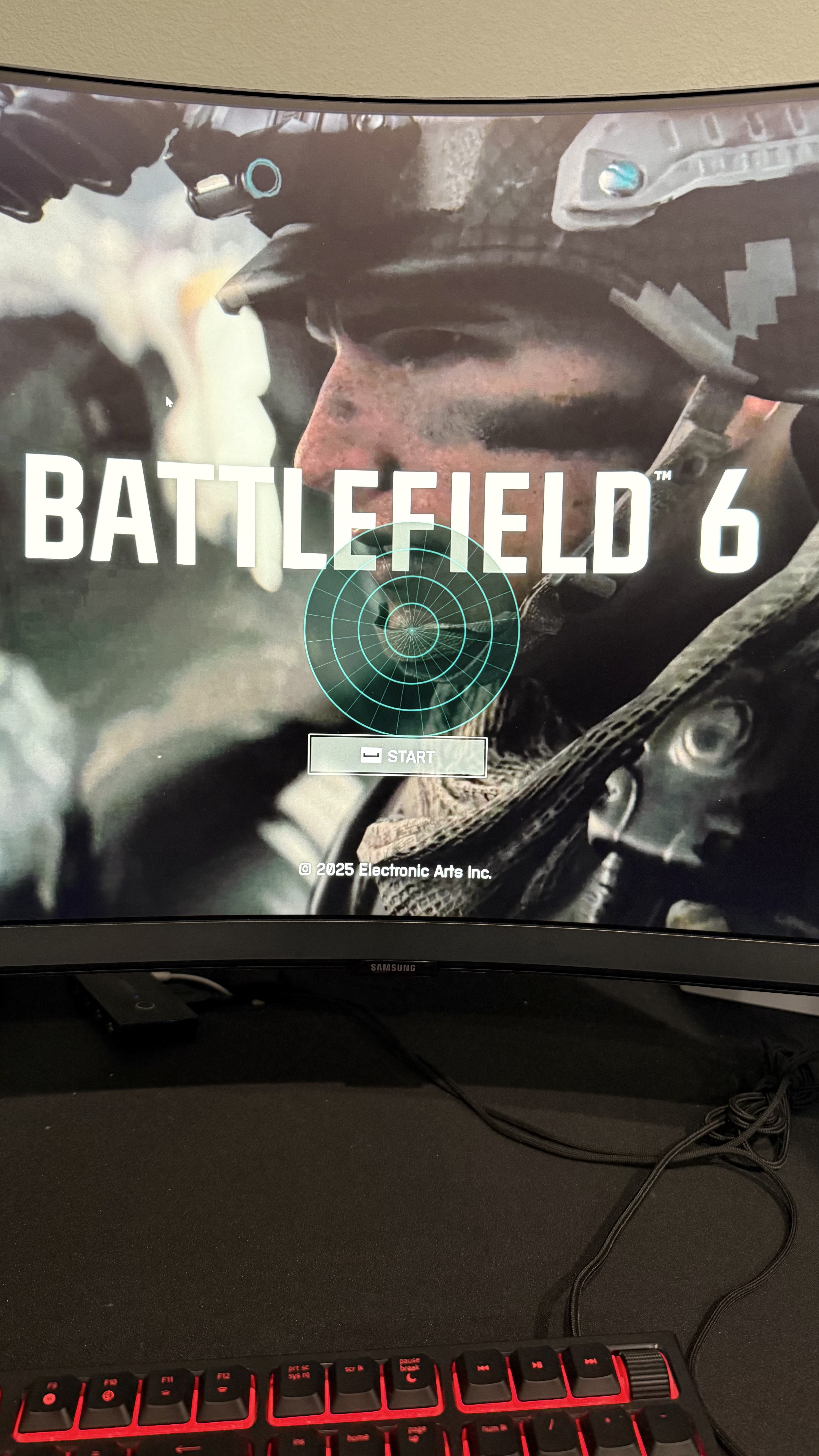
What is this circle?

Hi so lately, this past week, I’ve been having this weird circle pop up on the game. Stays in the game itself when windowed borderless or fullscreen. Doesn’t show when I minimize battlefield and hover over it when it’s docked. What is this from? I remember it went away a few days ago not sure how but it had something to do with my refresh rate possibly? Anyways, I just want to play BF6 but this is such a PITA I can’t until I get this fixed. Help someone! Thank you. 
7 Replies

  • Hi, this looks like the sound tracker of Nahimic software. Check if you have Nahimic installed and the Sound Tracker is enabled.

  • BrekMarb's avatar
    BrekMarb
    Rising Scout
    1 day ago

    It looks like some kind of sound radar for games...

  • uhnonemus's avatar
    uhnonemus
    Seasoned Newcomer
    1 day ago

    Anyone else have any other possibility as to what it could be?

  • uhnonemus's avatar
    uhnonemus
    Seasoned Newcomer
    2 days ago

    Just have the one. It’s a Samsung odyssey G8. At first I thought the colors looked like it was related to that but I have no clue if that’s case since it only shows on the windowed, full screen or borderless versions of the game itself and nowhere else. 

  • Mexicola9302's avatar
    Mexicola9302
    Seasoned Hotshot
    2 days ago

    If you have multiple monitors, try to turn all off except the one you play with.

  • uhnonemus's avatar
    uhnonemus
    Seasoned Newcomer
    2 days ago

    Done this already minus the remove the shaders thing. I’ve checked all in game settings toggling each one and nothing seems to be the cause. :( verified integrity of files and that came back good. 

  • Mexicola9302's avatar
    Mexicola9302
    Seasoned Hotshot
    2 days ago

    It could be anything, it looks like a sort of thing for handicapped people or something. I would check the Accessibility menu and look for the markers that show if you changed something on the left side. It always shows if you set it to anything other than default.

    Else I don't know, you could try to verify the game files in Steam or use Display Driver Uninstaller to remove the Shaders, so they can be compiled again, maybe that helps who knows.

Featured Places

Node avatar for Battlefield 6 Technical Issues

Battlefield 6 Technical Issues

Having issues with Battlefield 6? Join here to find help with connectivity, performance issues, crashes and more.Latest Activity: 20 minutes ago
6,133 Posts