Forum Discussion


axdog2007p
3 years agoNot applicable
@gksvr1 Thanks for trying to help but i didn't work just a different error came up
ActivationUI.exe - application error
"The application was unable to start correctly (0xc000007b). Click ok to close the application"
Ant other fixes ??

gksvr1
3 years agoNot applicable
Hi @axdog2007p,
This error code indicates that there is something corrupted within your Windows files. You have to run the System File Checker tool to repair it. Please follow these steps:
- Run CMD as administrator and type this command "sfc /scannow".
- Press Enter and wait for the process to finish.
- Once the process is complete, type this command "Dism /Online /Cleanup-Image /RestoreHealth" and press Enter.
NOTE: Restart your PC once the processes are complete.
Now uninstall every Microsoft Visual C++ (2005-2022).
Go to Control Panel > Programs > Programs and Features.
Use "Search" (top-right corner) and type 'Visual' then uninstall every Microsoft Visual C++ 20XX
- Download Microsoft Visual C++ 20XX then install.
- Go to game files and install redist installers (x64 + x86). You can find it in this path
Battlefield 1\__Installer\vc\vc2013\redist
NOTE: Restart your PC once the processes are complete.
Things to note:
- It worth to install .NET Framework 4.8. If it's already installed, repair the .NET Framework.
- Make sure your hardware drivers are updated.
- Update DirectX.
- axdog2007p3 years agoNot applicable
@gksvr1 Hey mate i did all of the fixes but none have worked, i also tried to play titanfall2 and its the same for it to.
any other fixes for this issue
Cheers
- gksvr13 years agoNot applicable
@axdog2007p, I have gathered these possible solutions under the spoiler tag, hopefully one of them may fix the issue you are facing.
.NET Framework is disabled by default in Windows 10.
SpoilerTo enable .NET Framework in Windows 10, follow these steps:- Go to Control Panel > Uninstall a program > Turn Windows features on or off.
- Expand and check any .NET Framework you see.
- Reinstall Latest Supported Visual C++ Redistributable.
- Go to game folder and install/repair both redist installers (x86 & x64).
Battlefield 1\__Installer\vc\vc2013\redistvcredist_x64.exe
Battlefield 1\__Installer\vc\vc2013\redistvcredist_x86.exe
Things to note:
◉ Run installers as administrator.
◉ If you get the message that the file is already installed, select Repair instead.
◉ Restart your PC after installation.
Once the installation is complete, the game should be working fine.Scan your hard drives for errors and corrupted files.
Spoiler- Open File Explorer and Go to This PC.
- Right-click on your C Drive and select Properties from the menu.
- Select the Tools tab. Under the “Error checking” section, click on the Check button.
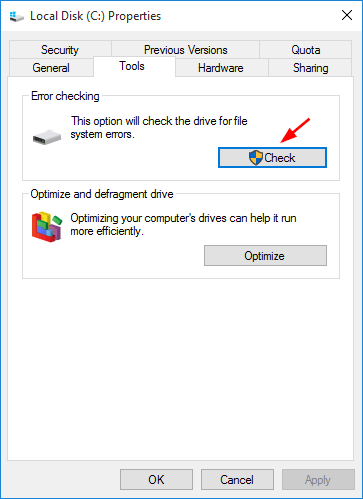
NOTE: Do this for all hard drives that has Windows, Steam and the game installed.Windows error pointing to an issue with your system.
SpoilerTry a clean boot to see if it helps: https://help.ea.com/en-us/help/faq/how-to-clean-boot-your-pc/If your VC++ is fully installed and up to date, then I would recommend the steps suggested in this Microsoft help thread: https://answers.microsoft.com/en-us/windows/forum/all/windows-error-0xc000007b/3933c823-7a63-4356-8ef5-69fcc0ed18f3
If none of the provided solutions worked for you, then there is not much I could help you with apart from saying report it as a bug.
 TheWhiteWolfOma3 years agoNot applicable
@axdog2007p wrote:@gksvr1 Hey mate i did all of the fixes but none have worked, i also tried to play titanfall2 and its the same for it to.
any other fixes for this issue
Cheers
Hi, is it working right now?
 Anoobis100prc2 years agoNot applicable@TheWhiteWolfOmar Is it the 0xc000007b for you too? Cause if you ever found a solution, I'd love to hear about it.
Featured Places






