Forum Discussion

robPhenom's avatar
5 years ago

EA Desktop does not open - "The application was unable to start correctly"

Product: EA Desktop
Platform:PC
Error Report ID (learn how to create an Error Report ID in the sticky post) f6794948-0033-40aa-9beb-a34a73298651
Which client functionality are you experiencing this bug with? Other (Please Describe)
Please describe Application Launch
When did this happen? (dd.mm.yy hh:mm) 15.10.20 20:05
Summarize your bug Can install EA Desktop but when I try to start it, I always get the "The application was unable to start correctly" error message. Tried a reinstall but that didn't change anything.
How often does the bug occur? Every time (100%)
Steps: How can we find the bug ourselves? Install EA Desktop, open EA Desktop
What happens when the bug occurs? Error message "The application was unable to start correctly"
What do you expect to see? open application "EA Desktop"

Can install EA Desktop but when I try to start it, I always get the "The application was unable to start correctly" error message. Tried a reinstall but that didn't change anything. Windows 10  Pro 2004 x64

7 Replies

  • I also have an issue with EA Desktop and it started today with a new update to it.

    Seems like the issue for me is EABackgroundService.

    Faulting application name: EABackgroundService.exe, version: 12.0.16.4019, time stamp: 0x5f7e3af2
    Faulting module name: ucrtbase.dll, version: 10.0.19041.488, time stamp: 0x0d8057d8
    Exception code: 0xc0000409
    Fault offset: 0x000000000007287e
    Faulting process id: 0xca8
    Faulting application start time: 0x01d6a3209703b48d
    Faulting application path: C:\Program Files\EA\EA Desktop\EA Desktop\EABackgroundService.exe
    Faulting module path: C:\Windows\System32\ucrtbase.dll
    Report Id: 56de2017-b146-44c2-80e2-fddcc67a5eb4
    Faulting package full name: 
    Faulting package-relative application ID: 

    Not even EACrashReporter will start because of it and when I launch EA Desktop it always welcomes me with the message:

    "Sorry, an unresolvable error occurred. Please restart the app."

    Even if removing completely and installing fresh, same issue occurs for me.

  • Just downloaded today and after installing it i'm getting this message constantly.

  • RanSkids's avatar
    RanSkids
    5 years ago

    Yeah, crashes just as the other two are describing.  I can't use it if it only wants to constantly restart.

  • Same here. Just downloaded. Tried to open from desktop icon: no go. Tried to open from the actual file folder vs desktop short cut: no go. 

  • Has there been any updates? I'm having the same problem I only downloaded it to try and fix my sims 3 launcher.

  • ajhockey19's avatar
    ajhockey19
    4 years ago

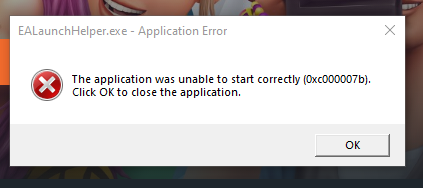
    I hope this isn't too much of a necro, but I figured I'd try the new platform by EA, but it won't launch. I can install fine, but when trying to launch, I get the following error. I'm running on a 64-bit Windows 10 desktop OS. I can run Origin fine, but EA Desktop doesn't open.

Featured Places

Node avatar for EA app Technical Issues & Bugs

EA app Technical Issues & Bugs

Having issues with the EA app? Join us to report bugs, and find help with downloads, DLCs, purchases, and login errors.Latest Activity: 23 minutes ago
8,675 Posts