Forum Discussion

7 Replies
 EA_cuervo1 year ago
Community Manager
Hi @ghork7,
I've moved your post here as this seems to be the same issue. Can you please take a look at the first page of this Thread and try reinstalling Visual C++ as this has fixed the issue for other users?
Thank you ghork71 year agoNew Novice
Hi, i tried this, but it doesnt worked.
1.unnistall and install all VC++ versions 2005+ - yes i did that.....all VC++ uninstalled and i install 2005 version
2.scann the pc with DISM and sfc in command prompt - in command promt i wrote DISM and than sfc, thats all?
3.try to install in manager mode - i tried, but still same error
- EA_cuervo1 year ago
@ghork7 thanks for the additional information.
It seems that there are some old installation files in your device that are preventing the app from installing again.Can you please try using CCleaner to clear out issues and errors?
For instructions on how to use Ccleaner to uninstall apps, click here.
While we suggest using CCleaner, EA does not provide user support for this program–use it at your own risk. Please follow any installation guides straight from CCleaner when installing and performing program set-up. You can find help on CCleaner’s support page.
- ghork71 year agoNew Novice
I allready uninstalled EA App....1-2 weeks ago, but i have this error code.
- EA_cuervo1 year ago
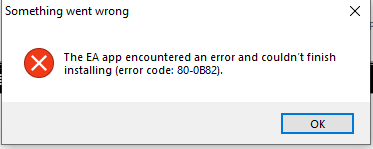
Thanks for sharing the screenshot. It seems that the EA app is not being recognized as installed anymore but some cached/registry files might still be there which are probably causing this issue. Ccleaner has the option to clean the registry and cached files. Please try that, restart your device and try to install the EA app again.
- ghork71 year agoNew Novice
I am desperate ☹️
1. I cleared all registry
2. Restart PC
3. Tried EAappInstaller
But still....it says "launch" and do nothing or "repair" with error code. ☹️
- ghork71 year agoNew Novice
Ha.....something is new......error code is now 80-0B82
Featured Places