Forum Discussion

Katiardguez's avatar
Katiardguez
Rising Veteran
3 years ago
Solved

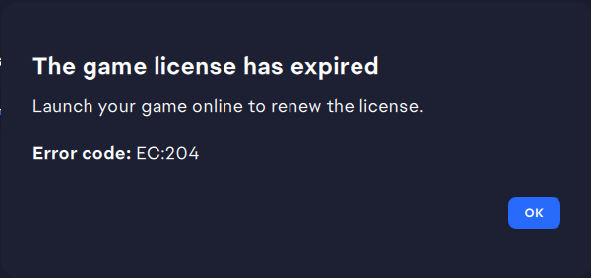
[RESOLVED] - EA app Error Code EC:204

As of June 26, 2023 every time I launch the EA App and go offline and than try to launch the Sims 4 game I get this error code: ec:204 with the message to go online to renew the license. I have tried to fix it but I have failed.

I tried to:

-Clear the Ea app cache

- Update the Ea app

-Repair game

-restart the pc numerous of times

Is there any other way to fix this error? and how can I renew the license of an already bought game? Thanks.


CM edit: edited title for clarity.

  • EA_Leeuw's avatar
    EA_Leeuw
    3 years ago

    Marking this thread as Resolves based on Player Feedback. Accepting as solution for visibility purposes.

    Hello everyone, 

    Many thanks for the continuous reports.

    The EA app dev teams have investigated the issue and have released an update for the EA app client that should fix the EC:204 error. 

    The fix for the issue is incorporated in EA app version 12.224.0, or above.

    At the time of writing, it looks like version 12.234.0 is the app's most recent version.

    To check which version of the EA app you have installed on your PC, please follow these steps:

    The EA app will automatically update itself over time. However, if you would like to force the EA app update(s), you can do so by running the EAUpdater.exe program that you can find in the installation folder of the EA app: "C:\Program Files\Electronic Arts\EA Desktop\EA Desktop", or by typing "EA Update" (without the quotation marks) in the Windows Search field.

    Please let us know if you can see & install the newest version of the EA app and if that also solves the issue for you. 

    If you continue to experience the issue

    If you continue to experience the issue, please provide the following details (please click on "Spoiler" to reveal the info):

    Spoiler
    • IMPORTANT:
    • Please share an EA app Error Report ID with us here in the thread. Steps can be found here on how to generate this ID.
      • If you cannot open the EA app, you can still generate an Error Report ID by following the steps mentioned underneath the section called "I can't open the EA app".
    • Please share logs of the EA app, by either creating a .zip or .rar file of them and adding them to your post,
      • The EA app logs can be found in C:\ProgramData\EA Desktop\Logs & C:\Users\%username%\AppData\Local\Electronic Arts\EA Desktop\Logs.

    Thank you!

140 Replies

  • Thank you so much! I unliked my Xbox account from my EA one and cleared the catch. That solved it. So if you have your Xbox linked to EA and have the game pass and the Sims 4 purchased through EA the two versions clash with each other preventing it from launching. 

  • EA_Shepard's avatar
    EA_Shepard
    Icon for Community Manager rankCommunity Manager
    3 years ago

    @Tsuki0all wrote:

    Thank you so much! I unliked my Xbox account from my EA one and cleared the catch. That solved it. So if you have your Xbox linked to EA and have the game pass and the Sims 4 purchased through EA the two versions clash with each other preventing it from launching. 


    Glad to see that you were able to get this resolved!

  • I have this problem from 2 august 2023, with the friend account no worries, but mine no.

  • prinapha's avatar
    prinapha
    2 years ago
    fe9f0efa-ef72-4d8d-b087-5b32b0d8c794
    I am also having this problem. I have selected the part to keep me signed in when I sign in and that does not solve the issue either. I have restarted the app and it does not work either. Only way I can play offline is if I load the game WITH internet and as it starts loading then disconnect my internet, there is no way to load the game WITHOUT any internet. I added a me too.
  • 3DED8DAB-970C-4904-830A-D0C83FA52452

    I received the code EC:204 which prevented me from entering the game.

     ฉันยังมีปัญหานี้ ฉันได้เลือกส่วนที่จะให้ฉันลงชื่อเข้าใช้เมื่อฉันลงชื่อเข้าใช้และนั่นก็ไม่สามารถแก้ปัญหาได้เช่นกัน ฉันได้รีสตาร์ทแอปแล้วและมันก็ใช้งานไม่ได้เช่นกัน วิธีเดียวที่ฉันสามารถเล่นแบบออฟไลน์ได้คือถ้าฉันโหลดเกมด้วยอินเทอร์เน็ตและเมื่อมันเริ่มโหลดแล้วตัดการเชื่อมต่ออินเทอร์เน็ตของฉันไม่มีวิธีโหลดเกมโดยไม่ใช้อินเทอร์เน็ต ฉันเพิ่มฉันด้วย

  • EA_Leeuw's avatar
    EA_Leeuw
    Icon for Community Manager rankCommunity Manager
    2 years ago

    Hi all,


    I'm going to close this thread to stop it from being necro'd.


    If you're experiencing the same or a related problem, please create a new discussion or respond to a more current thread.


    Thank you.

  • creash1981's avatar
    creash1981
    Seasoned Rookie
    9 months ago

    As usual, EA is lying about having the issue fixed. The guy told me to refer to these steps, after I repeatedly told him there was already a forum entry about it, and many people were saying it didn't work. I told him I'd already gone through all the steps before I contacted them. So he told me to start a thread about it. And I told him, there already IS a thread, and your solutions don't work. He didn't even try to help me beyond referring me to this crap that doesn't work. They know their solution doesn't work, they just don't care.

  • THIS ISSUE HAS NOT BEEN RESOLVED!

    I am having this issue, and I contacted live support they told me that their teams needs to "investigate" this issue even though they are aware many people are having this issue. HOW MANY YEARS DO THEY NEED TO INVESTIGATE? and they are lying too saying it was resolved when it's not. people are being forced to update their game when they don't want to. How do we pay for the game but can't chose not to update our own game with updates that ruin the game and break it even more?

Featured Places

Node avatar for EA app Technical Issues & Bugs

EA app Technical Issues & Bugs

Having issues with the EA app? Join us to report bugs, and find help with downloads, DLCs, purchases, and login errors.Latest Activity: 2 hours ago
8,470 Posts