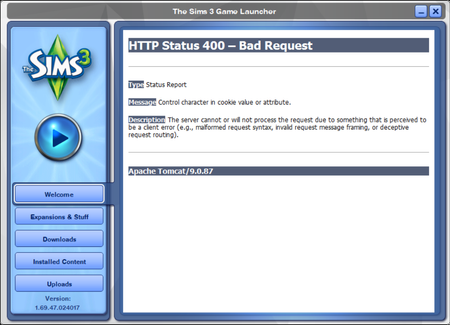
Has anyone run into this Launcher connection issue today? I saw a thread from about a month ago with folks experiencing the same issue. Seems like it has something to do with an EA/TheSims3 serve...
puzzlezaddict, I really appreciate you for responding and for offering those troubleshooting steps. There were a couple snags out the gate, so I'll recap what I ended up doing in case it helps others later.
clear Edge's Internet Explorer-mode data: This should be a simple first step. In Edge, navigate to Settings -> Privacy, search, and searches -> Clear browsing data -> Choose what to clear. And from there, the option to clear IE-mode data should appear as a blue hyperlink at the bottom of the menu, right ..... ? Nope, not for me!
I mentioned in my OP that I don't use Edge as my browser. So, I figured the option wasn't appearing because I didn't have any IE-mode data to clear in the first place. To test this, I went through additional steps to turn on IE-mode through Edge (here's a walkthrough) and added the Sims3 website to the list, just to make sure something would trigger the IE-mode setting. After I visited the Sims3 website and clicked around other sites a bit, I went back through the steps to clear the data, et voilà!
After that, I opened and closed the Sims 3 Launcher a couple times for good measure, but it eventually returned to normal and I was able to download my Store/Exchange/Studio content through it just as before. Maybe there were other factors involved that I'm unfamiliar with, but the point is, we're up and running!
Hey I just want to say a personal thank you because without you explaining that you need to enable IE mode I would still be stuck! Thank you so so much!!