[Current Issue] Sims 3 "serious error" when loading save
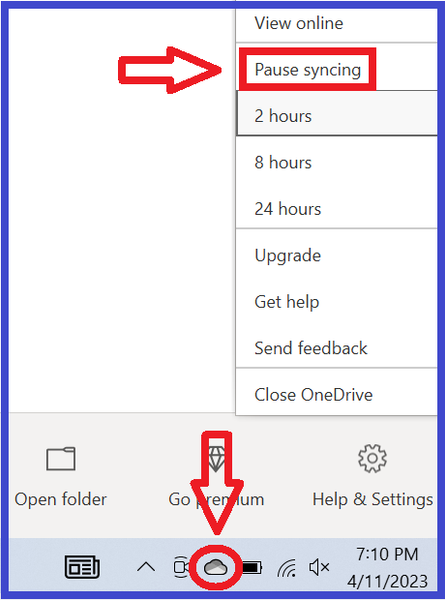

@neoromanempire Try getting rid of OneDrive instead. It might seem unlikely that OneDrive is the culprit here given that playing on low settings helps. But I've heard from several other people that this was in fact the cause of their recent "serious error" messages.
By get rid of OneDrive, I don't mean uninstall it, I mean move the user Documents directory out of the OneDrive folder. If you don't want to do this in your main Windows account, create a new one, as a test, and make it local—don't link it to your Microsoft account or any email address. That will prevent it from hooking into OneDrive at all. If you do want to change the settings in your main account, here's how:
The new admin Windows account is a useful test even if OneDrive turns out not to be the culprit, so please try it if you change the settings in your main account and it doesn't help. If the new account doesn't help either, please run a dxdiag and attach it to your reply.
https://help.ea.com/en-us/help/pc/how-to-gather-dxdiag-information/

Okay i did as the link said and unlinked onedrive from my pc and even verified that the documents folder was no longer in onedrive. It didn't work. I still get the message. any other ideas?
@neoromanempire Do you get the message when trying to start a new save, or only with existing saves? If new saves are affected too, please rename the Sims 3 folder, or move it, to allow the game to create a new one, and test again.
If you still get the error, please create a new admin Windows account and try playing there. Make it local, as in, don't link it to your Microsoft account or any email address. You'll be able to launch Sims 3 without reinstalling anything.
I dont have any saves. I recently built this PC and downloade Sims 3 on it like a week ago. The Sims 3 has never worked correctly on it yet. I get the message when attempting to create a new one regardless of which world I attempt to load, always the same. It loads the entire bar immediately and then says the error message and sends me back to the main screen.
@neoromanempire Then please try a new admin Windows account. It's possible something is wrong with your main account, or at least wrong enough to affect Sims 3.



