Poor graphics/low-resolution/graphics glitches (TS3 64-bit)

@Rhazya Thanks for all the info. It's interesting that you can't use cmd-enter to switch to windowed mode; someone else with an iMac said the same. What you can do is edit options.ini, in Documents > Electronic Arts > The Sims 3, to set fullscreen to 0. (Use cmd-f to search for the line.) When the game launches in windowed mode, try switching the resolution a couple times and see whether it works.
I wouldn't be surprised if the full resolution of your screen didn't work as an option though: it seems like in windowed mode, the game window takes up more space than it should given the chosen resolution. I'm not sure why. But try 2560x1440 and see how it looks. If you still can't switch it, you can try editing options.ini again: there's also a "resolution" line in the file.
For the way the map is rendered, I see that too, and I'm not sure how to fix it, except maybe to play on a different resolution. You might need to experiment a bit.

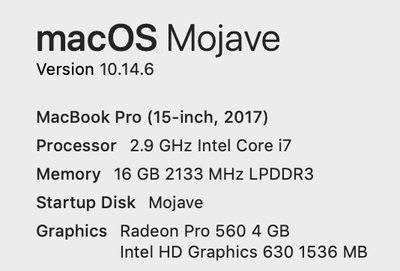
My graphics are awful, i tried to set everything to low again because of the glitches i get on screen with it being high, but low is unplayable because everything meshes into one and you cannot see the actual details on anything so whether it is low, medium, high, or very high, i struggle with the game graphically and i have tried every mode. i have some screenshots of what my monitor looks like when the game is even loading (and it is like that to play as well) and how they look. this is unplayable.
@xMyNameIsMaddiex Your graphics chip is below the minimum requirement for the 64-bit version of Sims 3. While that doesn't mean you can't play, it does mean you can't really expect to be able to play on high, or perhaps even medium, settings without excessively taxing your hardware. I understand that the game looks bad on low settings, but that may be all your laptop can handle.
On the other hand, the static on-screen doesn't look great. Is there a chance you could get the laptop checked out at an Apple store? I'm not saying there's anything wrong with it, just that it's possible, and it might be worth asking someone to take a look in-person.
By the way, I hope you're not playing on battery. The game is quite demanding, and you should only play it while your laptop is plugged in.
@puzzlezaddict I did not realise about the graphics card as i was unsure about the requirement. Makes a lot of sense but i luckily have been able to play with the settings on medium just fine, i seem to run into more problems when its low. High definitely does not work though and now i know why.
I also do play sims 3 whilst its plugged in anyway as it runs out so quickly if i do not lol but i will get the screen checked, though where i live there is a national lockdown for a month so i may need to wait or speak to Apple through chat and send pictures. The static on screen only happens when i play sims and never is the issue for anything else but like you say, it is worth the check.
Thank you.