Forum Discussion

Re: [CURRENT ISSUE] sims 3 64 bit & metal keeps crashing?

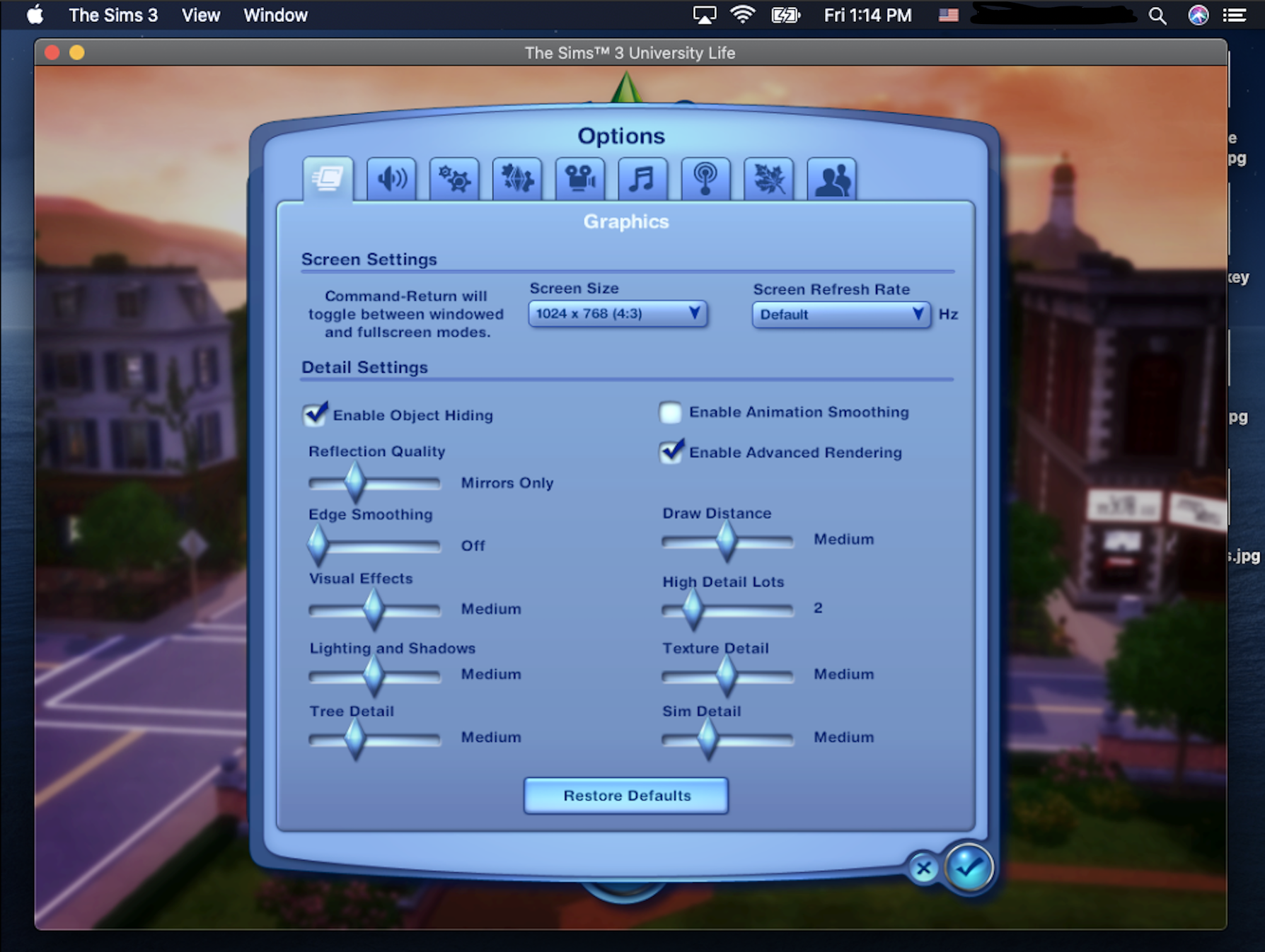
Ah okay, that makes sense. Anyway, I attached the screenshot. For whatever reason, the game forces my whole screen into a 4:3 aspect ratio and changing the settings just makes all the UI super tiny in-game and doesn't actually change the ratio of the screen... That's something that is inconvenient but manageable. The freezing every few minutes is my main issue ☹️ But anyway, those were the default settings. I didn't change them except for the "Enable Animation Smoothing" (when I played the game I enabled it). 

22 Replies

Replies have been turned off for this discussion
  • puzzlezaddict's avatar
    puzzlezaddict
    Hero+
    5 years ago

    @daydreamqt  For the screen resolution, try deleting options.ini (in Documents > Electronic Arts > The Sims 3) and letting the game spawn a new one.  Switch to windowed mode (cmd-enter) and apply the change, then switch to another resolution.

    When you change any settings other than those two, be sure to do so at the Main Menu and then quit the game before loading a save.

    As a test, please change all your settings to low and see whether the same issues occur.  I'm not saying you need to play on low settings going forward, but I am wondering whether a particular setting is a problem.

  • daydreamqt's avatar
    daydreamqt
    5 years ago

    Thank you for the tip about the screen resolution! It looks a lot better now lol. Anyway, I made all the settings to the very lowest. I think that's what the issue was! I was able to have time fast forward with no problems and have my sim travel from one lot to another with no freezing. What should I do so that I don't have to play with all the graphics at the lowest setting though? 

  • puzzlezaddict's avatar
    puzzlezaddict
    Hero+
    5 years ago

    @daydreamqt  The fast-forwarding may be an issue going forward—it's often a problem even in Windows on computers that can otherwise handle all packs on ultra settings.  For the other issue, try raising one or two settings at a time and see how it goes.  Your graphics chip is above the minimum requirement for this new version of Sims 3, but not by a large margin, so performance may always be less than ideal.

    I'd be interested to know whether certain settings, and certain levels within those settings, tend to cause more issues than others, so please let me know what you find.  The point is though to figure out how you can play with good enough graphics and no crashes, so if you find some combination that works for you, stick with it.

  • smallfry0270's avatar
    smallfry0270
    5 years ago

    I am having the same crashing issue- by the way you fixed my issue with the game not launching, so thank you! I switched all my settings to low as well as it was freezing a ton, but now a new problem; the crashing. No particular time or order either, sometimes soon sometimes later.  I have been saving intermittently. 

  • Akosantwi79's avatar
    Akosantwi79
    5 years ago

    I am having this same issue. I can play for about 30 minutes directly after starting up my computer, but then it crashes. Each subsequent time I start up the game, the play time gets shorter and shorter before it crashes. That's my only issue- crash after crash. Everything works fine for me, my launcher, all my cc show up, and the game it's super slow or laggy. I believe I'm already playing in windowed mode bc my game doesn't take up my whole screen. I don't have all the packs either or any mods, but I do have cc. But I also don't believe that's the problem bc people using only the base game have experienced crashing. Could this be memory issues? I really need help bc I have missed this game so much. I haven't played it in 4 years bc of all the issues ☹️

  • puzzlezaddict's avatar
    puzzlezaddict
    Hero+
    5 years ago

    @smallfry0270 and @Akosantwi79  Please attach your deviceconfig.log, in Documents > Electronic Arts > The Sims 3.  You'll neeed to manually open the folders; the file won't show up in a search.  You can delete your user and computer names, about 25 lines down, but there's nothing else in that file that can identify you.

    Please also try playing in Sunset Valley rather than another world—SV is among the most stable of worlds and is a good baseline for judging performance.  And try playing with no pets in the household, if you haven't already.

    @Akosantwi79  When you're playing in fullscreen mode but the in-game resolution doesn't match the native resolution of your screen, you'll sometimes get black bars on either side of the game window, as opposed to the window stretching unnaturally to fill the screen.  This is still fullscreen mode.  To switch to windowed mode, hit cmd-enter at the Main Menu, or edit options.ini (in Documents > Electronic Arts > The Sims 3) to set fullscreen to 0.

  • Vibama's avatar
    Vibama
    5 years ago
    @puzzlezaddict Hello, I did everything you said and started a new save file and now its even worse :'( lol now the game doesn't even want to load to the Map to choose a household. Im giving up ☹️ could be my RAM that's only 8gb that's what BluebellFlora said on twitter, hopefully they roll out a fix, I also couldn't even see the water options to swim in ocean or fish. And so many more issues that overall think its RAM issue but so sad anyway lol
  • Akosantwi79's avatar
    Akosantwi79
    5 years ago

    @puzzlezaddict  Here is the info. Also, are the graphics stats okay to run the game on my computer?

    === Application info ===
    Name:            Sims3
    Version:         
    Build:           Release
    === Rating info ===
    GPU: 1 GPU Memory: 5 CPU: 1 RAM: 5 CPU Speed: 1600 Threading: 3
    Adjusted CPU: 2320 RAM: 8192 Adjusted RAM: 7680 Cores: 2
    Card Found in DB: 0
    === Machine info ===
    OS version:      Mac OS X Version 10.15.6 (Build 19G2021)
    OS prod type:    0
    OS major ver:    10
    OS minor ver:    15
    OS SP major ver: 0
    OS SP minor ver: 0
    OS is 64Bit: 1
    CPU:             MacBookAir7,2
        Brand:       Intel(R) Core(TM) i5-5250U CPU @ 1.60GHz
        Family:      8
        Model:       7
        Cores:       2
        HT:          1
        x64:         1
    Memory:          8192MB
    Free memory:     945MB
    === Graphics device info ===
    Number:          0
    Name (driver):   Intel HD Graphics 6000
    Name (database): Intel HD Graphics 6000 [Found: 0, Matched: 1]
    Vendor:          Intel
    Chipset:         Vendor: 8086, Device: 1626, Board: 0000011b, Chipset: 0009
    Driver:          macOS Metal driver, Version: 0.0.0.0
    Driver version:  0
    Monitor:         00000000
    Texture memory:  1536MB
    Vertex program:  3.0
    Pixel program:   3.0
    Hardware TnL:    0
    === Options ===
    AnimationSmoothing 0
    LightingQuality 1
    GeneralReflections 0
    TextureQuality 1
    VisualEffects 1
    TerrainQuality 1
    EdgeSmoothing 0
    ObjectHiding 1
    AspectRatio 0
    ForceSquarePixels 1
    SimQuality 1
    TreeQuality 1
    DrawDistance 1
    MaxActiveLots 1
    NumMaxActiveLotOptions 6
    AdvancedRendering 0
    AudioQuality 1
    Audi🤭utputMode 1
    VoiceLevel 255
    SoundFXLevel 255
    MusicLevel 255
    AmbientLevel 255
    FocusMute 1
    VoiceMute 0
    SoundFXMute 0
    MusicMute 0
    AmbientMute 0
    EdgeScrolling 1
    EdgeScrollingWarning 0
    SupressOpportunityDialogs 0
    SuppressOpportunityDialogsWarningProducts 164783
    SimWhileMinimized 0
    TwelveHourClock 1
    ShowPlacementGrid 0
    AutonomyLevel 2
    DisableAutonomyForSelectedSim 0
    PetAutonomyLevel 2
    AgingInterval 2
    EnableAging 1
    EnableTutorial 1
    EnableIntroTutorial 0
    EnableTombResets 1
    EnableInGameStore 1
    EnableTelemetry 1
    EnableMemories 1
    AgingStageLengthBaby 3
    AgingStageLengthToddler 7
    AgingStageLengthChild 7
    AgingStageLengthTeen 14
    AgingStageLengthYoungAdult 21
    AgingStageLengthAdult 21
    AgingStageLengthElder 17
    EnableInteractiveLoading 1
    AgingStageLengthPuppy 0
    AgingStageLengthDogAdult 0
    AgingStageLengthDogElder 0
    AgingStageLengthKitten 0
    AgingStageLengthCatAdult 0
    AgingStageLengthCatElder 0
    AgingStageLengthFoal 0
    AgingStageLengthHorseAdult 0
    AgingStageLengthHorseElder 0
    LunarCycleLength 3
    LunarPhaseLength 0
    EnableLunarCycle 1
    EnableLunarPhase 0
    EnableStoryProgression 1
    EnableVampires 1
    EnableWerewolves 1
    EnablePets 1
    EnableCelebrities 1
    EnableFairies 1
    EnableWitches 1
    EnableHorses 1
    EnableOptOutCeleb 0
    ReceiveConnectTNS 1
    ReceivedDevGift 0
    PostFilterFlags 0
    RequireLoginBeforeLoad 0
    SummerLength 7
    FallLength 7
    WinterLength 7
    SpringLength 7
    SummerEnabled 1
    FallEnabled 1
    WinterEnabled 1
    SpringEnabled 1
    IsCelcius 0
    FogEnabled 1
    RainEnabled 1
    SnowEnabled 1
    HailEnabled 1
    InvertHorizontalRotation 0
    InvertVerticalRotation 0
    VideoCaptureSize 1
    VideoCaptureQuality 2
    VideoCaptureSound 0
    VideoCaptureTime 60
    VideoCaptureHideUI 1
    === Default Options ===
    AnimationSmoothing 0
    LightingQuality 1
    GeneralReflections 0
    TextureQuality 1
    VisualEffects 1
    TerrainQuality 1
    EdgeSmoothing 0
    ObjectHiding 1
    AspectRatio 0
    ForceSquarePixels 1
    SimQuality 1
    TreeQuality 1
    DrawDistance 1
    MaxActiveLots 1
    NumMaxActiveLotOptions 6
    AdvancedRendering 0
    AudioQuality 1
    Audi🤭utputMode 1
    VoiceLevel 255
    SoundFXLevel 255
    MusicLevel 255
    AmbientLevel 255
    FocusMute 1
    VoiceMute 0
    SoundFXMute 0
    MusicMute 0
    AmbientMute 0
    EdgeScrolling 0
    EdgeScrollingWarning 1
    SupressOpportunityDialogs 0
    SuppressOpportunityDialogsWarningProducts 0
    SimWhileMinimized 0
    TwelveHourClock 1
    ShowPlacementGrid 0
    AutonomyLevel 2
    DisableAutonomyForSelectedSim 0
    PetAutonomyLevel 2
    AgingInterval 2
    EnableAging 1
    EnableTutorial 1
    EnableIntroTutorial 1
    EnableTombResets 1
    EnableInGameStore 1
    EnableTelemetry 1
    EnableMemories 1
    AgingStageLengthBaby 3
    AgingStageLengthToddler 7
    AgingStageLengthChild 7
    AgingStageLengthTeen 14
    AgingStageLengthYoungAdult 21
    AgingStageLengthAdult 21
    AgingStageLengthElder 17
    EnableInteractiveLoading 1
    AgingStageLengthPuppy 0
    AgingStageLengthDogAdult 0
    AgingStageLengthDogElder 0
    AgingStageLengthKitten 0
    AgingStageLengthCatAdult 0
    AgingStageLengthCatElder 0
    AgingStageLengthFoal 0
    AgingStageLengthHorseAdult 0
    AgingStageLengthHorseElder 0
    LunarCycleLength 3
    LunarPhaseLength 0
    EnableLunarCycle 1
    EnableLunarPhase 0
    EnableStoryProgression 1
    EnableVampires 1
    EnableWerewolves 1
    EnablePets 1
    EnableCelebrities 1
    EnableFairies 1
    EnableWitches 1
    EnableHorses 1
    EnableOptOutCeleb 0
    ReceiveConnectTNS 1
    ReceivedDevGift 0
    PostFilterFlags 0
    RequireLoginBeforeLoad 0
    SummerLength 7
    FallLength 7
    WinterLength 7
    SpringLength 7
    SummerEnabled 1
    FallEnabled 1
    WinterEnabled 1
    SpringEnabled 1
    IsCelcius 0
    FogEnabled 1
    RainEnabled 1
    SnowEnabled 1
    HailEnabled 1
    InvertHorizontalRotation 0
    InvertVerticalRotation 0
    VideoCaptureSize 1
    VideoCaptureQuality 2
    VideoCaptureSound 0
    VideoCaptureTime 60
    VideoCaptureHideUI 1

  • @Vibama  I'm sorry to hear that.  I don't think 8 GB RAM is the issue itself; it may be that overloaded saves don't run well, or the game doesn't run well when other apps are open in the background and using a lot of memory.  But based on how much RAM a new save uses for me, I wouldn't expect memory to be the limiting factor alone.  Restarting your computer before playing would help free up as much memory as possible, if you wanted to test, and you could see the system and game RAM use in real time in the Activity Monitor.

    The missing open water options is a known issue that affects everyone, as far as I can tell.  It has its own thread:

    https://answers.ea.com/t5/Technical-Issues-Mac/CURRENT-ISSUE-64-bit-All-open-water-options-missing/m-p/9666249#M12332

    But if you're not interested in trying anymore, I understand.

  • puzzlezaddict's avatar
    puzzlezaddict
    Hero+
    5 years ago

    @Akosantwi79  Your hardware is actually below the minimum requirement for the 64-bit version of Sims 3.  That doesn't mean you necessarily can't play, just that performance may not be great, especially if you play with Pets (might not work at all) or Seasons (you might see crashes during inclement weather).  It can help to play in windowed mode and on low settings.

    @amycoLLiNs4518  For the Finalizing issue, try repairing the game in Origin: open your game library, right-click on the Sims 3 icon, and select Repair.  If that doesn't help, run the Origin reset tool for macOS:

    https://help.ea.com/en-us/help/origin/origin/how-to-reset-origin-on-mac/

    and repair again.  If that doesn't help either, then hopefully a future Origin update will fix this—it may be related to the issue of packs being grayed out at the bottom of the launcher, which will need an Origin update to fix.  We hope that will happen soon; it's already fixed in the "technical preview" (beta version).

  • biancaadav's avatar
    biancaadav
    5 years ago

    Hello!

    I am having this same exact issue as everyone explains. My game crashes and closes every 30 mins. The last 3 times I tried to play and my game closes out on me. Yesterday, evening as I was playing. I notice every time I fast forward the game would freeze and the rainbow wheel appeared. 

  • biancaadav's avatar
    biancaadav
    5 years ago
    === Application info ===
    Name:            Sims3
    Version:         
    Build:           Release
    === Rating info ===
    GPU: 3 GPU Memory: 5 CPU: 1 RAM: 5 CPU Speed: 1100 Threading: 3
    Adjusted CPU: 1470 RAM: 8192 Adjusted RAM: 7680 Cores: 2
    Card Found in DB: 0
    === Machine info ===
    OS version:      Mac OS X Version 10.15.7 (Build 19H15)
    OS prod type:    0
    OS major ver:    10
    OS minor ver:    15
    OS SP major ver: 0
    OS SP minor ver: 0
    OS is 64Bit: 1
    CPU:             MacBookAir9,1
        Brand:       Intel(R) Core(TM) i3-1000NG4 CPU @ 1.10GHz
        Family:      8
        Model:       7
        Cores:       2
        HT:          1
        x64:         1
    Memory:          8192MB
    Free memory:     611MB
     
    Computer:        Biancas-MacBook-Air
    === Graphics device info ===
    Number:          0
    Name (driver):   Intel Iris Plus Graphics
    Name (database): Intel Iris Plus Graphics [Found: 0, Matched: 1]
    Vendor:          Intel
    Chipset:         Vendor: 8086, Device: 8a5c, Board: 0000020d, Chipset: 0007
    Driver:          macOS Metal driver, Version: 0.0.0.0
    Driver version:  0
    Monitor:         00000000
    Texture memory:  1536MB
    Vertex program:  3.0
    Pixel program:   3.0
    Hardware TnL:    0
    === Options ===
    AnimationSmoothing 0
    LightingQuality 2
    GeneralReflections 1
    TextureQuality 2
    VisualEffects 2
    TerrainQuality 1
    EdgeSmoothing 0
    ObjectHiding 1
    AspectRatio 0
    ForceSquarePixels 1
    SimQuality 2
    TreeQuality 1
    DrawDistance 2
    MaxActiveLots 1
    NumMaxActiveLotOptions 6
    AdvancedRendering 1
    AudioQuality 1
    Audi🤭utputMode 1
    VoiceLevel 255
    SoundFXLevel 255
    MusicLevel 255
    AmbientLevel 255
    FocusMute 1
    VoiceMute 0
    SoundFXMute 0
    MusicMute 0
    AmbientMute 0
    EdgeScrolling 0
    EdgeScrollingWarning 0
    SupressOpportunityDialogs 0
    SuppressOpportunityDialogsWarningProducts 164523
    SimWhileMinimized 0
    TwelveHourClock 1
    ShowPlacementGrid 0
    AutonomyLevel 2
    DisableAutonomyForSelectedSim 0
    PetAutonomyLevel 2
    AgingInterval 2
    EnableAging 1
    EnableTutorial 1
    EnableIntroTutorial 0
    EnableTombResets 1
    EnableInGameStore 1
    EnableTelemetry 1
    EnableMemories 1
    AgingStageLengthBaby 3
    AgingStageLengthToddler 7
    AgingStageLengthChild 7
    AgingStageLengthTeen 14
    AgingStageLengthYoungAdult 21
    AgingStageLengthAdult 21
    AgingStageLengthElder 17
    EnableInteractiveLoading 1
    AgingStageLengthPuppy 0
    AgingStageLengthDogAdult 0
    AgingStageLengthDogElder 0
    AgingStageLengthKitten 0
    AgingStageLengthCatAdult 0
    AgingStageLengthCatElder 0
    AgingStageLengthFoal 0
    AgingStageLengthHorseAdult 0
    AgingStageLengthHorseElder 0
    LunarCycleLength 3
    LunarPhaseLength 0
    EnableLunarCycle 1
    EnableLunarPhase 0
    EnableStoryProgression 1
    EnableVampires 1
    EnableWerewolves 1
    EnablePets 1
    EnableCelebrities 1
    EnableFairies 1
    EnableWitches 1
    EnableHorses 1
    EnableOptOutCeleb 0
    ReceiveConnectTNS 1
    ReceivedDevGift 0
    PostFilterFlags 0
    RequireLoginBeforeLoad 0
    SummerLength 7
    FallLength 7
    WinterLength 7
    SpringLength 7
    SummerEnabled 1
    FallEnabled 1
    WinterEnabled 1
    SpringEnabled 1
    IsCelcius 0
    FogEnabled 1
    RainEnabled 1
    SnowEnabled 1
    HailEnabled 1
    InvertHorizontalRotation 0
    InvertVerticalRotation 0
    VideoCaptureSize 1
    VideoCaptureQuality 2
    VideoCaptureSound 0
    VideoCaptureTime 60
    VideoCaptureHideUI 1
    === Default Options ===
    AnimationSmoothing 0
    LightingQuality 2
    GeneralReflections 1
    TextureQuality 2
    VisualEffects 2
    TerrainQuality 1
    EdgeSmoothing 0
    ObjectHiding 1
    AspectRatio 0
    ForceSquarePixels 1
    SimQuality 2
    TreeQuality 1
    DrawDistance 2
    MaxActiveLots 1
    NumMaxActiveLotOptions 6
    AdvancedRendering 1
    AudioQuality 1
    Audi🤭utputMode 1
    VoiceLevel 255
    SoundFXLevel 255
    MusicLevel 255
    AmbientLevel 255
    FocusMute 1
    VoiceMute 0
    SoundFXMute 0
    MusicMute 0
    AmbientMute 0
    EdgeScrolling 0
    EdgeScrollingWarning 1
    SupressOpportunityDialogs 0
    SuppressOpportunityDialogsWarningProducts 0
    SimWhileMinimized 0
    TwelveHourClock 1
    ShowPlacementGrid 0
    AutonomyLevel 2
    DisableAutonomyForSelectedSim 0
    PetAutonomyLevel 2
    AgingInterval 2
    EnableAging 1
    EnableTutorial 1
    EnableIntroTutorial 1
    EnableTombResets 1
    EnableInGameStore 1
    EnableTelemetry 1
    EnableMemories 1
    AgingStageLengthBaby 3
    AgingStageLengthToddler 7
    AgingStageLengthChild 7
    AgingStageLengthTeen 14
    AgingStageLengthYoungAdult 21
    AgingStageLengthAdult 21
    AgingStageLengthElder 17
    EnableInteractiveLoading 1
    AgingStageLengthPuppy 0
    AgingStageLengthDogAdult 0
    AgingStageLengthDogElder 0
    AgingStageLengthKitten 0
    AgingStageLengthCatAdult 0
    AgingStageLengthCatElder 0
    AgingStageLengthFoal 0
    AgingStageLengthHorseAdult 0
    AgingStageLengthHorseElder 0
    LunarCycleLength 3
    LunarPhaseLength 0
    EnableLunarCycle 1
    EnableLunarPhase 0
    EnableStoryProgression 1
    EnableVampires 1
    EnableWerewolves 1
    EnablePets 1
    EnableCelebrities 1
    EnableFairies 1
    EnableWitches 1
    EnableHorses 1
    EnableOptOutCeleb 0
    ReceiveConnectTNS 1
    ReceivedDevGift 0
    PostFilterFlags 0
    RequireLoginBeforeLoad 0
    SummerLength 7
    FallLength 7
    WinterLength 7
    SpringLength 7
    SummerEnabled 1
    FallEnabled 1
    WinterEnabled 1
    SpringEnabled 1
    IsCelcius 0
    FogEnabled 1
    RainEnabled 1
    SnowEnabled 1
    HailEnabled 1
    InvertHorizontalRotation 0
    InvertVerticalRotation 0
    VideoCaptureSize 1
    VideoCaptureQuality 2
    VideoCaptureSound 0
    VideoCaptureTime 60
    VideoCaptureHideUI 1
  • puzzlezaddict's avatar
    puzzlezaddict
    Hero+
    5 years ago

    @biancaadav  Does it help to play in windowed mode?  If that alone doesn't make a difference, try lowering all the graphics settings as well.  If the game is then stable, you can try raising one setting at a time to see whether any of them cause crashes.

    Fast forward has always been a little dicey in Sims 3, especially on low-end hardware.  It's unfortunately not likely to change, although it's possible lowering one setting or another will help.

  • biancaadav's avatar
    biancaadav
    5 years ago

    Thank you for responding. How do I play in windowed mode? I'll try that and will give you an update 

  • Sebosze's avatar
    Sebosze
    5 years ago

    Damn I'm also experiencing these crashes.

    • OS: Catalina AND Big Sur 11.0.1 (20B28). Tried on both.
    • Mac model: MacBook Pro 15-inch 2018
    • Processor: 2.6 GHz 6-Core Intel Core i7
    • Memory (RAM) 16 GB 
    • Graphics: Intel UHD Graphics 630 1536 MB and Radeon Pro 560X 4 GB
    • Are you running any antivirus? No
    • What Expansion and Stuff Packs do you have installed? World Adv., Ambitions, Late Night, Gens, Pets, Showtime, Supernatural, Seasons, University, Island Paradise, Into the Future, High-End Loft, Fast Lane.
    • Do you use CC/Mods? Not really.

    I'm playing in fulscreen mode but I'm not planning on playing in windowed mode or lowering graphics settings since they're already quite low. I thought this game was supposed to work as before and I don't think that it's my job to fix it. I hope they'll patch it sooner than later. I'll attach the macOS crash log if it happens again.

    EDIT: I attached the crash report.

  • amycoLLiNs4518's avatar
    amycoLLiNs4518
    5 years ago

    Ok I will try that! I did play last night with my expansion packs on low settings and windowed mode and it worked perfect as well, I’m gonna play around with it to see when the freezing and the lagging starts. 

  • puzzlezaddict's avatar
    puzzlezaddict
    Hero+
    5 years ago

    @biancaadav  You can switch between fullscreen and windowed modes by clicking cmd-enter either at the Main Menu or once your save is loaded.  If that doesn't work for some reason, as it doesn't for a few people, go into Documents > Electronic Arts > The Sims 3, open options.ini, cmd-F to search for fullscreen, and set it to 0.

  • puzzlezaddict's avatar
    puzzlezaddict
    Hero+
    5 years ago

    @Sebosze  Please try playing in a clean user folder.  Move your entire Sims 3 folder out of Documents > Electronic Arts and onto your desktop, and when you open the launcher, a clean folder will spawn with no content.  Don't add anything to it yet; just see whether you get the same error.  Let me know either way.

    If you do get another error, please post the same crash log.  I'd also like to see a deviceconfig, which will be in Documents > Electronic Arts > The Sims 3.  Your user and computer names are about 25 lines down, so feel free to delete those, but there's no other personal information in the file.

  • Sebosze's avatar
    Sebosze
    5 years ago

    Here's the DeviceConfig.log:

    Spoiler
    === Graphics device info ===
    Number: 0
    Name (driver): Radeon Pro 560X
    Name (database): Radeon Pro 560X [Found: 1, Matched: 1]
    Vendor: ATI
    Chipset: Vendor: 1002, Device: 67ef, Board: 0000018f, Chipset: 00c2
    Driver: macOS Metal driver, Version: 0.0.0.0
    Driver version: 0
    Monitor: 00000000
    Texture memory: 4096MB
    Vertex program: 3.0
    Pixel program: 3.0
    Hardware TnL: 0
    === Options ===
    AnimationSmoothing 1
    LightingQuality 3
    GeneralReflections 2
    TextureQuality 3
    VisualEffects 3
    TerrainQuality 3
    EdgeSmoothing 2
    ObjectHiding 0
    AspectRatio 0
    ForceSquarePixels 1
    SimQuality 4
    TreeQuality 3
    DrawDistance 3
    MaxActiveLots 6
    NumMaxActiveLotOptions 6
    AdvancedRendering 1
    AudioQuality 3
    Audi🤭utputMode 1
    VoiceLevel 255
    SoundFXLevel 255
    MusicLevel 255
    AmbientLevel 255
    FocusMute 1
    VoiceMute 0
    SoundFXMute 0
    MusicMute 0
    AmbientMute 0
    EdgeScrolling 1
    EdgeScrollingWarning 0
    SupressOpportunityDialogs 0
    SuppressOpportunityDialogsWarningProducts 1493695
    SimWhileMinimized 0
    TwelveHourClock 0
    ShowPlacementGrid 0
    AutonomyLevel 2
    DisableAutonomyForSelectedSim 0
    PetAutonomyLevel 2
    AgingInterval 3
    EnableAging 1
    EnableTutorial 1
    EnableIntroTutorial 0
    EnableTombResets 1
    EnableInGameStore 0
    EnableTelemetry 0
    EnableMemories 1
    AgingStageLengthBaby 6
    AgingStageLengthToddler 15
    AgingStageLengthChild 15
    AgingStageLengthTeen 30
    AgingStageLengthYoungAdult 45
    AgingStageLengthAdult 45
    AgingStageLengthElder 36
    EnableInteractiveLoading 0
    AgingStageLengthPuppy 15
    AgingStageLengthDogAdult 54
    AgingStageLengthDogElder 30
    AgingStageLengthKitten 15
    AgingStageLengthCatAdult 60
    AgingStageLengthCatElder 36
    AgingStageLengthFoal 10
    AgingStageLengthHorseAdult 75
    AgingStageLengthHorseElder 36
    LunarCycleLength 4
    LunarPhaseLength 0
    EnableLunarCycle 1
    EnableLunarPhase 0
    EnableStoryProgression 1
    EnableVampires 1
    EnableWerewolves 1
    EnablePets 1
    EnableCelebrities 0
    EnableFairies 1
    EnableWitches 1
    EnableHorses 0
    EnableOptOutCeleb 1
    ReceiveConnectTNS 0
    ReceivedDevGift 0
    PostFilterFlags 0
    RequireLoginBeforeLoad 1
    SummerLength 14
    FallLength 14
    WinterLength 14
    SpringLength 14
    SummerEnabled 1
    FallEnabled 1
    WinterEnabled 1
    SpringEnabled 1
    IsCelcius 1
    FogEnabled 1
    RainEnabled 1
    SnowEnabled 1
    HailEnabled 1
    InvertHorizontalRotation 0
    InvertVerticalRotation 0
    VideoCaptureSize 1
    VideoCaptureQuality 2
    VideoCaptureSound 0
    VideoCaptureTime 60
    VideoCaptureHideUI 1
    === Default Options ===
    AnimationSmoothing 1
    LightingQuality 3
    GeneralReflections 2
    TextureQuality 3
    VisualEffects 3
    TerrainQuality 3
    EdgeSmoothing 0
    ObjectHiding 0
    AspectRatio 0
    ForceSquarePixels 1
    SimQuality 4
    TreeQuality 3
    DrawDistance 3
    MaxActiveLots 4
    NumMaxActiveLotOptions 6
    AdvancedRendering 1
    AudioQuality 3
    Audi🤭utputMode 1
    VoiceLevel 255
    SoundFXLevel 255
    MusicLevel 255
    AmbientLevel 255
    FocusMute 1
    VoiceMute 0
    SoundFXMute 0
    MusicMute 0
    AmbientMute 0
    EdgeScrolling 0
    EdgeScrollingWarning 1
    SupressOpportunityDialogs 0
    SuppressOpportunityDialogsWarningProducts 0
    SimWhileMinimized 0
    TwelveHourClock 0
    ShowPlacementGrid 0
    AutonomyLevel 2
    DisableAutonomyForSelectedSim 0
    PetAutonomyLevel 2
    AgingInterval 2
    EnableAging 1
    EnableTutorial 1
    EnableIntroTutorial 1
    EnableTombResets 1
    EnableInGameStore 1
    EnableTelemetry 1
    EnableMemories 1
    AgingStageLengthBaby 3
    AgingStageLengthToddler 7
    AgingStageLengthChild 7
    AgingStageLengthTeen 14
    AgingStageLengthYoungAdult 21
    AgingStageLengthAdult 21
    AgingStageLengthElder 17
    EnableInteractiveLoading 1
    AgingStageLengthPuppy 0
    AgingStageLengthDogAdult 0
    AgingStageLengthDogElder 0
    AgingStageLengthKitten 0
    AgingStageLengthCatAdult 0
    AgingStageLengthCatElder 0
    AgingStageLengthFoal 0
    AgingStageLengthHorseAdult 0
    AgingStageLengthHorseElder 0
    LunarCycleLength 3
    LunarPhaseLength 0
    EnableLunarCycle 1
    EnableLunarPhase 0
    EnableStoryProgression 1
    EnableVampires 1
    EnableWerewolves 1
    EnablePets 1
    EnableCelebrities 1
    EnableFairies 1
    EnableWitches 1
    EnableHorses 1
    EnableOptOutCeleb 0
    ReceiveConnectTNS 1
    ReceivedDevGift 0
    PostFilterFlags 0
    RequireLoginBeforeLoad 0
    SummerLength 7
    FallLength 7
    WinterLength 7
    SpringLength 7
    SummerEnabled 1
    FallEnabled 1
    WinterEnabled 1
    SpringEnabled 1
    IsCelcius 1
    FogEnabled 1
    RainEnabled 1
    SnowEnabled 1
    HailEnabled 1
    InvertHorizontalRotation 0
    InvertVerticalRotation 0
    VideoCaptureSize 1
    VideoCaptureQuality 2
    VideoCaptureSound 0
    VideoCaptureTime 60
    VideoCaptureHideUI 1
  • puzzlezaddict's avatar
    puzzlezaddict
    Hero+
    5 years ago

    @Sebosze  Are you still getting crashes even in the clean folder?  Does it help to play in windowed mode?  Please also play with nothing else running on your computer other than Origin, immediately after restarting.

  • Akosantwi79's avatar
    Akosantwi79
    5 years ago

    @puzzlezaddict Thanks for your response, I tried your recommendations but I still experienced crashing very shortly into game play. I have already been considering this, but do you recommend I install the Windows partition to play? Though my computer specs are below the minimum for the 64-bit update, do you think I will still experience these problems running Windows?

  • puzzlezaddict's avatar
    puzzlezaddict
    Hero+
    5 years ago

    @Akosantwi79  If you Bootcamped your Mac and installed the game in Windows, it might run okay, but it's entirely possible it wouldn't perform any better than what you're seeing now.  Different players can have widely different experiences, for sure.  However, your hardware is pretty weak for the Windows version of the game as well, and many people with similar processors and graphics chips struggle to play at all.

    Besides, you'd want to have at least 100 GB free to devote to the Windows partition, plus at least 30 GB free on the Mac side once you've uninstalled Sims 3.  (I'd prefer more, but it's not strictly necessary.)  And you'd need to buy a Windows 10 product key, which, last I checked, is about $110 for the cheapest legitimate option.

    If you'd like to troubleshoot a bit more on the Mac side, please do this:

    • Move your entire Sims 3 folder out of Documents > Electronic Arts and onto your desktop.
    • Load the game to the Main Menu, switch to windowed mode (cmd-enter), turn ALL the graphics settings to the minimum, and quit.
    • Do not add any content at all: no saves, no mods or cc, etc.
    • Reload, and start a one sim, no pet household in Sunset Valley.
    • Keep track of any freezes/spinning cursors/crashes, and let me know when they happen.

    Please also list the packs you currently have installed.