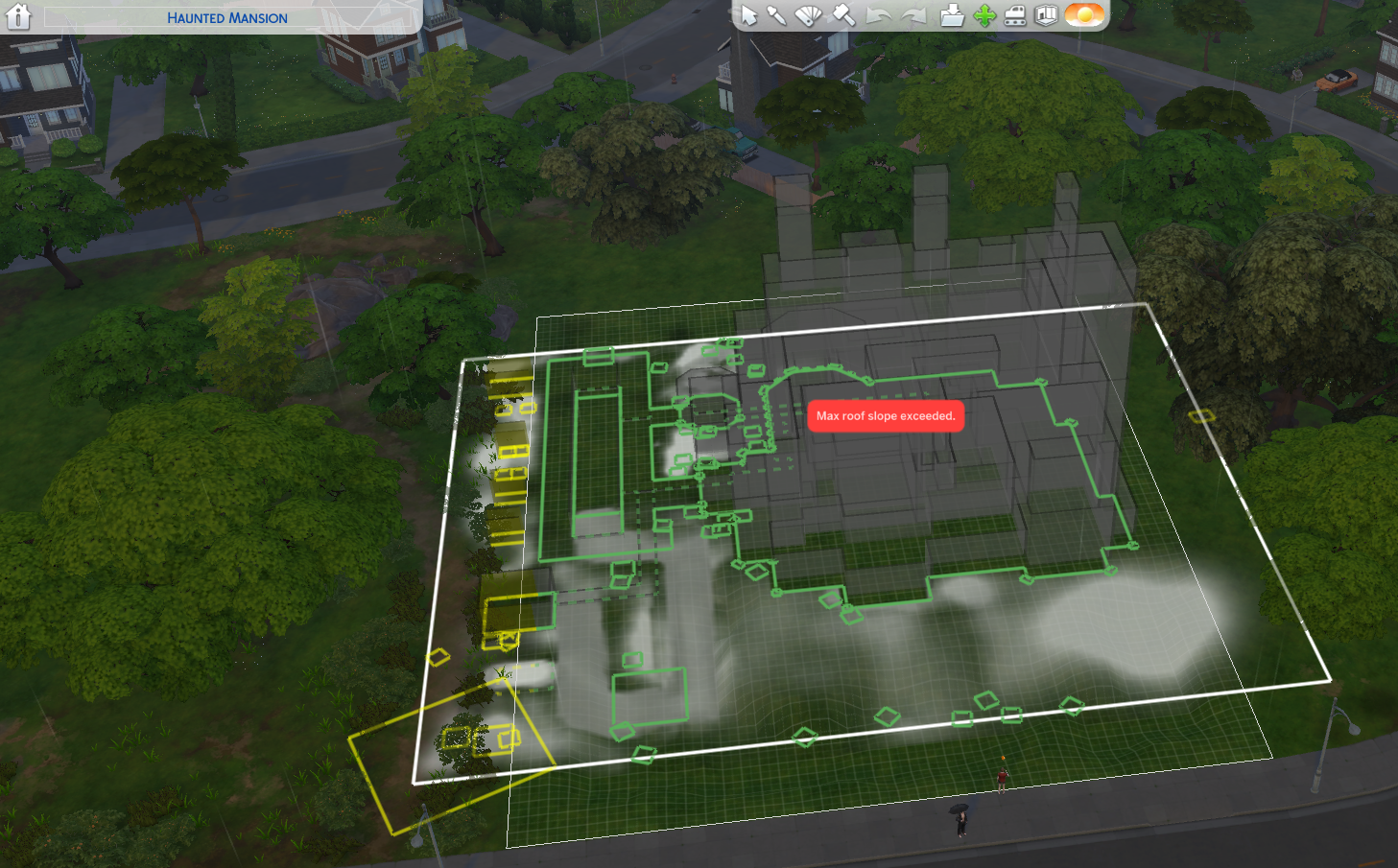
uom34pbqn80u You may be getting a false error message. The issue may be something else, but the system does not have a specific error message for that, so it uses one it thinks is closest and just confuses the player. Based on your picture and another lot I troubleshot a year or two ago with the same problem, I think that the lot may have objects that extend off lot that are not square to the grid (rotated or alt placed). On the left back corner there is a 2x2 square which is probably a tree and all along the back perimeter I also see several 1x1 squares that are probably plants that are also not square to the grid. And I see one thing on the right perimeter lot edge as well. There may be others that aren't shown in your pic. So, you might want to check all those things and adjust them to be within the lot borders and square to the grid. After adjusting an object, try to rotate the lot. It may just be one object causing the problem so trying to rotate after adjusting each object will save you time and effort.
Another thing that can cause the issue you have run into is nonlevel perimeter tiles which have an object on them. So, making sure your perimeter tiles are flat is something you can check for. Once you get the lot placed like you want it, you can adjust the terrain to what it was if you like. Same with the objects you changed.
One easy thing you can try is to bulldoze the lot and place it again making sure you have turned MOO on before placing the lot. It might rotate the 2nd time.
Hope this helps.