[ARCHIVED] How to use Mods/CC on PC
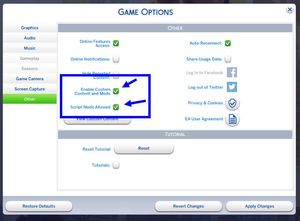


HI @CHAMOMIL3T3A Do you have One Drive syncing your Sims folders? And when you say you reset the game data, you dragged the Sims 4 folder to your desktop, started the game to recreate it, then dragged the individual save files, individual mod files, and individual Tray files back in, leaving the game-created files alone?

I do have it synced. Onedrive is kinda screwing everything up for me bc i didnt even have it on my old computer. how do i disable it? or just move my electronic arts folder to my computer? and no when i reset the game i completely deleted the game and all data on the new computer, downloaded it again through steam then transferred the files again
You can go here for instructions on how to unsync OneDrive: https://answers.ea.com/t5/Technical-Issues-PC/CURRENT-ISSUE-Sims-4-saves-user-content-disappearing-PC/td-p/12475370. It really does mess with Sims, unfortunately, and unsyncing is the only fix.
sorry edit. it still is in my one drive, ive completely disabled onedrive but it still wont allow me to change the location. there is no location tab in the properties and i cant figure out why ☹️

@CHAMOMIL3T3A That happens sometimes. Here's how to force-change the location of Documents:
You're looking for the Personal value.