[ARCHIVED] How to use Mods/CC on PC
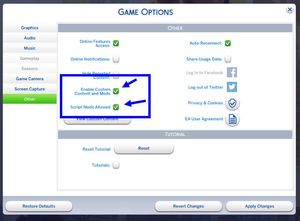


Hi @zouragirl12 First, make sure all old versions have been deleted, and delete the file called localthumbcache. Redownload the current version (it has had multiple updates). Right now, that.s v3.2.3. Double click on it to open up the ZIP folder, then drag the folder you see there into Documents > Electronic Arts > The SIms 4. It can't go in a subfolder.
If you're on a Mac, the download might not be a ZIP file. If it's not a ZIP file, drag the whole folder that downloaded into Mods.
This should be the folders you see after you've installed:
Documents > Electronic Arts > The Sims 4 > Mods > TMex-BetterBuildBuy
This is what should be inside the last folder - not directly inside Mods:

See that's the thing, I do exactly that (I use Windows so I follow the ZIP install instructions) and it still says I installed it incorrectly
@zouragirl12 And you're on the current version? Have you checked if you have any conflicting mods? (I can't recall if there are any for this BBB.) Check also if you have a duplicate copy.