[ARCHIVED] How to use Mods/CC on PC
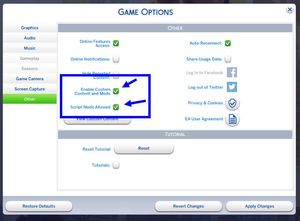


My game is telling me certain mods are installed incorrectly or are more than one subfolder deep, as well as telling me to enable script mods. I have double checked to make sure script mods are enabled, none of my mods are more than one subfolder deep, and as far as installing them correctly they are unzipped and in my mods folder. I have Better exceptions which was supposed to combat the bug that affects scripts but it seemingly does not work. For reference my path is EA>TS4>Mods>ModName and the mod is in the folder the name corresponds to.
This is what my mods folder looks like, and the mod is directly in that folder, not deeper than that. Before I made the post I deleted me EA folder, so it could produce a new one, and it still gave me the same response. To work around I took everything out of their folders and put them directly into the mods folder and they started to work. So my best description of the issue is there is an "invisible folder" inside of my mods folder, that makes it seem like my mods are deeper than they are.
[folder screen shot deleted due to adult mods]

@Ariees416 A couple of notes. Check what you have in "Movies" - if it's anything but .ts4script, .package, .cfg, and .txt files, you might have your problem there. You also have a folder called Mods inside Mods, and that could cause problems - better to rename it, and make sure it doesn't contain duplicates. FInally, I don't see your Resource.cfg file there. Did you delete that? The game will recreate it, and you can just leave it there.
Also, what's the full path above "Mods"?
I checked movies, they were all .package files from the ultimate movie override mods.
I renamed the Mods folder,
and the path above previously named Mods folder is my MC Command Center folder.
I deleted my whole mods folder so it could regenerate (It helped last time I had this problem), which is why there was no resource.cfg.
I put everything back but to no avail