[ARCHIVED] How to use Mods/CC on PC
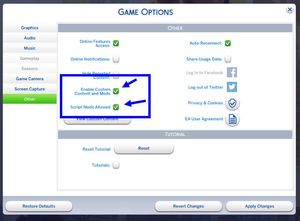


Hi everyone! I am having some difficulties with my Sims 4 mods. So I'll explain the situation: Yesterday, my OneDrive's storage filled up, and because of that, all of my Sims 4 data got deleted. After a while, I couldn't log into Sims at all, so I tried a few things, but they couldn't seem to work, so I reinstalled Ts4 since I made a bit of a mess (at that point I didn't care about the Data I just wanted to go back into playing).
Today, I went on Google to look up for solutions and came across a video that explains how to move the Sims data without OneDrive.
I followed step by step, and it actually worked! I could log into Sims without any problems. What a bliss! After I moved back all of my cc/mods files into the mods folder, I went into the game, and I couldn't see any mods/cc I had put in the mods folder. I tried to see what people were saying in the comments of the video I watched, but I couldn't find any solution to that. If anybody can help, I would be really grateful. Thanks!

HI @rinaroto We have a tutorial here on getting your content out of OneDrive: https://answers.ea.com/t5/Technical-Issues-PC/CURRENT-ISSUE-Sims-4-saves-user-content-disappearing-PC/td-p/12475370 Does it match what you did?
Also, what is the full path of the Mods folder you're using? Making OneDrive go away is a good time to actually make a new Sims 4 folder and copy your old files into the new ones.