Game crashing or not loading especially after updating? Post here.
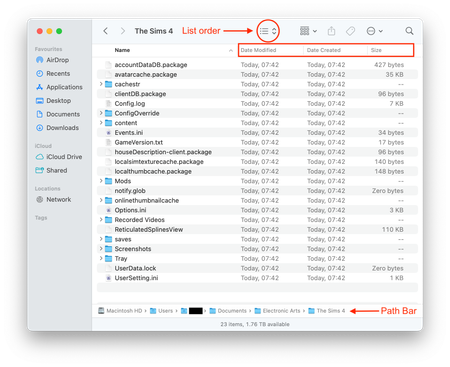


I have an issue where The Sims 4 will not launch on my Mac.
When I click Play in the EA App, the preparing game message appears, then after 1-2 minutes the app reopens and the game never starts. No error message.
This started today. The game worked fine yesterday.
I do not use mods and tested with a clean Sims 4 folder. The issue still happens.
MacBook, macOS Tahoe 26, latest EA App. I tried reinstalling, clearing cache, repair the app, and give all the permissions, but nothing worked. I even did the thing of starting with a clean The Sims 4 folder (saving in another location the old one with my households) and it created. But still not launching.
This seems like a broader issue, possibly from a recent update.
I've also had the same issue on Microsoft, so it's likely from their end.
PugLov3r55 Are you experiencing it now or it’a just recurring thing? The one time I got problems I just duplicated the folder and transfer my saves. Worked fine. This time I tried everything and nothing.
Maybe there was a sims update or something. I also saw that in case of Mac could be because iCloud Drive was doing syncs in the documents folder, where the sims 4 is… if anyone knows something about it, please feel free to share.
If you're still having issues could you please provide the screenshot of the TS4 folder requested in the opening post in this help thread I've merged your post into.
