Unable to start: The Sims 4 is already running - Mac only
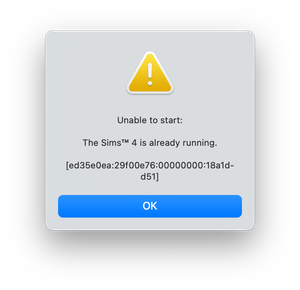


I'm having trouble launching The Sims 4 after reinstalling it. I keep getting a message that says: "The Sims 4 already running." A while ago, I deleted my Sims 4 game because I wasn't playing it anymore. Recently, I decided to download it again, but when I tried to launch it, I got a message saying, "The Sims 4 is already running." Before I originally deleted the game, I had uploaded it to my external hard drive and I was playing the game with no problems. When I reinstalled it, I made sure to download it onto that same hard drive. However I keep getting that same error message. I also noticed that on the external hard drive there's an "Electronic Arts" folder, but the icon appears as a paper with an arrow instead of a regular folder.
See the opening post for fixes for the error message. It's a permission issue.
puppies130 wrote:I also noticed that on the external hard drive there's an "Electronic Arts" folder, but the icon appears as a paper with an arrow instead of a regular folder.
Have you ever attempted to store the Electronic Arts folder on the external drive and create a symlink to it in the Documents folder?
I'm not sure, When I had originally uploaded The Sims 4 to my hard drive I was watching a step by step tutorial on how to uploaded to the external hard drive, but I think that I may have created a symlink. I do remember following the steps for entering commands in the terminal.



