[CURRENT ISSUE] Several Issues after incomplete Installation
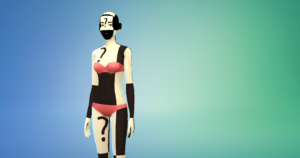


I opened create a sim after the latest update (v1.21) my sims look messed up. I don't have any cc installed or mods, and mods are turned off.

@WaterSpirit95 Try repairing the game in Origin: open your game library, right-click on the Sims 4 icon, and select Repair.

Thank you for the helpful hint. I tried to do this, but I have no option to "repair." I can see the word, but it is in gray as if I can't click it. Hopeful this is error gets to Origin quickly so they can release another patch to fix it.
@KTuel You can only repair while the game isn't running. If that's not the issue, try clearing Origin's cache and then see whether you can repair.
https://help.ea.com/en-us/help/faq/clear-cache-to-fix-problems-with-your-games/
So, yesterday I was prompted to update in my origin account. I did so, after that I went to play sims and all my characters seems to have a red and white face color with a question mark on their forehead. How can I get this fix please??
@nanaA1207 Try repairing the game in Origin: open your game library, right-click on the Sims 4 icon, and select Repair.
I have the same issue, only it extends beyond the creation screen. Aspects of the neighborhood are also colored incorrectly with question marks. I also have no mods or cc content.