[CURRENT ISSUE] Sims 4 Problem With Your Game's Setup
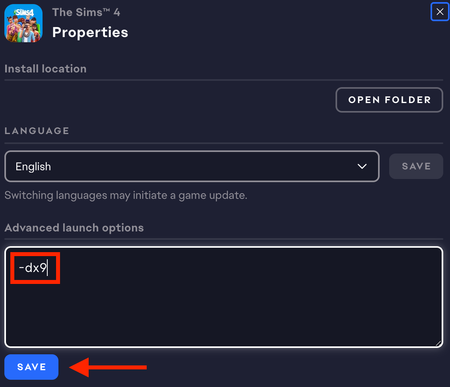


Luiluirock I've merged your post with the master thread for this particular error. There are a couple more suggestions in the first post.
If those don't help, try playing immediately after restarting your computer, with nothing else running. Your dxdiag shows that your computer's page file is a reasonable size but almost all used, which means that at the time you ran the dxdiag at least, you had enough programs running to eat a lot of resources. (The page file is where the computer stores data that would normally be in RAM but doesn't fit, and your system only has 6 GB available once you account for what's reserved for the graphics chip.) That could mean not enough memory is left over for Sims 4.
Restarting your computer closes everything running, although some apps may be set to open with Windows. So if you still can't play, go through the Task Manager shutting down anything that doesn't absolutely need to be running. If you accidentally kill the wrong app, you can always restart again.

Hi there. I tried everything that was mentioned in the thread and what you said about restarting the computer and playing first thing, and it still hasn't worked. But I wonder if that's also because I just uninstalled GShade. I saw someone mentioning that in the thread, so maybe that could be related? Please help me. I haven't been feeling good these days, and the only thing that I want is to play my good game.