Forum Discussion

briasmits's avatar
2 years ago

Expansion Packs Missing

All of my expansion packs are missing from the game...I have tried clearing the cache, repairing the game, uninstalling and re-installing...nothing is working. What do I do in this situation? Nothing is on my onedrive, everything is stored in the Electronic Arts folder under my documents. I have an 8TB Hard Drive on my computer so I know storage isnt an issue. I also have been playing sims for years and two days ago I open the app and now nothing is there. It's completely base game with my cc.

What am i supposed to do? I have 22 packs...and I can't use any of them. This is extremely frustrating.

3 Replies

  • @briasmits  Please run searches for two or three of your missing packs.  Open a File Explorer window, click This PC in the left panel, and enter the folder name for one of the missing packs in the search field in the upper-right corner.  This is the full list of packs:

    https://sims4.crinrict.com/eng/extras-2/available-packs-dlc/

    For example, if you're looking for Seasons, you'd search for EP05 .  Wait for the search to finish, then make sure the full file path is showing under each result.  If it's not, expand the window sideways as necessary.  Take a screenshot using Windows key-shift-S and attach it to a reply here.  Then repeat for one or two more packs.

  • briannasmits's avatar
    briannasmits
    2 years ago

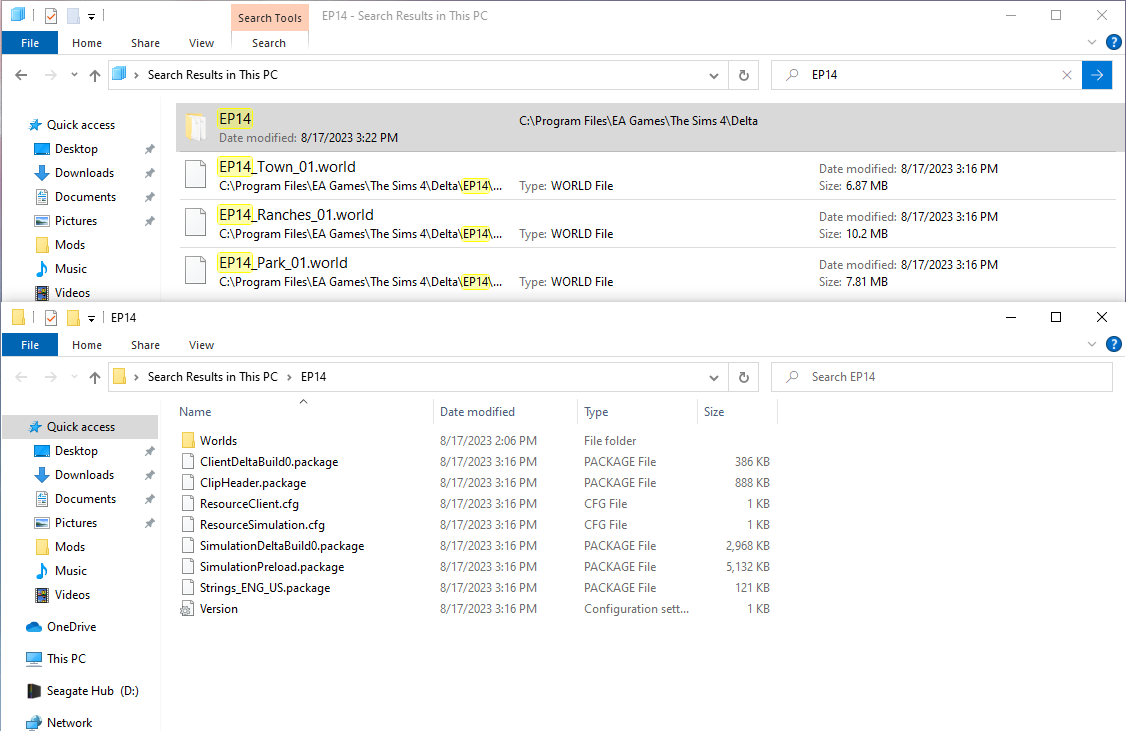
    Here are two of my packs. I did this on several others and it shows similar for everything.

  • puzzlezaddict's avatar
    puzzlezaddict
    Hero+
    2 years ago

    @briannasmits  It looks like you have two copies of Sims 4 installed, but Get to Work and Horse Ranch aren't actually installed in either location.  The Delta folder holds patch data, not the data for the actual packs; if these packs were installed, you'd see an EP01 or EP14 folder directly within a "The Sims 4" folder, not only inside Delta.

    I don't know whether this is why the EA App is getting confused about installing your packs, but it might be the problem here. I would suggest you do a clean uninstall and reinstall of Sims 4:

    • Put aside your Sims 4 folder in Documents\Electronic Arts and rename it to something that doesn't include the words "Sims 4."
    • Download Revo Uninstaller (the free version is fine) from here.
    • Launch Revo, select Sims 4 from the list, and click Uninstall.
    • Once the game is uninstalled, select "Moderate" under "scanning modes," and click Scan.
    • Review the list, in case there's something you want to save; otherwise, click Select All, and then Delete.
    • Close Revo, and restart your computer.

    Uninstall the EA App with Revo as well.  I don't have instructions for that at the moment, but the process should be straightforward.  Restart again when you're done.

    Install the EA App, then install Sims 4.  But make sure you're installing into the location you want to use going forward—changing that location after the fact, for example moving the install from an internal drive to an external, would require uninstalling and reinstalling the game.