Forum Discussion

deelilaa's avatar
5 years ago

Game crashing and Exception Breakpoint Error ? Please Help.

For several weeks now my game has been crashing after 1 hour or so of gameplay and now I keep getting the Exception Breakpoint Error when I try to load a game. 

Both my origin app and game are fully updated and I have cc/mods installed in the game. 

I have tried going through and deleting some mods and cc but that doesn't seem to be working. 

I have attached a screenshot of the error message and the DxDiag file to this. 

Does anyone know what the issue is? 

Please help! I miss playing sims.

20 Replies

Replies have been turned off for this discussion
  • sfried812's avatar
    sfried812
    3 years ago

    I did the window powershell thing and i got a error 740

    what do i do after i get that error?

  • puzzlezaddict's avatar
    puzzlezaddict
    Hero+
    4 years ago

    @babygirl1908957  Did you get that error while trying to run DISM or sfc?  The error usually means you chose the regular version of Command Prompt or PowerShell, not the one with (administrator) in the name.  These commands require admin permissions to run.

  • puzzlezaddict's avatar
    puzzlezaddict
    Hero+
    5 years ago

    @deelilaa  So MemTest86 reported no errors?  Please run a couple of basic checks of your Windows system files:

    • Hit Windows key-X
    • Choose either “PowerShell (Administrator)” or “Command prompt (Administrator),” whichever option is offered
    • Inside the window that appears, copy and paste “DISM.exe /Online /Cleanup-image /Restorehealth” without quotes into the window, and enter
    • The system will start validating soon. If it throws an error, please list it here
    • After it reaches 100%, hit Windows key-X again
    • Again, choose “PowerShell (Administrator)” or “Command prompt (Administrator)”
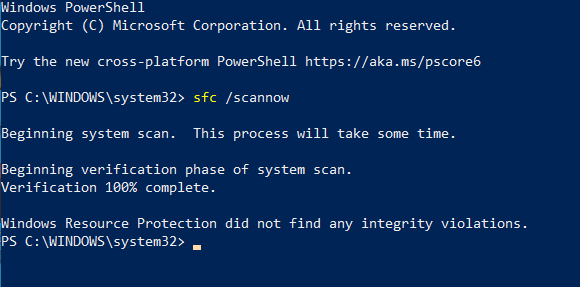
    • Inside the window, copy and paste “sfc /scannow” without quotes into the window, and enter
    • Post the message you receive here

    Restart your computer before playing.  If you get another crash, please run a second dxdiag, so I can see whether the errors have changed or there are any interesting new ones.

  • deelilaa's avatar
    deelilaa
    5 years ago
    @puzzlezaddict I downloaded nvidia, restarted and ran the test through windows (no errors) and the game is still crashing... ☹️
  • puzzlezaddict's avatar
    puzzlezaddict
    Hero+
    5 years ago

    @deelilaa  This dxdiag does have all the relevant info.  It lists a couple of errors related to the driver for your graphics card, or at least one of them.  Acer doesn't offer a newer Nvidia driver, but Nvidia does:

    https://www.nvidia.com/Download/driverResults.aspx/164740/en-us

    Install it, restart your computer, and see how Sims 4 runs.

    Given the other errors in the dxdiag, it's also a good idea to test the RAM.  The most thorough scan is MemTest86, although you'd need a USB stick you don't mind erasing to run it.  The download and directions on running it are here:

    https://www.memtest86.com/index.html

    https://www.overclockersclub.com/guides/memtest86_memory_guide/

    If you don't have a spare USB stick, you can use the built-in Windows test, although it's not as reliable.  This works in Windows 10 as well:

    https://docs.microsoft.com/en-us/previous-versions/technet-magazine/ff700221(v=msdn.10)

  • deelilaa's avatar
    deelilaa
    5 years ago

    So I did everything, then tried to run the game.... and it just crashed again when I tried to load the household, but no error message or pop-ups this time. 

    All screenshots and new DxDiag attached. 

    As far as I can see, my windows is up to date (the latest update was done 2 days ago).

  • puzzlezaddict's avatar
    puzzlezaddict
    Hero+
    5 years ago

    @deelilaa  DISM should start right away, or close enough, and let you know when it goes to completion or if it errors out.  If you've restarted your computer a couple times—a real restart, not just closing the laptop lid and opening it again—sfc should be able to at least start.  But try rebooting a couple more times, just to see whether it makes a difference.

    If you get the same error, I'd like to see a screenshot, just in case there's an error code or anything else that might be relevant.  So please take one and attach it to a post.

    Please also let me know your Windows version.  There are several ways to find it, but the simplest is to click on the Windows icon in the lower left corner, select Settings, then System, then About (at the bottom of the list).  Please take a screenshot of the information under "Windows specifications; I don't need to see the other info on that page.

    To take a screenshot, hit Windows key-shift-S and drag your cursor over the section of screen you want to capture.  Then open Paint or another image-editing app and crtl-V to paste.

    Finally, open Settings > Update & Security, and see whether there are any update errors listed.

  • deelilaa's avatar
    deelilaa
    5 years ago

    @puzzlezaddictHow do I know that the DISM.exe /Online /Cleanup-image /Restorehealth has reached 100% ? Because nothing comes up for me and no errors appear.

    I've waited about 2 hours and then tried the sfc /scannow and it tells me "Beginning system scan. This process will take some time.There is a system repair pending which requires reboot to complete. Restart Windows and run sfc again."

    So I restarted, tried it again and the same thing came up - so confused, I suck at this whole IT thing lol.

    Thank you for helping!! I really appreciate it.

  • @deelilaa  Breakpoint errors can have a few different causes, and it's often a question of addressing each of the potential problems in turn until something works.  Among the causes are system issues, and on that note, your dxdiag crashed while running three separate times, which is unusual and could indicate a serious issue, although it doesn't necessarily.  So it's best to start with a couple of basic checks of your Windows system files.  Here's how:

    • Hit Windows key-X
    • Choose either “PowerShell (Administrator)” or “Command prompt (Administrator),” whichever option is offered
    • Inside the window that appears, copy and paste “DISM.exe /Online /Cleanup-image /Restorehealth” without quotes into the window, and enter
    • The system will start validating soon. If it throws an error, please list it here
    • After it reaches 100%, hit Windows key-X again
    • Again, choose “PowerShell (Administrator)” or “Command prompt (Administrator)”
    • Inside the window, copy and paste “sfc /scannow” without quotes into the window, and enter
    • Post the message you receive here

    Restart your computer, then repair the game in Origin: open your game library, right-click on the Sims 4 icon, and select Repair.

    If you get another crash, please run a second dxdiag; hopefully this one will work properly and will have all the relevant information.