My game suddenly got very pixelated
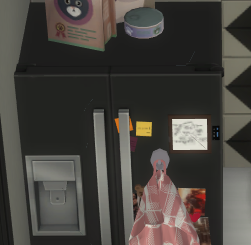


Mundirrka Please move Options.ini out of Documents > Electronic Arts > The Sims 4 and onto your desktop. This will reset all in-game settings. Don't touch anything yet; just have a look around. If that doesn't help, disable post processing, but nothing else yet, and quit and reload the game.
If that doesn't help either, please disable Edge Smoothing and close the game. Right-click the desktop, select the Nvidia Control Panel, choose Manage 3D Settings > Program settings, choose ts4_x64, and set Antialiasing to override the application settings. Then play with the other AA options. I'd suggest starting with something like this:
Antialiasing - FXAA: On
Antialiasing - Gamma correction: On
Antialiasing - Mode: Override any Application Setting
Antialiasing - Setting: 2x [or higher]



